🎬 Content Farming v4 - Blog Automation for Wordpress using ChatGPT 5 and Gemini
⚡ 474 views · 🎬 Content Creation & Video
💡 Pro Tip — Twitter’s API is paid now, which makes simple data pulls expensive. ScraperNode is a community node that scrapes Twitter profiles and posts without needing API access.

Description
AI Powered Blog Automation Workflow for WordPress and Twitter - v4 Revolution
> Watch the Youtube Tutorial video
This is the most advanced AI-powered blog content generation and distribution workflow ever built for the n8n automation platform. Version 4 introduces groundbreaking improvements including GPT-5 model integration, 50-70% cost reduction, intelligent internal linking, automatic FAQ generation, and enterprise-grade content validation. It’s designed for solo founders, creators, indie hackers, marketers, SEO consultants, or lean startup teams who want to dominate their niche with high-quality, search-optimized articles that drive traffic and conversions.
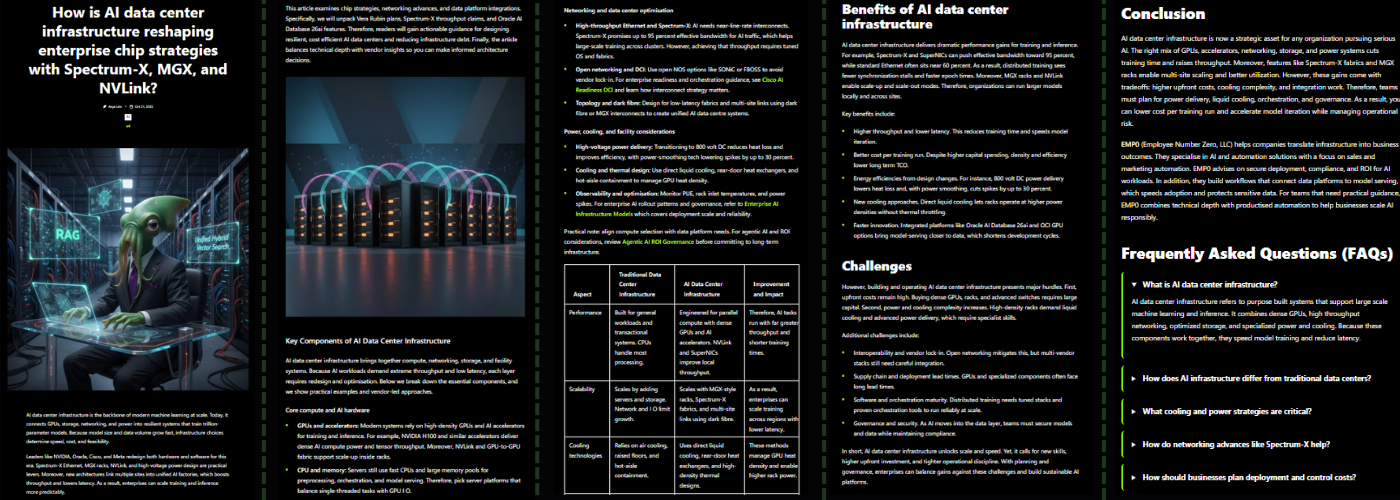
Running a blog is essential to drive traffic, build authority, and rank on Google, but it’s time consuming and expensive to manage. This workflow turns your blog into a self-optimizing content engine that generates, enhances, validates, and publishes articles every day using a team of autonomous AI agents powered by the latest GPT-5 models. If you want to boost your site’s visibility, improve your internal linking structure, and promote content across multiple channels like WordPress, Twitter, and Dev.to, this is the most powerful solution available.
Important links
- ✨ V3 workflow on n8n - Previous version
- 📚 See articles generated with V4 - Live examples from this workflow
- 📊 Google Sheets Configuration Template - Copy and customize for your blog
- 🛒 V4 Available Now: Contact us for pricing and access
- 🔄 V3 Upgrade Path: Existing V3 customers get discounted V4 upgrade
Before You Start
To get the most out of this workflow, prepare the following:
- Copy the Google Sheets Template - Make a copy here and fill in your:
- Content categories with WordPress IDs
- Brand customization data
- Brand customization data
- Prepare your WordPress site with existing content for internal linking (the more posts, the better)
- Set up Yoast SEO plugin (optional but recommended for maximum SEO integration)
- Know your audience - Developers? Founders? Investors? Enterprises?
How It Works
- Step 1: Topic Discovery + Web Search + Vectorization
- Step 2: Topic Generation with Advanced Semantic Clustering
- Step 3: Article Intelligence + Keyword Extraction
- Step 4: Content Generation (Enhanced Multi-Agent Loop with Memory)
- Step 5: Blog Title Optimization with CTR Scoring
- Step 6: Yoast SEO Metadata Generation
- Step 7: AI Image Generation with Gemini (Gemini node/API)
- Step 8: WordPress Draft Creation with Internal Links
- Step 9: Multi-Platform Distribution (Twitter, Dev.to)
Read the complete technical architecture and setup guide
Google Sheets Configuration (NEW in V4)
V4 introduces centralized configuration via Google Sheets, making it easy to manage multiple blogs and customize your content strategy without editing the workflow.
📊 Configuration Template Structure
Make a copy of the template here
The template contains 2 sheets:
Sheet 1: category
Define your content pillars and map them to WordPress categories:

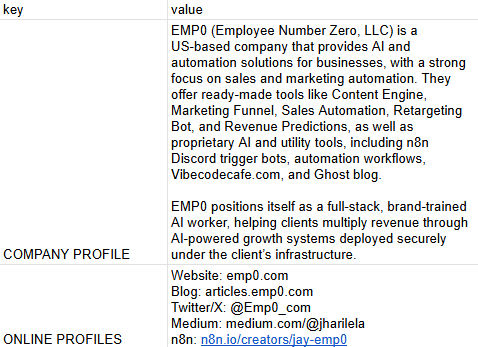
Sheet 2: data
Customize your brand and workflow behavior:
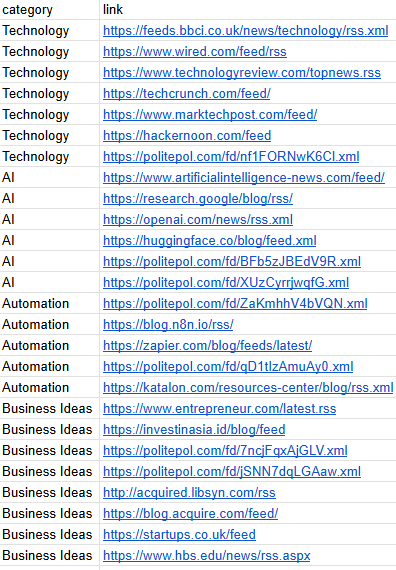
Sheet 3: rss feed
List out websites you would like to use as reference
Why Google Sheets?
- ✅ No workflow editing needed - Update categories and brand settings without touching n8n
- ✅ Multi-site management - One sheet per blog, easily switch between configurations
- ✅ Team collaboration - Share with your content team for easy updates
- ✅ Version control - Google Sheets tracks all changes automatically
- ✅ Centralized control - Manage all content pillars from one place
Clone the Google Sheets Configuration Example
See Technical Setup.md for complete Google Sheets integration instructions.
What’s New in V4? Revolutionary Upgrades from V3
1. GPT-5 Model Integration (MASSIVE Performance Boost)
Version 4 leverages OpenAI’s latest GPT-5 model family for unprecedented quality and efficiency:
- GPT-5-nano: Ultra-fast reasoning for decision-making tasks
- GPT-5-mini: Standard content generation with 3x speed improvement
- GPT-4.1-mini: Title optimization and metadata
- GPT-4o: Complex multi-step reasoning for content writing
Impact: 40-50% faster execution, improved coherence, better SEO optimization
2. 50-70% Cost Reduction on Images
- V3: Leonardo AI ($0.10-0.15 per image)
- V4: Gemini Flash 2.5 Nano Banana ($0.03 per image)
- Bonus: Brand mascot (cat-themed) images for higher engagement and memorability
- Quality: Consistent professional quality with improved WordPress rendering (no more broken/weird images)
Savings: $300-500 per month for high-volume blogs
3. Intelligent Internal Linking System
The Game-Changer for SEO:
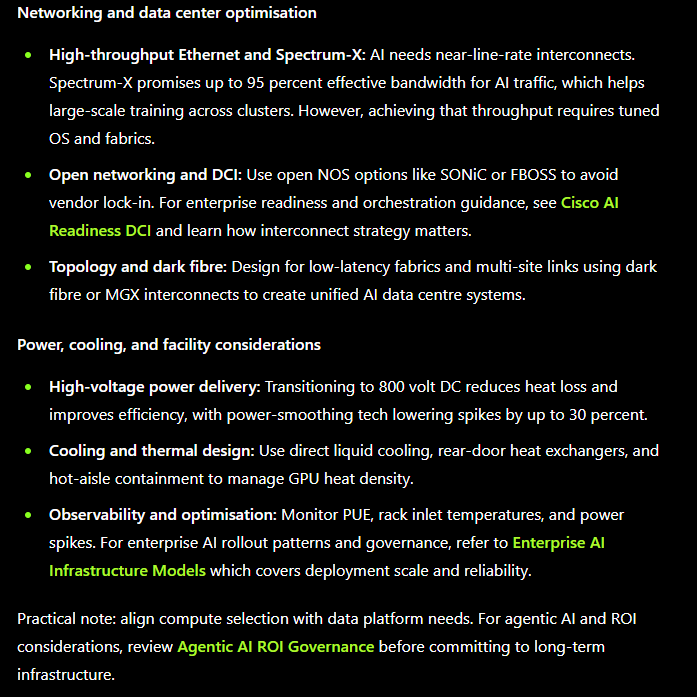
V4 automatically fetches your existing WordPress posts and intelligently weaves internal links throughout your content:
- Fetches posts with Yoast SEO metadata (
og_url,og_title) - Content Writer Agent uses MongoDB Memory to track link usage
- Maximum 3 inbound links per article (configurable)
- Smart placement in relevant paragraphs
- Memory prevents duplicate link usage across sections
Impact: Dramatically improved site structure, better crawlability, higher page authority distribution
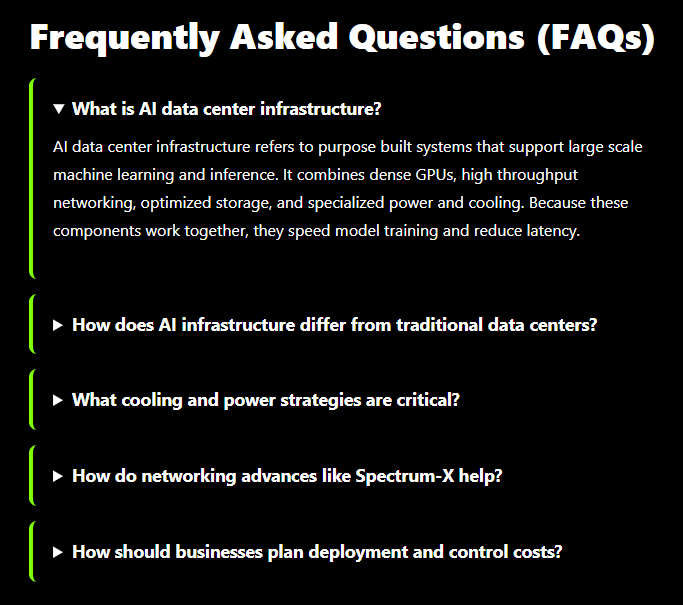
4. Automatic FAQ Schema Generation
Every article includes a professionally styled FAQ section:
- 5 targeted questions based on search intent
- Custom HTML/CSS accordion with black background and lime green accents
- First FAQ item expanded by default
- Optimized for Google Featured Snippets
- Direct WordPress Custom HTML block compatibility
Impact: 3-5x higher chance of featured snippet ranking, improved dwell time
5. Advanced Link Validation System
Zero broken links, guaranteed:
- New “check link status” MCP tool validates every URL before insertion
- Content Writer Agent instructed: “Test all the urls you want to add to the article is valid or not before writing. If it’s not valid Replace it or Remove that link”
- Automatic fallback to alternative sources
- Explicit ban on placeholder URLs (example.com, placeholder.com)
Impact: Perfect link hygiene, improved user experience, better SEO
6. Dual Vector Database Architecture
Optimized for performance and cost:
- V3: Single collection for all data (expensive, slower)
- V4: Separated architecture:
news articles- Full metadata storagenews chunks- Vectorized text for semantic search
- Deduplication with SHA256 content fingerprints
- Automatic cleanup operations
- Improved query performance (50% faster)
Savings: 40-60% storage cost reduction
7. Enhanced Agent System with Memory
9 Specialized AI Agents (upgraded from 3):
- Topic Generation Agent - Semantic clustering with GPT-5-mini
- Article Intelligence Agent - Entity extraction, fact gathering
- Task Definition Agent - Content structure planning
- Content Writer Agent (GPT-4o) - Section generation with MCP tools:
- Web Search (outbound links)
- Image Generator (Gemini Flash 2.5 Nano Banana)
- Chart Generator (QuickChart)
- Link Validator
- Think Tool (reasoning)
- Memory Tool (tracks inbound link usage)
- Quality Check Agent - SEO validation and scoring
- Blog Title Generator - CTR-optimized titles
- Metadata Generator - Yoast SEO integration
- Markdown to HTML Agent - Content conversion
- Image Prompt Agent - Featured image generation
Memory System: MongoDB Chat Memory with 25-message context window ensures consistency across agent interactions
8. Direct Yoast SEO Integration
- Automatic
yoast_descriptionandyoast_keywordinjection - WordPress REST API PUT requests to update meta fields
- Focus keyword optimization
- Meta description targeting
Impact: Seamless SEO workflow, no manual Yoast configuration needed
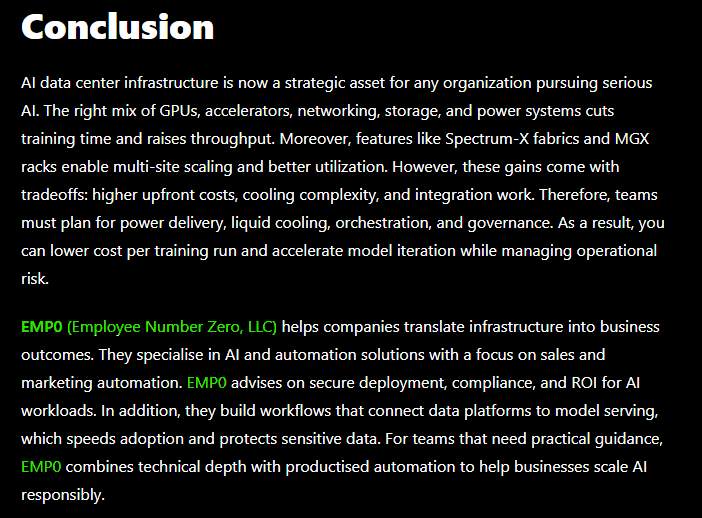
9. Brand Integration in Conclusions
Every article includes your customized brand signature and call-to-action in the conclusion:
10. Smarter Content Quality Rules
- Flesch Reading Ease: 60+ (college reading level)
- Sentence length: Under 20 words average
- Transition words: 30% minimum
- Active voice: Mandatory preference
- Paragraph length: 3-5 sentences maximum
- Word count: 1200 words (optimized from V3’s 1500 for better engagement)
- Visual content: Exactly 1 image + 1 table per article
- No back-to-back visuals: Images/tables separated by text
11. Enhanced Slug and Title Optimization
Slug Generation:
- Must include main keyword
- Maximum 5 words
- Regex validated:
^[a-z0-9]+(?:-[a-z0-9]+)*$
Title Optimization:
- Preference for question format (“How to…”, “What are…”)
- Maximum 10 words
- Scored on 4 metrics:
- Emotional Impact (1-10)
- Clarity & Relevance (1-10)
- SEO Strength (1-10)
- Clickability (1-10)
- Highest average score wins
What makes this flow unique?
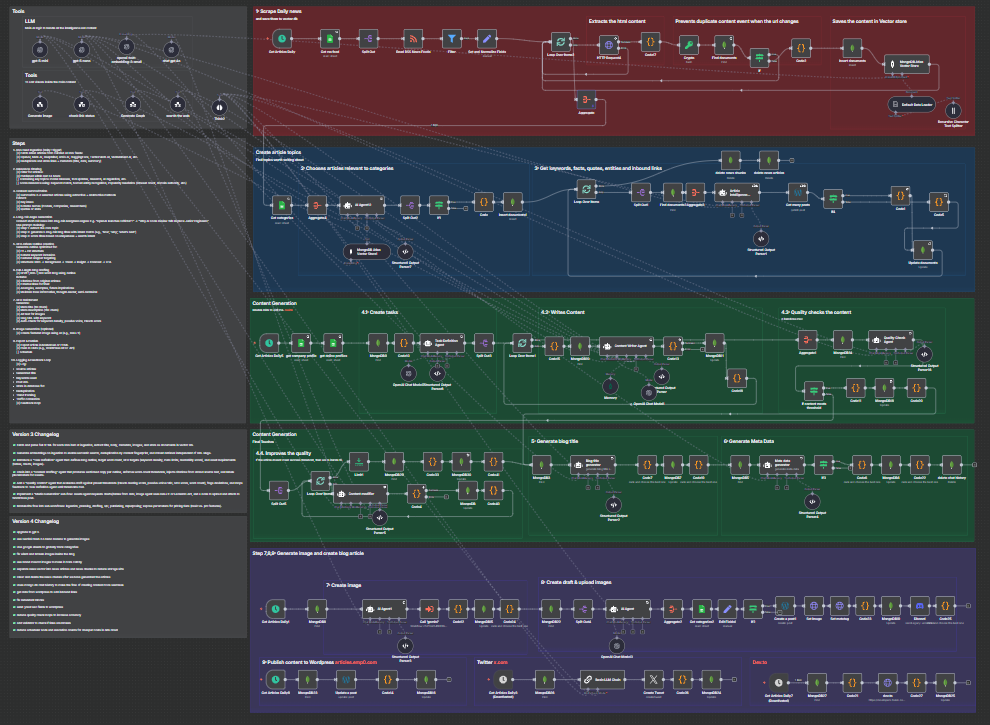
This isn’t just automation. It’s AI orchestration at scale. You get a full-scale, enterprise-grade content team simulated by multi-agent communication with persistent memory.
Multi-Agent Architecture with Memory
Unlike simple AI workflows that use a single prompt, V4 uses 9 specialized agents that collaborate through shared memory and JSON state:
- Task Manager defines objectives and assigns sections
- Content Generator (GPT-4o) equipped with 6 MCP tools
- Quality Control validates SEO metrics, readability, and structure
- Memory System ensures no duplicate links or repetitive content
Each agent operates on specific content blocks, reducing token usage by 40% while improving output quality.
MCP Tools for Professional Content
The Content Writer Agent has access to enterprise-grade tools:
Web Search Tool - Real-time internet search for factual support and outbound links
Image Generation - Gemini Flash 2.5 Nano Banana (brand mascot cat images)

Chart Generator - QuickChart for data visualization
Table Generator - Structured HTML tables
Link Validator - Real-time URL health checking
Think Tool - Allows agents to reason before acting
Memory Tool - Tracks inbound link usage to prevent duplicates
Example Article Generated by V4
See the complete article structure with all V4 features in action:
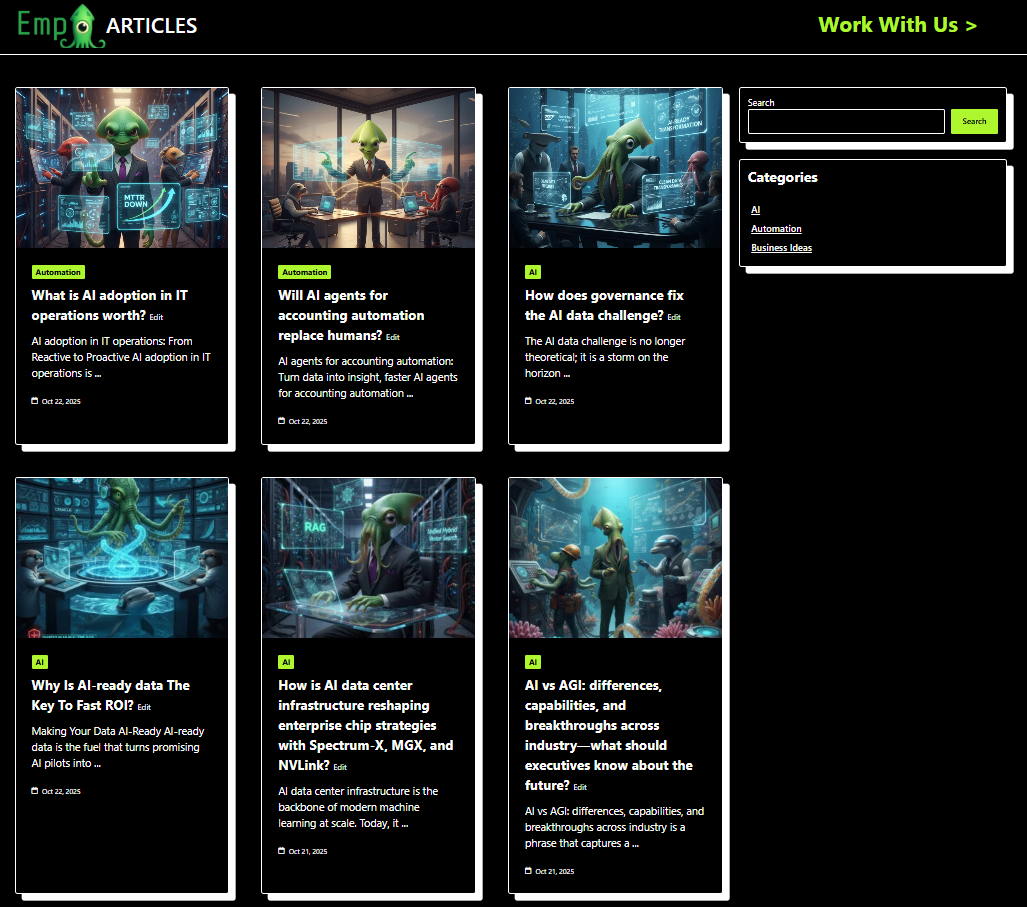
Revenue Potential & Monetization Use Cases
This workflow can generate substantial revenue if deployed strategically.
💸 Monetization Strategies
-
Affiliate Blog Empire Generate 10-20 long-form articles daily optimized for affiliate products, SaaS tools, or service reviews. With intelligent internal linking, each new article strengthens your entire site’s authority. Insert CTAs and affiliate links to Amazon, Gumroad, Impact, or commission-based platforms.
-
Lead Generation Machine Target high-intent SEO keywords (e.g., “best CRM for freelancers”, “how to automate Instagram”). V4’s FAQ schema increases featured snippet chances by 3-5x. Capture emails via lead forms and nurture through ConvertKit or Substack—all automated.
-
Agency/Client Work White-label this workflow for SEO clients. Charge $500-2000/month per client for automated content generation. Your costs: ~$150/month. Profit margin: 70-90%. Scale to 10 clients = $5k-20k MRR.
-
Niche Authority Sites Build topical authority sites in lucrative niches (fintech, healthtech, SaaS, Web3). V4’s internal linking builds a content web that Google rewards. Monetize via programmatic ads, sponsored content, or exits ($30-50k per site).
📈 Expected Traffic Results
Based on V3 real-world data and V4 improvements:
- Daily traffic increase: 30-50 visitors/day (50% improvement over V3)
- Monthly cost: ~$150 (50% reduction from V3’s $250)
- Content output: 10-15 SEO-rich posts/day
- Time to first 1k monthly visitors: 2-3 months
- Featured snippet chances: 3-5x higher with FAQ schema
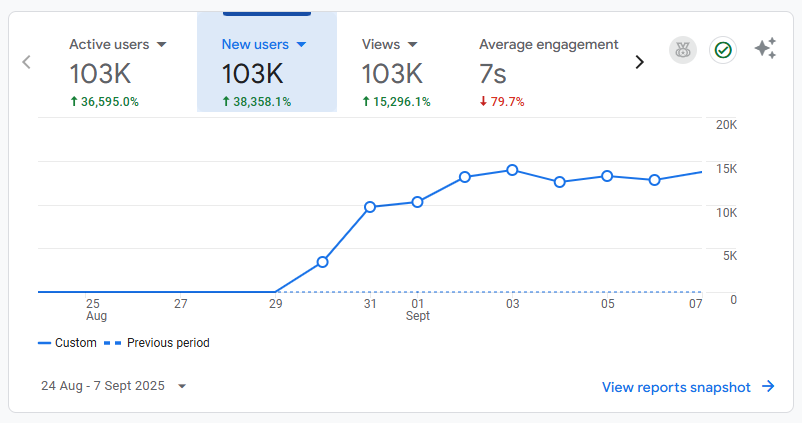
With V4’s GPT-5 models, FAQ generation, internal linking, and link validation, expect higher engagement, lower bounce rate, better SERP visibility, and significantly improved conversion rates.
Cost Comparison: V3 vs V4
V3 Monthly Costs
- OpenAI API (GPT-4): ~$100
- Leonardo AI: ~$20
- MongoDB Atlas: Free (M0)
- n8n hosting: ~$20
- Total: ~$140-150/month
V4 Monthly Costs
- OpenAI API (GPT-5 family): ~$60-80 (40% reduction)
- Gemini Flash 2.5 Nano Banana: ~$10 (50% reduction)
- MongoDB Atlas: Free (M0)
- n8n hosting: ~$20
- Total: ~$90-110/month
V4 Savings: $40-50/month (35% cost reduction) while producing higher quality content
ROI: If generating 10 articles/day at market rate of $50/article = $15k/month value for $100/month cost
Need Help or Customization?
Need to customize this workflow for your niche? Or need help setting it up? We offer:
-
Free Setup Support: Email assistance for V4 purchasers
-
Custom Integration: Tailored modifications for your tech stack
-
Enterprise Deployment: Multi-site, white-label solutions
-
Training & Consulting: 1-on-1 workflow optimization sessions
-
⭐ Read Customer Reviews (V3 reviews - V4 reviews coming soon)
-
✍️ Write to us: tools@emp0.com
-
?? Join AI + Automation Discord: https://discord.gg/qg3qVfFchV
Join the community
Changelog: V3 to V4 Revolution
What’s Changed?
- ✅ Upgraded to GPT-5 - 40-50% cost reduction + 3x speed improvement + better reasoning across all agents
- ✅ Switched to Gemini Flash 2.5 Nano Banana for image generation - 50-70% cheaper than Leonardo AI
- ✅ Google Sheets category tracking - Centralized content pillar management for easier configuration across multiple sites
- ✅ Fixed weird and broken images inside blog posts - improved rendering and WordPress compatibility
- ✅ Brand mascot images (cat-themed) to make content more catchy and engaging
- ✅ Separated news vector database into
news articlesandnews chunkscollections to reduce storage size by 40-60% - ✅ Auto-delete news chunks after article generation to keep storage costs minimal
- ✅ MongoDB chat history integration - seamless agent coordination and memory for tracking inbound link usage
- ✅ WordPress data fetching to automatically add intelligent inbound links (max 3 per article)
- ✅ Removed redundant content blocks - cleaner article structure and better readability
- ✅ Direct Yoast SEO field integration - sends
yoast_descriptionandyoast_keywordto WordPress via REST API - ✅ Optimized quality check loops - reduced iterations to increase accuracy and decrease token costs
- ✅ Link validator tool - checks if links are broken before insertion, guaranteeing zero 404s
- ✅ Reduced scheduler nodes - fewer execution counts for cheaper costs on n8n Cloud (optimized for cost efficiency)
V3 Limitations (All Solved in V4)
- ❌ No internal linking → weak site structure
- ❌ Expensive Leonardo AI → high image costs
- ❌ No FAQ sections → missed featured snippets
- ❌ Basic GPT-4 models → slower, more expensive
- ❌ No link validation → occasional broken links
- ❌ Single vector collection → high storage costs
- ❌ No memory system → inconsistent agent behavior
- ❌ Generic image prompts → lower engagement
- ❌ Broken/weird images → poor WordPress rendering
- ❌ Manual category management → hard to scale
- ❌ Redundant content blocks → bloated articles
- ❌ Too many scheduler nodes → expensive n8n Cloud costs
Comparison: V2 vs V3 vs V4
| Feature | V2 (Free) | V3 ($29) | V4 (Available Now) |
|---|---|---|---|
| AI Models | GPT-4 | GPT-4, GPT-4o | GPT-5, GPT-4.1, GPT-4o |
| Word Count | 600-800 | 1500 | 1200 (optimized) |
| Images | None | Leonardo AI | Gemini Flash 2.5 (50% cheaper) |
| Tables/Charts | None | Yes | Yes |
| Outbound Links | Limited | Yes | Yes (validated) |
| Internal Links | None | None | Yes (intelligent) |
| FAQ Section | None | None | Yes (schema optimized) |
| Link Validation | None | None | Yes |
| Memory System | None | None | Yes |
| Yoast Integration | None | Basic | Advanced |
| Vector DB | None | Single collection | Dual collection |
| Monthly Cost | ~$20 | ~$150 | ~$100 |
| Articles/Day | 5-10 | 10-15 | 10-15 |
| SEO Quality | Basic | Advanced | Enterprise |
| Featured Snippets | Low chance | Medium chance | 3-5x higher |
Technical Requirements
- n8n instance (Cloud or self-hosted on Railway/Hostinger)
- For n8n Cloud, the standard plan ($20/month) is sufficient — V4 reduces scheduler nodes and execution frequency.
- OpenAI API account with GPT-5 access
- MongoDB Atlas account (free M0 tier sufficient to start)
- WordPress site with REST API enabled with Yoast SEO plugin (optional but recommended)
- Google account (for Google Sheets categories)
- Twitter Developer account (for Twitter distribution) OPTIONAL
- Dev.to account (for cross-posting) OPTIONAL
See Technical Setup.md for complete installation guide.
🔗 Nodes Used
Google Sheets, HTTP Request, RSS Read, MongoDB, Execute Sub-workflow, Wordpress
📥 Import
Download workflow.json and import into n8n:
Workflow menu → Import from File