🎬 Automate YouTube thumbnail creation & social publishing with Templated.io & Blotato
⚡ 2,670 views · 🎬 Content Creation & Video
💡 Pro Tip — YouTube’s API quotas can be a bottleneck when you’re pulling data at scale. ScraperNode is a community node with dedicated scrapers for channels, videos, and comments — no quota limits, just structured data.

Description
💥 Automate YouTube thumbnail creation from video links (with templated.io)
Who is this for?
This workflow is designed for content creators, YouTubers, and automation enthusiasts who want to automatically generate stunning YouTube thumbnails and streamline their publishing workflow — all within n8n.
If you regularly post videos and spend hours designing thumbnails manually, this automation is built for you.
What problem is this workflow solving?
Creating thumbnails is time-consuming — yet crucial for video performance.
This workflow completely automates that process:
- No more manual design.
- No more downloading screenshots.
- No more repetitive uploads.
In less than 2 minutes, you can refresh your entire YouTube thumbnail library and make your channel look brand new.
What this workflow does
Once activated, this workflow can:
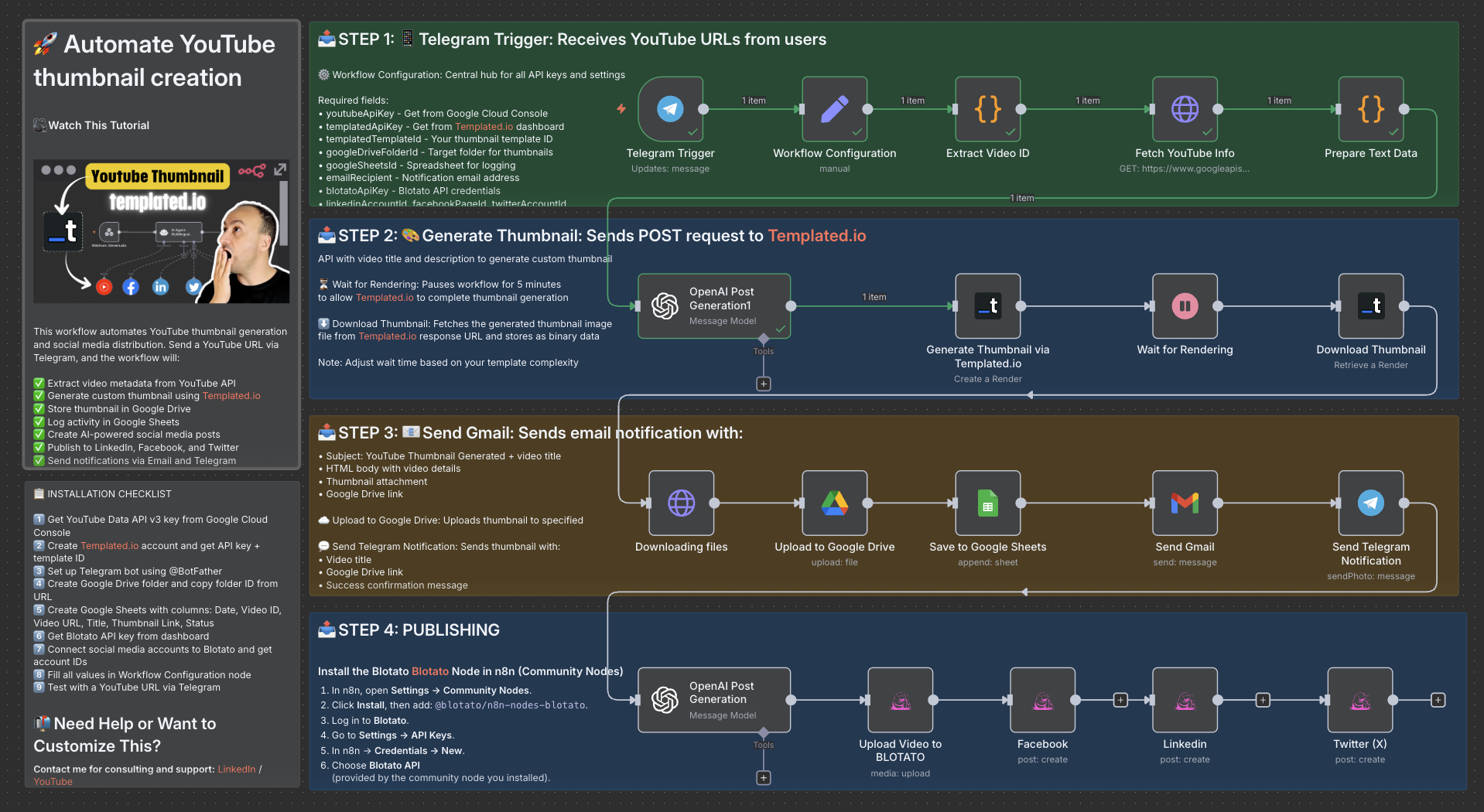
✅ Receive YouTube video links via Telegram
✅ Extract metadata (title, description, channel info) via YouTube API
✅ Generate a custom thumbnail automatically using Templated.io
✅ Upload the new thumbnail to Google Drive
✅ Log data in Google Sheets
✅ Send email and Telegram notifications when ready
✅ Create and publish AI-generated social posts on LinkedIn, Facebook, and Twitter via Blotato
Bonus: You can re-create dozens of YouTube covers in minutes — saving up to 5 hours per week and around $500/month in manual design effort.
Setup
1️⃣ Get a YouTube Data API v3 key from Google Cloud Console
2️⃣ Create a Templated.io account and get your API key + template ID
3️⃣ Set up a Telegram bot using @BotFather
4️⃣ Create a Google Drive folder and copy the folder ID
5️⃣ Create a Google Sheet with columns: Date, Video ID, Video URL, Title, Thumbnail Link, Status
6️⃣ Get your Blotato API key from the dashboard
7️⃣ Connect your social media accounts to Blotato
8️⃣ Fill all credentials in the Workflow Configuration node
9️⃣ Test by sending a YouTube URL to your Telegram bot
How to customize this workflow
- Replace the Templated.io template ID with your own custom thumbnail layout
- Modify the OpenAI node prompts to change text tone or style
- Add or remove social platforms in the Blotato section
- Adjust the wait time (default: 5 minutes) based on template complexity
- Localize or translate the generated captions as needed
Expected Outcome
With one Telegram message, you’ll receive:
- A professional custom thumbnail
- An instant email + Telegram notification
- A Google Drive link with your ready-to-use design
And your social networks will be automatically updated — no manual uploads.
Credits
- Thumbnail generation powered by Templated.io
- Social publishing powered by Blotato
- Automation orchestrated via n8n
👋 Need help or want to customize this?
📩 Contact: LinkedIn
📺 YouTube: @DRFIRASS
🚀 Workshops: Mes Ateliers n8n
🎥 Watch This Tutorial
📄 Documentation: Notion Guide
Need help customizing?
Contact me for consulting and support : Linkedin / Youtube / 🚀 Mes Ateliers n8n
🔗 Nodes Used
Google Sheets, HTTP Request, Telegram, Telegram Trigger, Google Drive, Gmail
📥 Import
Download workflow.json and import into n8n:
Workflow menu → Import from File