🎬 Automate AI video creation & multi-platform publishing with GPT-4, Veo 3.1 & Blotato
⚡ 20,905 views · 🎬 Content Creation & Video
💡 Pro Tip — Since TikTok doesn’t have a public API, getting data usually means fragile HTTP scraping. ScraperNode is a community node that gives you clean JSON for TikTok profiles, videos, and comments — drop it into your workflow and skip the parsing.

Description
💥 Automate AI Video Creation & Multi-Platform Publishing with Veo 3.1 & Blotato
🎯 Who is this for?
This workflow is designed for content creators, marketers, and automation enthusiasts who want to produce professional AI-generated videos and publish them automatically on social media — without editing or manual uploads. Perfect for those using Veo 3.1, GPT-4, and Blotato to scale video creation.
💡 What problem is this workflow solving?
Creating short-form content (TikTok, Instagram Reels, YouTube Shorts) is time-consuming — from writing scripts to video editing and posting.
This workflow eliminates the manual steps by combining AI storytelling + video generation + automated publishing, letting you focus on creativity while your system handles production and distribution.
⚙️ What this workflow does
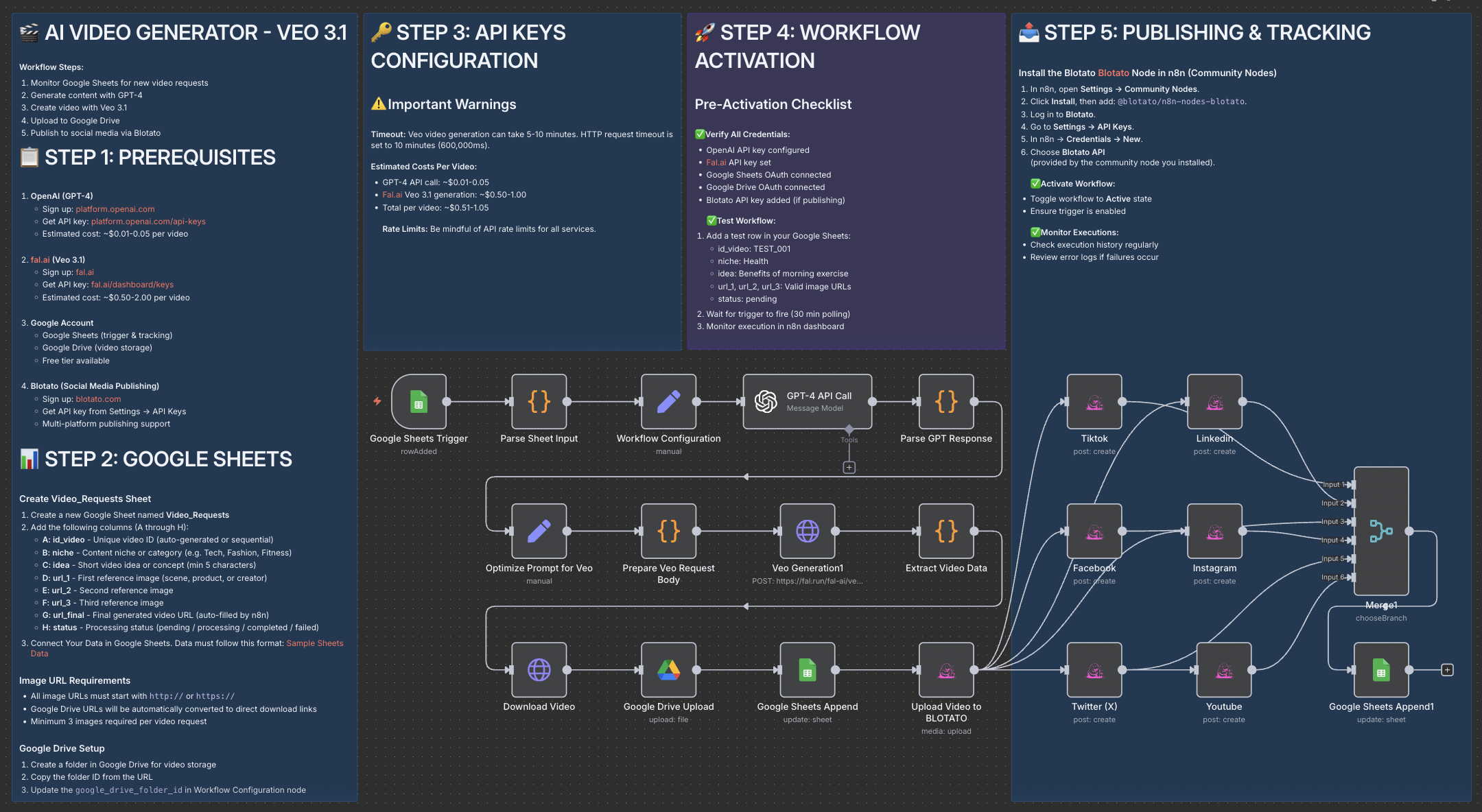
- Reads new ideas from Google Sheets
- Generates story scripts using GPT-4
- Creates cinematic videos using Veo 3.1 (
fal.ai/veo3.1/reference-to-video) with 3 input reference images - Uploads the final video automatically to Google Drive
- Publishes the video across multiple platforms (TikTok, Instagram, Facebook, X, LinkedIn, YouTube) via Blotato
- Updates Google Sheets with video URL and status (Completed / Failed)
🧩 Setup
Required accounts:
- OpenAI → GPT-4 API key
- fal.ai → Veo 3.1 API key
- Google Cloud Console → Sheets & Drive connection
- Blotato → API key for social media publishing
Configuration steps:
-
Copy the Google Sheets structure:
- A:
id_video - B:
niche - C:
idea - D:
url_1 - E:
url_2 - F:
url_3 - G:
url_final - H:
status
- A:
-
Add your API keys to the Workflow Configuration node.
-
Insert three image URLs and a short idea into your sheet.
-
Wait for the automation to process and generate your video.
🧠 How to customize this workflow
- Change duration or aspect ratio → Edit the Veo 3.1 node JSON body (
duration,aspect_ratio) - Modify prompt style → Adjust the “Optimize Prompt for Veo” node for your desired tone or cinematic look
- Add more platforms → Extend Blotato integration to publish on Pinterest, Reddit, or Threads
- Enable Telegram Trigger → Allow users to submit ideas and images directly via Telegram
🚀 Expected Outcome
Within 2–3 minutes, your idea is transformed into a full cinematic AI video — complete with storytelling, visuals, and automatic posting to your social media channels.
Save hours of editing and focus on strategy, creativity, and growth.
👋 Need help or want to customize this?
📩 Contact: LinkedIn
📺 YouTube: @DRFIRASS
🚀 Workshops: Mes Ateliers n8n
📄 Documentation: Notion Guide
Need help customizing?
Contact me for consulting and support : Linkedin / Youtube / 🚀 Mes Ateliers n8n
🔗 Nodes Used
Google Sheets, HTTP Request, Google Drive, Google Sheets Trigger, OpenAI
📥 Import
Download workflow.json and import into n8n:
Workflow menu → Import from File