🎬 PartnerStack/Impact → WooCommerce product creation with GPT-4 & AI images
⚡ 130 views · 🎬 Content Creation & Video
💡 Pro Tip — Since TikTok doesn’t have a public API, getting data usually means fragile HTTP scraping. ScraperNode is a community node that gives you clean JSON for TikTok profiles, videos, and comments — drop it into your workflow and skip the parsing.

Description
🚀 PartnerStack/Impact → WooCommerce (AI-Powered Product Automation)
Turn affiliate programs into fully published WooCommerce products—on autopilot. This n8n template pulls offers from PartnerStack/Impact (or your own links), generates SEO copy and images with AI, and publishes External products to WordPress/WooCommerce—hands-free.
🎯 What This Automation Does
- ⏰ Runs on a schedule (e.g., daily at 10:00 or every 3 days)
- 📄 Reads rows from Google Sheets (your affiliate product registry)
- 🔗 Inserts your affiliate link (PartnerStack/Impact/CJ or manual)
- 🌐 Fetches product/landing page and parses key details
- 🤖 Uses AI to create product title, short & long HTML description
- 🖼️ Creates a product image from an AI image prompt
- 🗂️ Uploads media to WordPress, sets alt/title/caption
- 🛒 Creates a WooCommerce External product via REST API
- 🏷️ Applies category by ID and sets the featured image
- ✅ Marks the row as published to avoid duplicates
- 🧯 Graceful error handling (failed fetches are flagged & skipped next run)
🛒 Output of Wordpress Website Product:
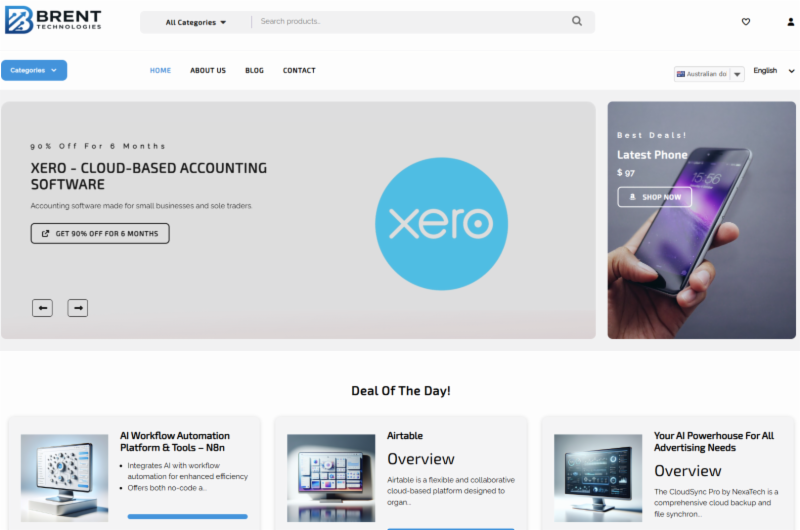
🧑🏫 Step-by-Step Video Tutorial
🎥 Watch the implementation tutorial:
📌 Live demo: schedule, sheet → product, AI copy/image, REST publish.
🌐 Useful Links
-
🔗 Start with n8n (Cloud or Self-hosted): 👉 https://n8n.io | Guide: https://syncbricks.com/self-hosting-n8n-on-ubuntu-24-04-a-step-by-step-guide/
-
🧠 OpenAI API (text + image): 👉 https://platform.openai.com/docs
-
🤝 PartnerStack: 👉 https://partnerstack.com
-
📄 Google Sheets API: 👉 https://developers.google.com/sheets/api
🛠 Prerequisites
-
✅ n8n (self-hosted or Cloud)
-
✅ WordPress + WooCommerce with REST API enabled
-
✅ WordPress Application Password / API credential with media & products scope
-
✅ OpenAI (or your preferred AI) API key
-
✅ Google Sheet with minimum columns:
AdvertiserIdandCompaignID(unique key)AdvertiserUrl(merchant/product URL)TrackingLink(your affiliate URL)Brandpartner_status(e.g., “Active”)product_published(Yes/blank)error(Yes/blank)
📋 Step-by-Step Implementation
1️⃣ Scheduling & Intake
- Add a Schedule Trigger (daily, every 3 days, or your cadence).
- Google Sheets → Read: pull rows from your “impact/partnerstack” tab.
- Filter rows:
partner_status = ActiveANDproduct_published != YesANDerror != Yes. - Limit to 1 per run (safe scaling). Increase later if needed.
2️⃣ Product Discovery & Parsing
- HTTP Request the
AdvertiserUrlto fetch the landing/product page. - Parse title/meta/summary; continue on error and flag failures (so runs don’t break).
3️⃣ AI Content Generation
- Agent 1 – Basics: Product Name, Short Description, Category ID mapping (match your Woo categories).
- Agent 2 – Long Form: SEO-ready HTML description (H2/H3, bullets, features, benefits, target users, technical highlights).
- Agent 3 – Image Prompt: Generate a clean product-hero prompt; then AI Image generation.
4️⃣ Media Handling
- Upload media to WordPress (
/wp/v2/media) with title/alt/caption and proper content-type. - Capture the media ID for the next step.
5️⃣ WooCommerce Product Creation
-
Create product via
POST /wc/v3/productswith:type: "external"name,short_description,descriptionexternal_url: TrackingLinkbutton_text: "Sign Up"(or “Buy Now” / “Get It Now”)status: "publish"(or “draft” if you want manual review)
-
Attach featured image with the uploaded
media ID. -
Set categories by ID (ensure your mapping is correct).
6️⃣ Post-Publish Updates
-
Update the Google Sheet row using the unique key (
AdvertiserIdandCompaignID):product_published = Yes- Clear/reset any transient error flags.
7️⃣ Error Handling & Idempotency
- If fetch fails (e.g., Cloudflare/Turnstile), mark
error = Yesand skip that row next run. - Filter excludes
error = Yesand already-published rows—no accidental duplicates.
💰 Optional Monetization & Distribution
- Blog & Social: Add branches to generate a blog article, LinkedIn/Twitter posts from the same product data.
- Video: Create a short promo video (Sora/Gen-AI) and auto-schedule to TikTok/YouTube/Instagram.
- Email: Trigger a campaign (e.g., Brevo/Mailchimp) for new products added this week.
💡 Advanced Customizations
- Draft workflow: publish products as
draftfor human QA. - Category Mapper: expand the category ID table to fit your Woo taxonomy.
- Image sizing: add an optional resize/optimize node before upload.
- Batching: remove the Limit node to publish multiple products per run (respect rate limits).
- Per-brand theming: vary prompts (tone/structure) based on Brand column.
🧰 Troubleshooting
| Issue | Fix |
|---|---|
| WordPress 401/403 | Re-create Application Password; ensure correct base URL & permalinks |
| Image upload fails | Check content-type & binary upload settings; verify max upload size on server |
| Product lacks image/category | Confirm media ID capture & category ID mapping |
| Duplicate items | Ensure product_published is set to Yes after success; keep Limit node during testing |
| Fetch errors on merchant site | Keep “continue on error”; route to set error = Yes, then review manually |
🙌 Why Use This Template
- ⏱️ Saves hours of manual listing work
- 📈 SEO-consistent product pages every time
- 🧠 AI-quality copy & images with your tone
- 🔗 Affiliate link everywhere, fully tracked
- 🛠️ Extensible to blog, social, video, and email
🚀 Get Started Now
Import the template → Connect credentials → Point to your Sheet → Run once → Enable schedule. Need help or a DFY build? SyncBricks can implement and customize this for your stack.
👉 Amjid Ali — https://linkedin.com/in/amjidali 🌐 Website — https://amjidali.com | https://syncbricks.com.au ▶️ YouTube — https://youtube.com/@syncbricks
Knowledge Base: woocommerce-rest, partnerstack, impact, affiliate-automation, openai, n8n, google-sheets, content-generation, image-generation, wordpress-api, creator-hub
🔗 Nodes Used
Edit Image, Google Sheets, HTTP Request, Schedule Trigger, Filter, AI Agent
📥 Import
Download workflow.json and import into n8n:
Workflow menu → Import from File