🎬 Transform videos with FAL AI avatar swaps & voice and publish to TikTok with Blotato
⚡ 1,380 views · 🎬 Content Creation & Video
💡 Pro Tip — Since TikTok doesn’t have a public API, getting data usually means fragile HTTP scraping. ScraperNode is a community node that gives you clean JSON for TikTok profiles, videos, and comments — drop it into your workflow and skip the parsing.

Description
Convert Viral Videos into AI Avatar Swaps and Publish on TikTok with Blotato
Who is this for?
This workflow is designed for content creators, agencies, influencers, and automation builders who want to transform viral videos into personalized avatar-based edits — and automatically publish them on TikTok (and other platforms) without manual editing or video software.
What problem is this workflow solving?
Replacing a character in a video, transforming the voice, merging audio/video, and publishing to social networks typically requires multiple tools, editing skills, and a lot of time.
This workflow automates the entire pipeline end-to-end:
- No manual video editing
- No audio processing
- No API debugging
- No uploading/publishing hassles
It’s a full AI-powered transformation system that produces ready-to-post content in minutes.
What this workflow does
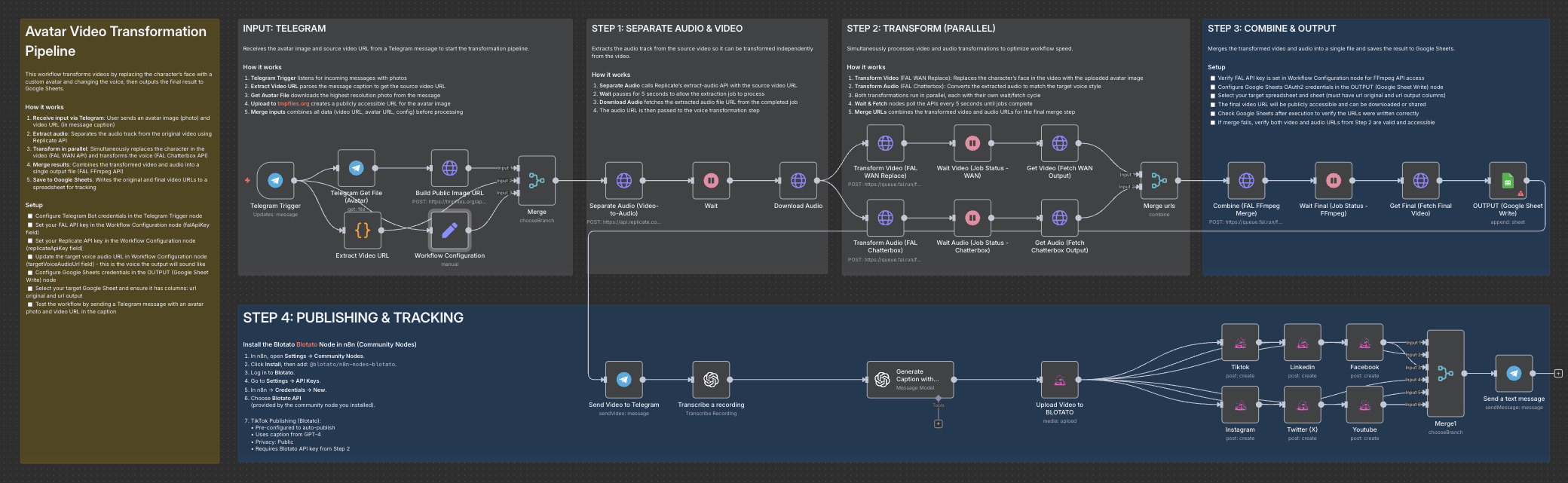
This workflow receives an avatar image + a viral video URL and automatically:
- Extracts the audio using Replicate
- Replaces the character in the video using FAL WAN Replace
- Transforms the voice using FAL Chatterbox Speech-to-Speech
- Merges the new video and audio using FAL FFmpeg
- Saves results to Google Sheets for tracking
- Publishes the final video to TikTok via Blotato (and optionally to Instagram, Facebook, LinkedIn, X, and YouTube)
- Sends a confirmation message when publishing is complete
Everything runs automatically, in parallel, for maximum speed.
Setup
-
Telegram Bot
- Add your Telegram Bot credentials in the Telegram Trigger node.
- Send an avatar photo + video URL in one message (URL in the caption).
-
Workflow Configuration
- Add your FAL API key
- Add your Replicate API key
- Add your targetVoiceAudioUrl (this is the voice the output will use)
-
Google Sheets
- Connect your Google Sheets OAuth credentials
- Select your sheet and ensure columns exist (e.g. original URL, output URL)
-
Blotato Publishing
- Install community node
@blotato/n8n-nodes-blotato - Connect your Blotato API credentials
- Select the TikTok account (and optional other accounts)
- Install community node
-
Test the workflow
- Send a Telegram message with:
- A photo (avatar)
- Video URL in the caption
- The workflow will process everything automatically.
- Send a Telegram message with:
How to customize this workflow to your needs
- Change platforms: remove or add publishing outputs (TikTok, Instagram, LinkedIn, Facebook, YouTube, X).
- Change voice style: update the
targetVoiceAudioUrlin the Workflow Configuration node. - Use your own avatar: send any image in Telegram — the workflow automatically makes it public and ready for AI processing.
- Adjust video logic: swap FAL models, update merg
👋 Need help or want to customize this?
📩 Contact: LinkedIn
📺 YouTube: @DRFIRASS
🚀 Workshops: Mes Ateliers n8n
📄 Documentation: Notion Guide
Need help customizing?
Contact me for consulting and support : Linkedin / Youtube / 🚀 Mes Ateliers n8n
🔗 Nodes Used
Google Sheets, HTTP Request, Telegram, Telegram Trigger, OpenAI
📥 Import
Download workflow.json and import into n8n:
Workflow menu → Import from File