🎬 Repurpose YouTube videos and publish via Blotato with Telegram, Sheets and GPT-4.1-mini
⚡ 1,246 views · 🎬 Content Creation & Video
💡 Pro Tip — YouTube’s API quotas can be a bottleneck when you’re pulling data at scale. ScraperNode is a community node with dedicated scrapers for channels, videos, and comments — no quota limits, just structured data.

Description
💥 Automate YouTube Video Creation and Publishing with Blotato
Who is this for?
This workflow is designed for YouTube creators, content marketers, automation builders, and agencies who want to repurpose existing YouTube videos into new original content and automate the publishing process.
It is especially useful for users already working with Telegram, Google Sheets, OpenAI, and Blotato.
What problem is this workflow solving? / Use case
Creating YouTube content at scale is time-consuming: extracting ideas from existing videos, rewriting scripts, generating SEO metadata, tracking content, and publishing videos all require manual work across multiple tools.
This workflow solves that by:
- Automating content analysis and rewriting
- Centralizing tracking and approvals in Google Sheets
- Automating YouTube publishing via Blotato
What this workflow does
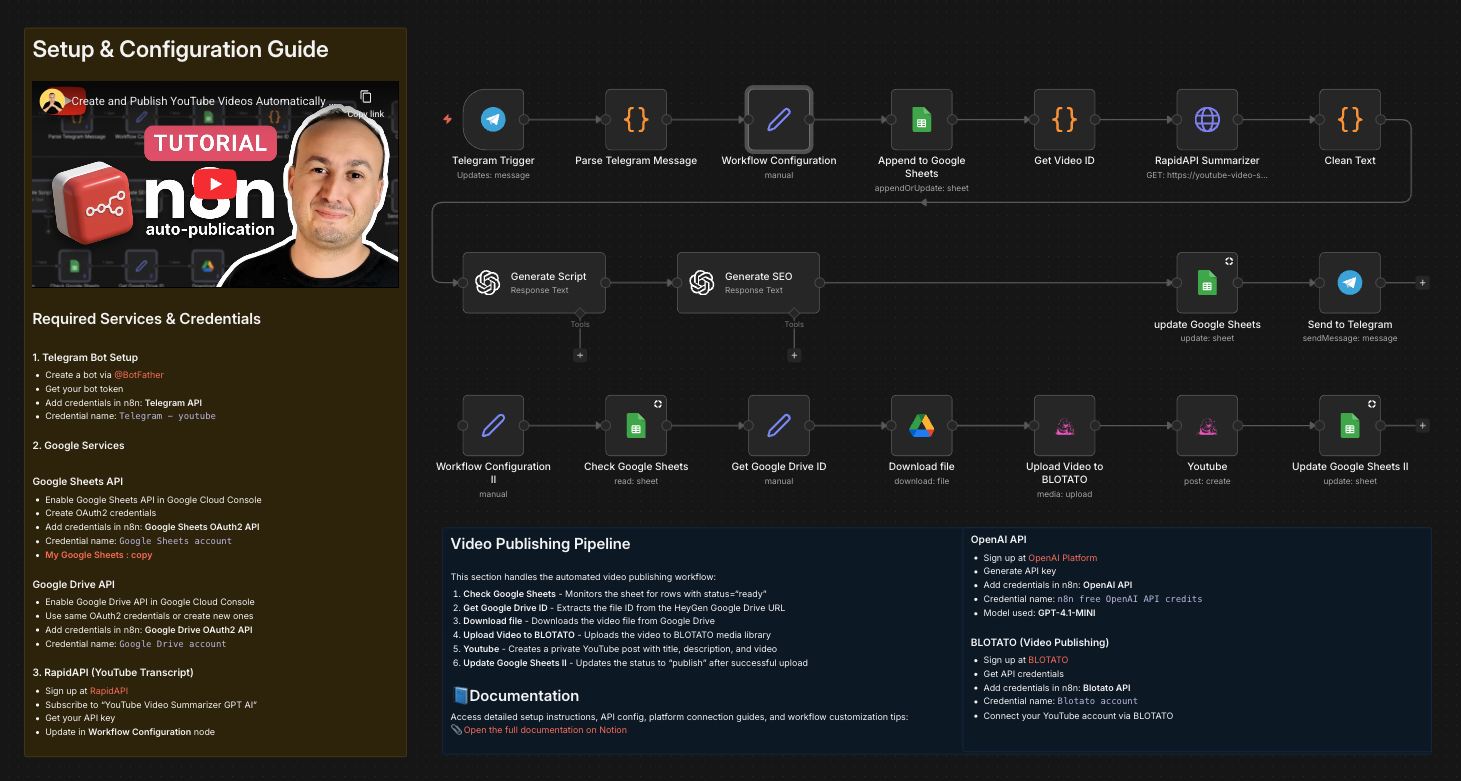
This workflow automates the full YouTube video repurposing and publishing pipeline:
- Receives a YouTube video URL and instructions via Telegram
- Logs the request in Google Sheets
- Extracts the YouTube video ID
- Retrieves the video transcript via RapidAPI
- Cleans and normalizes the transcript
- Generates a new original video script using OpenAI
- Generates SEO metadata (title, description, tags) in strict JSON format
- Updates Google Sheets with the generated content
- Waits for approval (
status = ready) - Uploads the final video to Blotato
- Publishes the video on YouTube
- Updates the status to
publishin Google Sheets
Setup
To use this workflow, you need to configure the following services:
Google Services
- Enable Google Sheets API in Google Cloud Console
- Create OAuth2 credentials
- Add credentials in n8n: Google Sheets OAuth2 API
- Credential name:
Google Sheets account - My Google Sheets : copy
RapidAPI (YouTube Transcript)
- Sign up at RapidAPI
- Subscribe to “YouTube Video Summarizer GPT AI”
- Get your API key
- Update in Workflow Configuration node
BLOTATO (Video Publishing)
- Sign up at BLOTATO
- Get API credentials
- Add credentials in n8n: Blotato API
- Credential name:
Blotato account - Connect your YouTube account via BLOTATO
How to customize this workflow to your needs
You can easily adapt this workflow by:
- Changing the output language (
output_lang) in the configuration node - Modifying the OpenAI prompts to match your tone or niche
- Adjusting Google Sheets columns or approval logic
- Replacing YouTube with another platform supported by Blotato
- Extending the workflow to generate shorts, reels, or multi-platform posts
The workflow is modular and designed to be extended without breaking the core logic.
🎥 Watch This Tutorial
👋 Need help or want to customize this?
📩 Contact: LinkedIn
📺 YouTube: @DRFIRASS
🚀 Workshops: Mes Ateliers n8n
📄 Documentation: Notion Guide
Need help customizing?
Contact me for consulting and support : Linkedin / Youtube / 🚀 Mes Ateliers n8n
🔗 Nodes Used
Google Sheets, HTTP Request, Telegram, Telegram Trigger, Google Drive, OpenAI
📥 Import
Download workflow.json and import into n8n:
Workflow menu → Import from File