🎬 Create automated video ad clones with NanoBanana, Kling, Airtable and Blotato
⚡ 1,342 views · 🎬 Content Creation & Video
Description
💥 Clone Video Ads Factory using NanoBanana, Kling and Publish with Blotato
📄 Documentation: Notion Guide
Who is this for?
This workflow is built for marketers, growth hackers, agencies, content creators, and automation builders who want to industrialize video ad production.
Perfect for anyone running paid ads, social media campaigns, UGC-style content, dropshipping creatives, AI ad testing, or scalable content factories.
What problem is this workflow solving? / Use case
Creating high-performing video ads is:
- Slow
- Manual
- Expensive
- Hard to scale
- Hard to test in volume
This workflow solves:
- ❌ Manual editing
- ❌ Manual prompt writing
- ❌ Manual scene creation
- ❌ Manual video assembly
- ❌ Manual audio integration
- ❌ Manual publishing
It turns one input video + prompt into a fully automated ad production pipeline.
What this workflow does
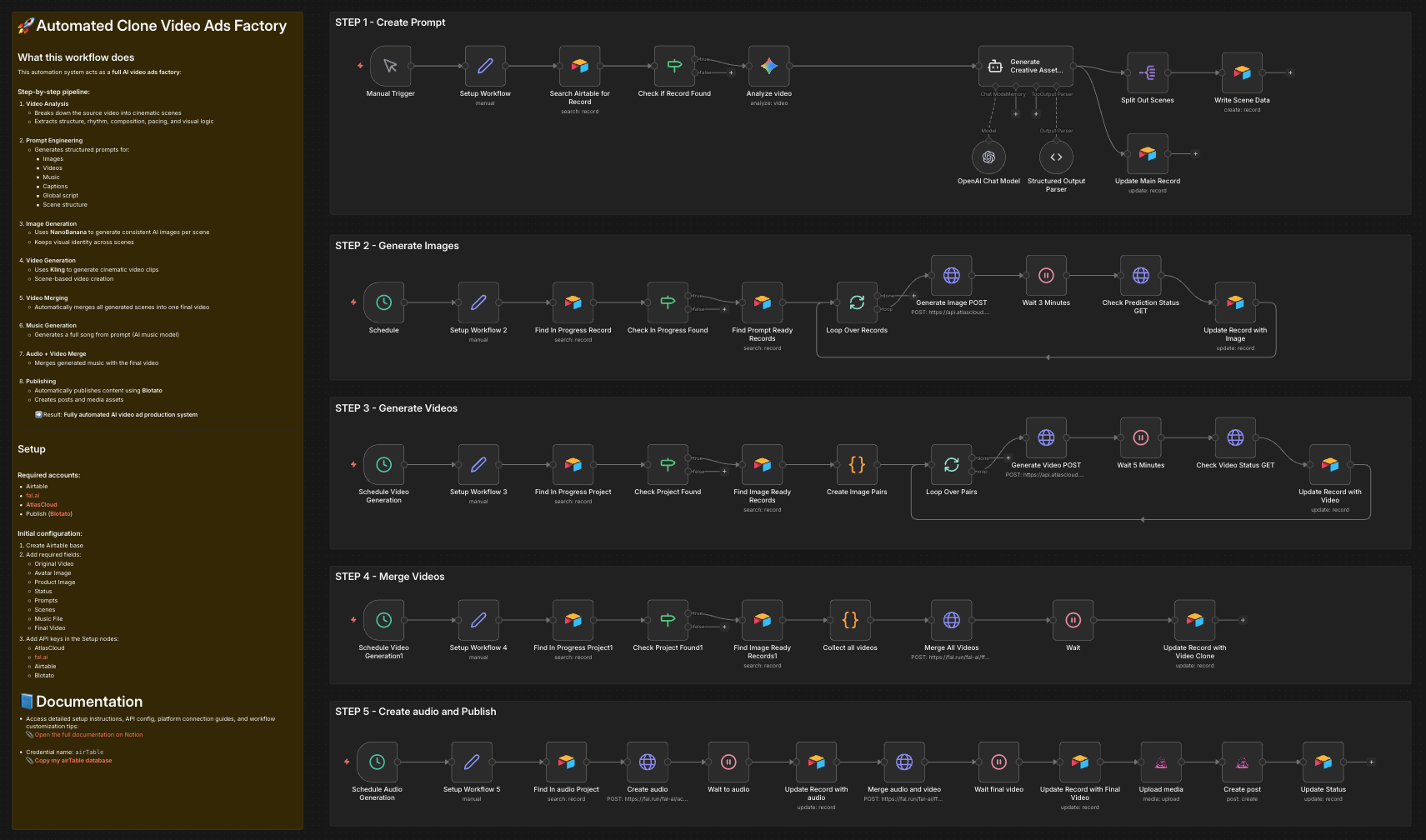
This automation system acts as a full AI video ads factory:
Step-by-step pipeline:
-
Video Analysis
- Breaks down the source video into cinematic scenes
- Extracts structure, rhythm, composition, pacing, and visual logic
-
Prompt Engineering
- Generates structured prompts for:
- Images
- Videos
- Music
- Captions
- Global script
- Scene structure
- Generates structured prompts for:
-
Image Generation
- Uses NanoBanana to generate consistent AI images per scene
- Keeps visual identity across scenes
-
Video Generation
- Uses Kling to generate cinematic video clips
- Scene-based video creation
-
Video Merging
- Automatically merges all generated scenes into one final video
-
Music Generation
- Generates a full song from prompt (AI music model)
-
Audio + Video Merge
- Merges generated music with the final video
-
Publishing
- Automatically publishes content using Blotato
- Creates posts and media assets
➡️ Result: Fully automated AI video ad production system
Setup
Required accounts:
- Airtable
- fal.ai
- AtlasCloud
- Blotato
Initial configuration:
- Create Airtable base
- Add required fields:
- Original Video
- Avatar Image
- Product Image
- Status
- Prompts
- Scenes
- Music File
- Final Video
- Add API keys in the Setup nodes:
- AtlasCloud
- fal.ai
- Airtable
- Blotato
Expected outcome
You get a fully automated AI content factory that can:
- Clone ad styles
- Scale ad production
- Test creatives at scale
- Generate UGC-style ads
- Build content farms
- Automate marketing pipelines
- Create AI ad studios
- Run continuous ad experiments
Typical use cases
- AI UGC ad factories
- Dropshipping ad automation
- SaaS promo videos
- Influencer content cloning
- Brand video scaling
- Marketing automation
- Ad testing labs
- Growth hacking pipelines
- AI content studios
👋 Need help or want to customize this?
📩 Contact: LinkedIn
📺 YouTube: @DRFIRASS
🚀 Workshops: Mes Ateliers n8n
Need help customizing?
Contact me for consulting and support : Linkedin / Youtube / 🚀 Mes Ateliers n8n
🔗 Nodes Used
Airtable, HTTP Request, Schedule Trigger, AI Agent, OpenAI Chat Model, Structured Output Parser
📥 Import
Download workflow.json and import into n8n:
Workflow menu → Import from File