🎬 Create and publish AI social posts to multiple platforms using Blotato
⚡ 616 views · 🎬 Content Creation & Video
💡 Pro Tip — Since TikTok doesn’t have a public API, getting data usually means fragile HTTP scraping. ScraperNode is a community node that gives you clean JSON for TikTok profiles, videos, and comments — drop it into your workflow and skip the parsing.

Description
AI-Powered Social Media Content Factory (Blotato × n8n)
📄 Documentation: Notion Guide
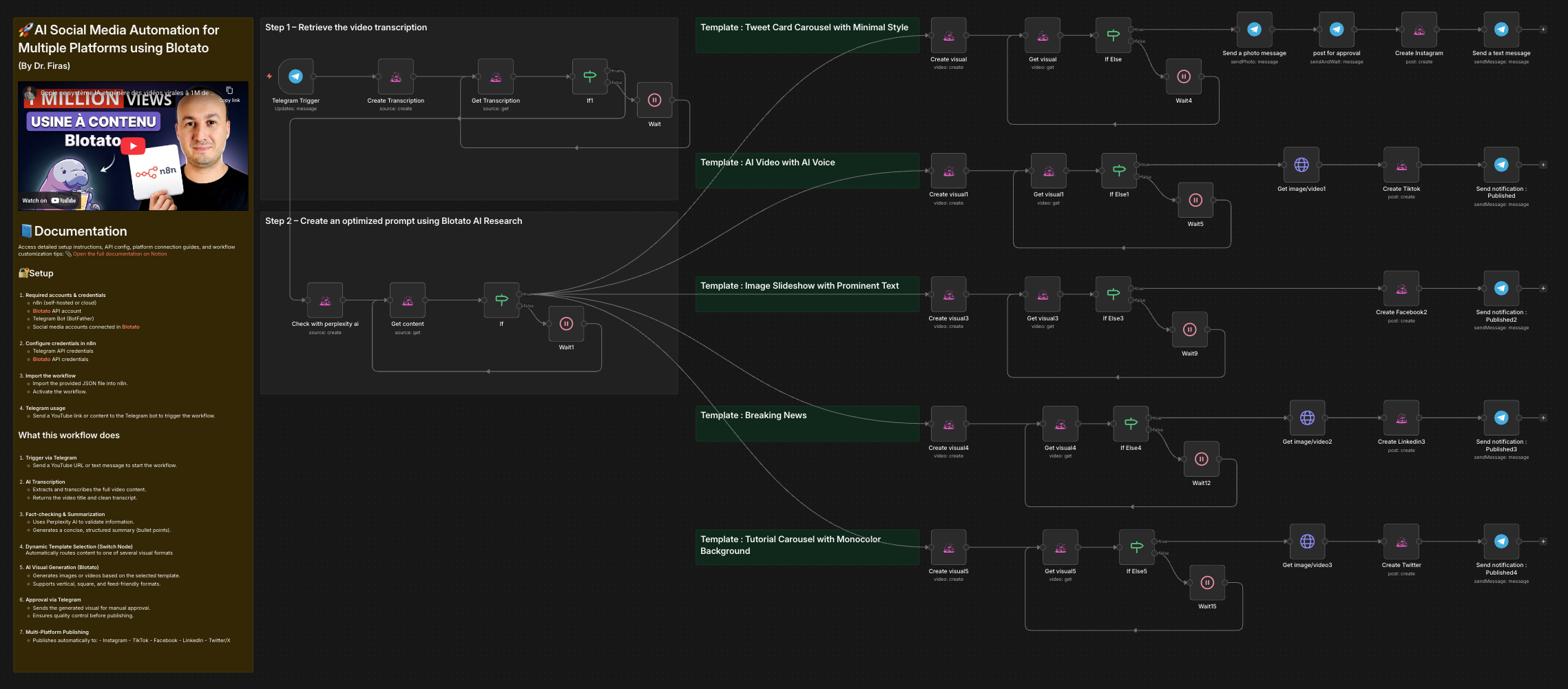
This n8n template automates the end-to-end creation, validation, approval, and publishing of social media content from a single YouTube link or text input, using AI-powered transcription, fact-checking, visual generation, and multi-platform publishing. :contentReference[oaicite:0]{index=0}
Who is this for?
This workflow is designed for:
- Content creators and educators
- Social media managers and agencies
- Solo founders and marketers
- Anyone producing short-form content at scale (Instagram, TikTok, Twitter/X, LinkedIn, Facebook)
It is especially useful if you want to turn long-form videos into high-quality social posts automatically.
What problem is this workflow solving? / Use case
Creating consistent, accurate, and visually engaging content across multiple platforms is:
- Time-consuming
- Repetitive
- Error-prone (especially with AI hallucinations)
This workflow solves that by:
- Automating transcription from YouTube
- Verifying content with Perplexity AI
- Generating multiple visual formats automatically
- Adding a human-in-the-loop approval step via Telegram
- Publishing to multiple platforms in one flow
What this workflow does
-
Trigger via Telegram
- Send a YouTube URL or text message to start the workflow.
-
AI Transcription
- Extracts and transcribes the full video content.
- Returns the video title and clean transcript.
-
Fact-checking & Summarization
- Uses Perplexity AI to validate information.
- Generates a concise, structured summary (bullet points).
-
Dynamic Template Selection (Switch Node)
Automatically routes content to one of several visual formats:- Tweet-style carousel (minimal design)
- AI video with AI voice
- Image slideshow with prominent text
- Breaking news–style video
- Tutorial carousel with monocolor background
-
AI Visual Generation (Blotato)
- Generates images or videos based on the selected template.
- Supports vertical, square, and feed-friendly formats.
-
Approval via Telegram
- Sends the generated visual for manual approval.
- Ensures quality control before publishing.
-
Multi-Platform Publishing
- Publishes automatically to:
- TikTok
- Twitter/X
- Publishes automatically to:
-
Publishing Confirmation
- Sends a final “Published” notification via Telegram.
Setup
-
Required accounts & credentials
-
Configure credentials in n8n
- Telegram API credentials
- Blotato API credentials
-
Import the workflow
- Import the provided JSON file into n8n.
- Activate the workflow.
-
Telegram usage
- Send a YouTube link or content to the Telegram bot to trigger the workflow.
How to customize this workflow to your needs
-
Change templates
Modify or remove visual templates in the Switch node. -
Adjust AI prompts
Fine-tune:- Transcription instructions
- Summary depth
- Visual generation prompts
-
Branding
- Update profile images, author names, handles, and colors.
- Customize CTA text per platform.
-
Platform selection
- Disable platforms you don’t use.
- Duplicate posting logic for additional accounts.
-
Approval logic
- Skip approval for full automation.
- Add rejection or revision flows if needed.
🎥 Watch This Tutorial
👋 Need help or want to customize this?
📩 Contact: LinkedIn
📺 YouTube: @DRFIRASS
🚀 Workshops: Mes Ateliers n8n
Need help customizing?
Contact me for consulting and support : Linkedin / Youtube / 🚀 Mes Ateliers n8n
🔗 Nodes Used
HTTP Request, Telegram, Telegram Trigger
📥 Import
Download workflow.json and import into n8n:
Workflow menu → Import from File