🎬 Generate AI videos and carousels with Blotato for Instagram and TikTok
⚡ 4,949 views · 🎬 Content Creation & Video
💡 Pro Tip — Since TikTok doesn’t have a public API, getting data usually means fragile HTTP scraping. ScraperNode is a community node that gives you clean JSON for TikTok profiles, videos, and comments — drop it into your workflow and skip the parsing.

Description
Generate AI videos and carousels with Blotato and publish to Instagram & TikTok
📄 Documentation: Notion Guide
Who is this for?
This workflow is designed for content creators, marketers, solopreneurs, and automation enthusiasts who want to generate and publish short-form content on Instagram and TikTok automatically.
It is ideal for users looking to combine AI-generated videos and carousels with Blotato and orchestrate everything using n8n.
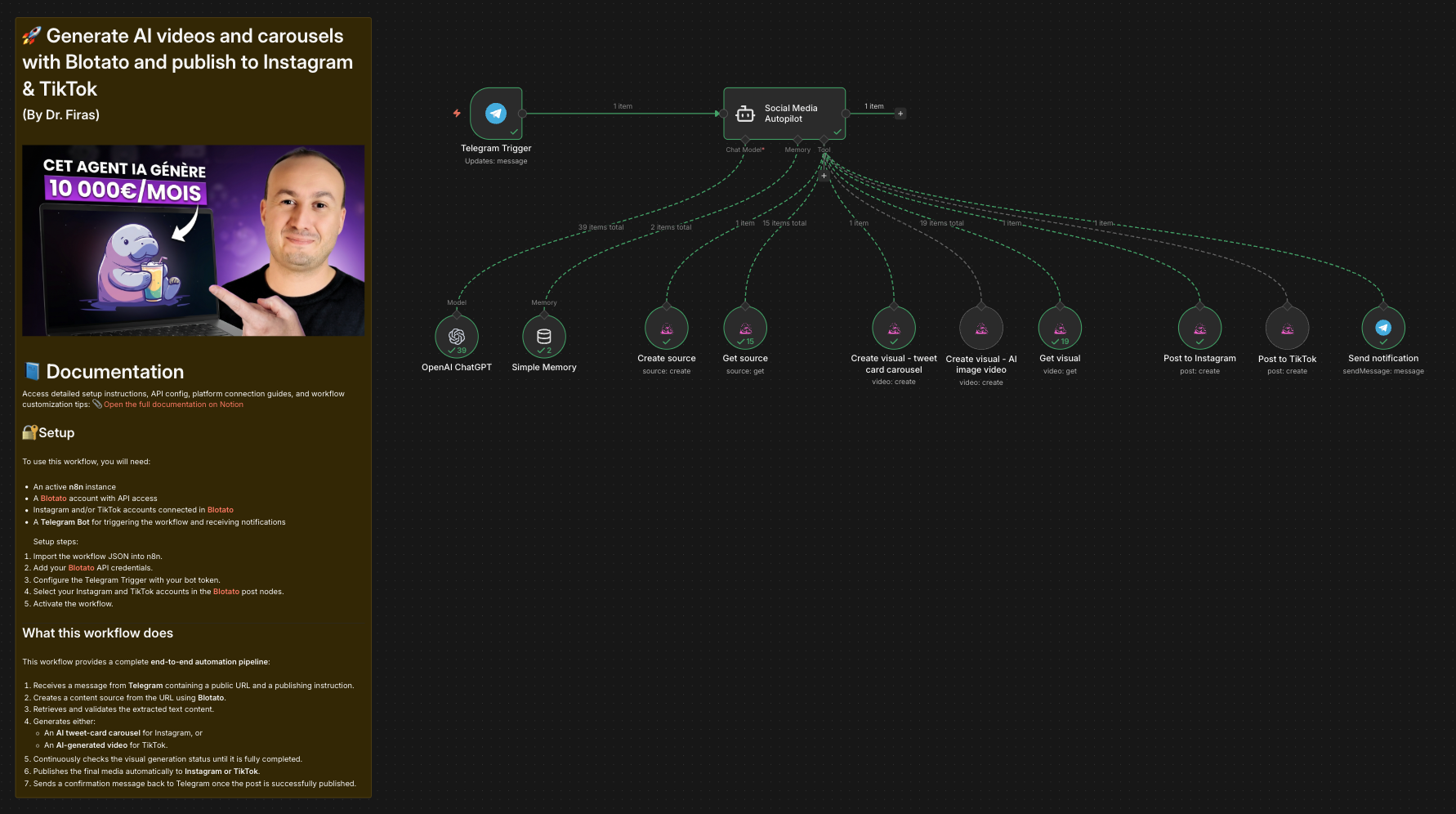
What this workflow does
This workflow provides a complete end-to-end automation pipeline:
- Receives a message from Telegram containing a public URL and a publishing instruction.
- Creates a content source from the URL using Blotato.
- Retrieves and validates the extracted text content.
- Generates either:
- An AI tweet-card carousel for Instagram, or
- An AI-generated video for TikTok.
- Continuously checks the visual generation status until it is fully completed.
- Publishes the final media automatically to Instagram or TikTok.
- Sends a confirmation message back to Telegram once the post is successfully published.
Setup
To use this workflow, you will need:
- An active n8n instance
- A Blotato account with API access
- Instagram and/or TikTok accounts connected in Blotato
- A Telegram Bot for triggering the workflow and receiving notifications
Setup steps:
- Import the workflow JSON into n8n.
- Add your Blotato API credentials.
- Configure the Telegram Trigger with your bot token.
- Select your Instagram and TikTok accounts in the Blotato post nodes.
- Activate the workflow.
How to customize this workflow to your needs
You can customize this workflow by:
- Changing the visual templates used in Blotato.
- Adjusting AI prompts to control tone, format, or content style.
- Adding additional publishing platforms after the posting step.
- Modifying polling behavior or adding timeouts for long visual renders.
- Replacing Telegram with another trigger such as Webhooks or Slack.
The workflow is modular and easy to extend, making it suitable for a wide range of content automation use cases.
🎥 Watch This Tutorial
👋 Need help or want to customize this?
📩 Contact: LinkedIn
📺 YouTube: @DRFIRASS
🚀 Workshops: Mes Ateliers n8n
Need help customizing?
Contact me for consulting and support : Linkedin / Youtube / 🚀 Mes Ateliers n8n
🔗 Nodes Used
Telegram Trigger, AI Agent, OpenAI Chat Model, Simple Memory
📥 Import
Download workflow.json and import into n8n:
Workflow menu → Import from File