🎬 Automate blog content creation with Notion MCP, DeepSeek AI, and WordPress
⚡ 16,984 views · 🎬 Content Creation & Video
Description
Who Is This For
This workflow is ideal for content creators, bloggers, marketers, and professionals seeking to automate the creation and publication of SEO-optimized articles. It’s particularly beneficial for those utilizing Notion for content management and WordPress for publishing.
What Problem Does This Workflow Solve
Manually creating SEO-friendly articles is time-consuming and requires consistent effort. This workflow streamlines the entire process—from detecting updates in Notion to publishing on WordPress—by leveraging AI for content generation, thereby reducing the time and effort involved.
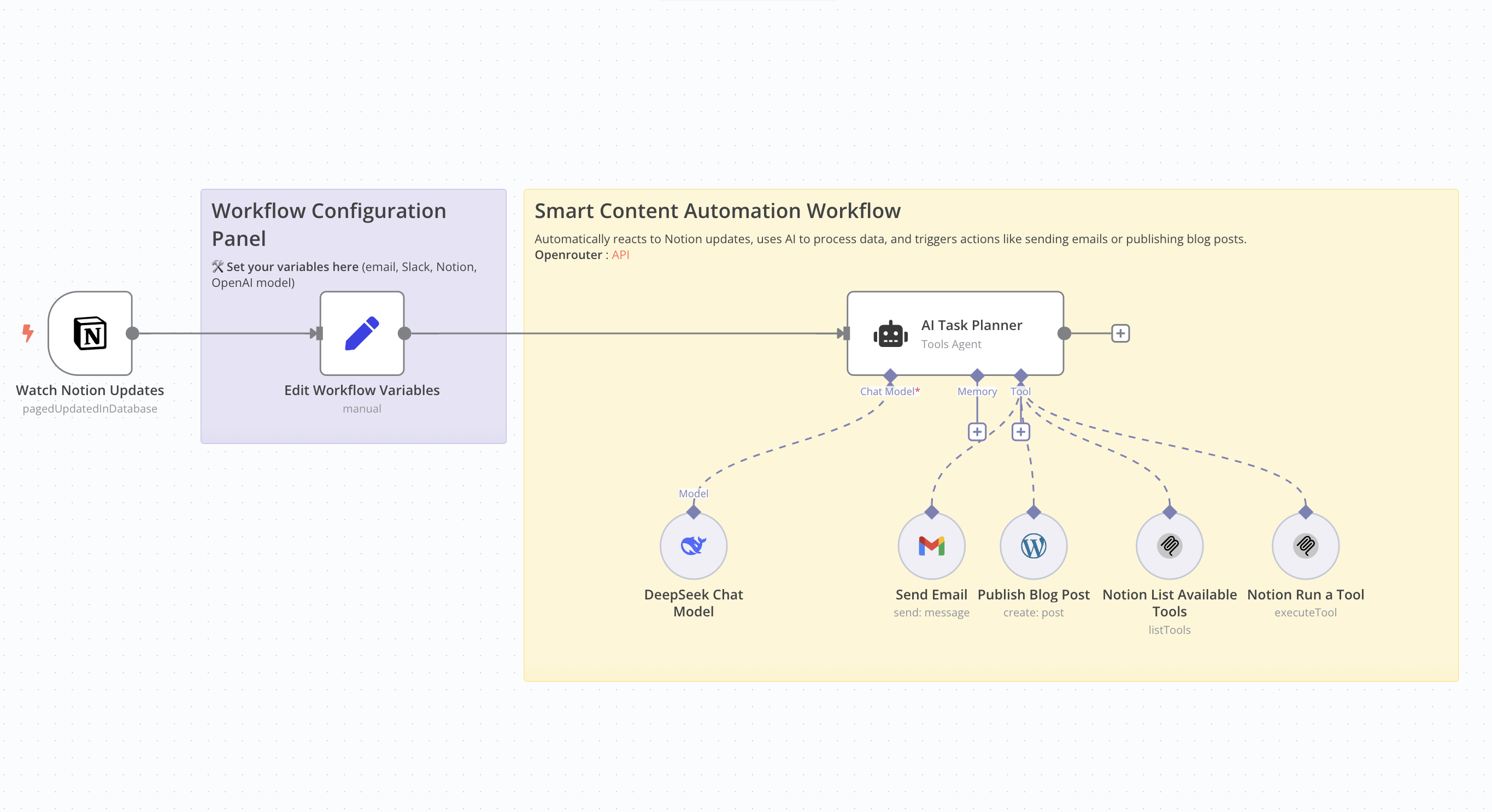
What This Workflow Does
- Monitor Notion Updates: Detects changes in a specified Notion database.
- AI Content Generation: Utilizes an AI model to produce an SEO-optimized article based on Notion data.
- Publish to WordPress: Automatically posts the generated article to a WordPress site.
- Email Notification: Sends an email containing the article’s title and URL.
Update Notion Database: Updates the corresponding entry in the Notion database with the article details.
Setup Guide
Prerequisites
- WordPress account with API access.
- API key for the AI model used.
- Notion integration with the relevant database ID.
- Credentials for the email service used (e.g., Gmail).
Community Node Requirement: This workflow utilizes the n8n-nodes-mcp community node, which is only compatible with self-hosted instances of n8n. For more information on installing and managing community nodes, refer to the n8n documentation. n8n Docs
Steps
- Import the workflow into your self-hosted n8n instance.
- Install the required community node (n8n-nodes-mcp).
- Configure API credentials for WordPress, the AI service, Notion, and the email service.
- Define necessary variables, such as the notification email address and Notion database IDs.
- Activate the workflow to automate the process.
How to Customize This Workflow
- AI Prompt: Adjust the prompt used for content generation to align with your preferred tone and style.
- Article Structure: Modify the structure of the generated article by tweaking settings in the content generation node.
- Notifications: Customize the content and recipients of the emails sent post-publication.
- Notion Updates: Tailor the fields updated in Notion to suit your specific requirements.
🔗 Nodes Used
Notion Trigger, AI Agent, DeepSeek Chat Model
📥 Import
Download workflow.json and import into n8n:
Workflow menu → Import from File