🎬 🧑🦯Improve your website accessibility with GPT-4o and Google Sheet
⚡ 2,107 views · 🎬 Content Creation & Video
Description
Tags: Accessibility, SEO, Blogging, Marketing, Automation, AI, Web Auditing
Context
Hey! I’m Samir, a Supply Chain Engineer and Data Scientist from Paris, and the founder of LogiGreen Consulting.
In my personal blog, I share insights on how to use AI, automation, and data analytics to improve logistics, operations, and digital sustainability practices.
> Have you heard about accessibility?
In this workflow, I use n8n to improve the quality of alternative texts for images on my personal website.
📬 For business inquiries, you can connect with me on LinkedIn
Who is this template for?
This workflow is for:
- Bloggers and website owners who want to improve accessibility
- SEO professionals looking to boost page performance
- Web developers and product teams automating web audits
What does it do?
This n8n workflow:
- 🔍 Downloads the HTML of a blog or web page
- 🖼️ Extracts all
<img>tags and theiraltattributes - 📉 Detects missing or too-short alt texts
- 🤖 Sends those images to GPT-4o (with vision) to generate new alt descriptions
- 📄 Saves the results into a Google Sheet, updating the alt text when needed
How it works
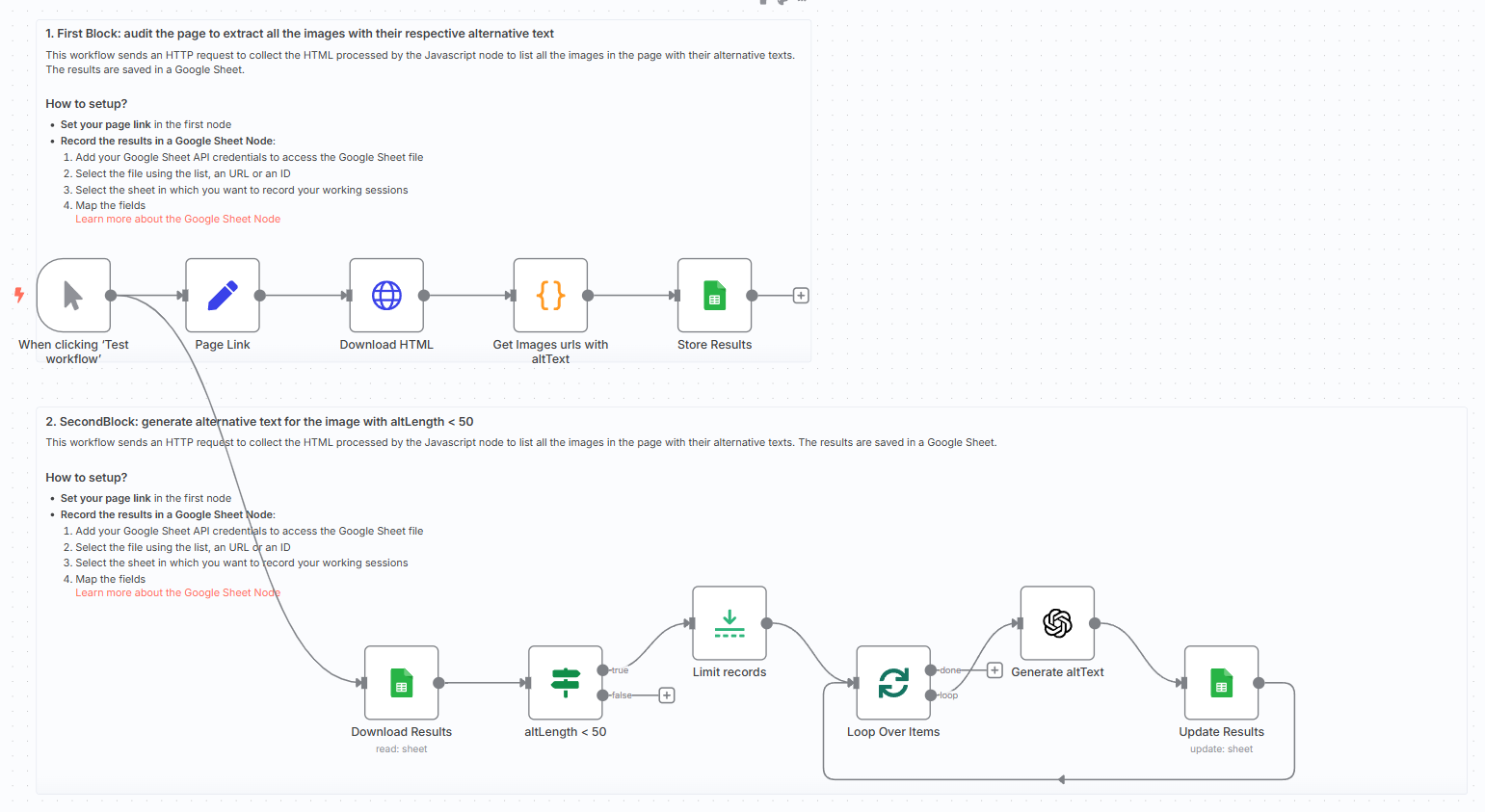
- Set a page URL using the
Setnode - Download HTML content
- Extract image
srcandaltusing aCodenode - Store results in a Google Sheet
- Filter images with
altLength < 50 - Send image URL to GPT-4o
- Update the Google Sheet with the newly generated
newAlttext
The AI alt texts are concise, descriptive, and accessibility-compliant.
What do I need to get started?
You’ll need:
- A Google Sheet to store the audit results
- An OpenAI account with GPT-4o access
Follow the Guide!
Follow the sticky notes in the workflow or check my tutorial to configure each node and start using AI to improve the accessibility of your website.
Notes
- GPT-generated alt texts are limited to ~125–150 characters for best results
- Use this to comply with WCAG and improve Google indexing
- Easily adapt it to audit multiple domains or e-commerce catalogues
This workflow was built using n8n version 1.85.4
Submitted: April 21, 2025
🔗 Nodes Used
Google Sheets, HTTP Request, OpenAI
📥 Import
Download workflow.json and import into n8n:
Workflow menu → Import from File