🎬 Auto-create and publish AI social videos with Telegram, GPT-4 and Blotato
⚡ 28,527 views · 🎬 Content Creation & Video
💡 Pro Tip — Since TikTok doesn’t have a public API, getting data usually means fragile HTTP scraping. ScraperNode is a community node that gives you clean JSON for TikTok profiles, videos, and comments — drop it into your workflow and skip the parsing.

Description
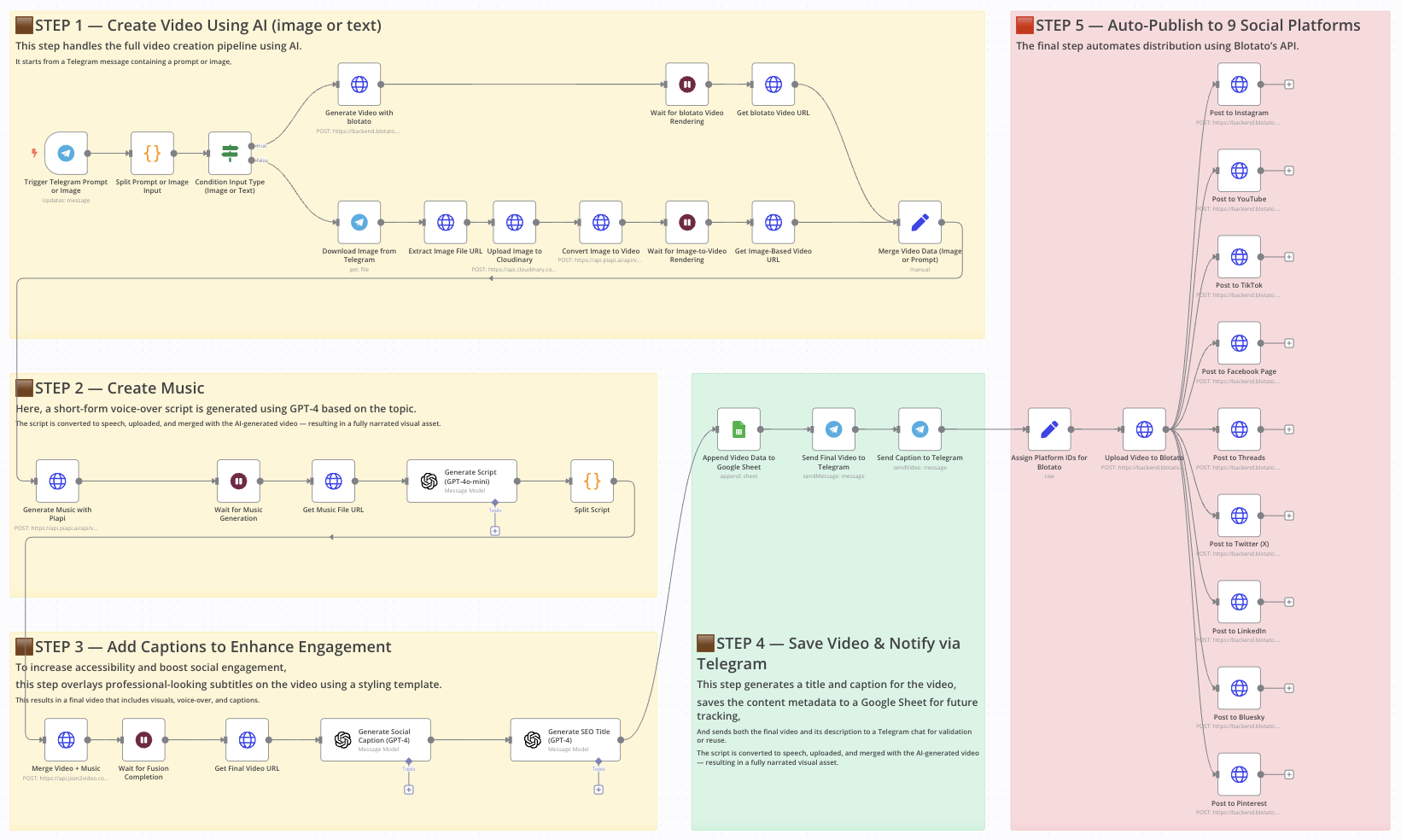
Auto-create and publish AI social videos with Telegram, GPT-4 and Blotato
> ⚠️ Disclaimer: This workflow uses Community Nodes and must be run on a self-hosted instance of n8n.
Who is this for?
This template is perfect for social media managers, content creators, AI enthusiasts, and automation pros who want to generate short-form videos (Reels) from a simple Telegram message, then publish them across multiple platforms—all without video editing or manual uploads.
What problem is this workflow solving?
Creating content is only half the job. The real bottleneck comes in:
- Rendering the video,
- Adding voice or music,
- Writing captions and titles,
- Publishing to multiple platforms.
This workflow automates all of that using AI. It saves hours every week and guarantees consistent output.
What this workflow does
This end-to-end automation handles everything from AI video generation to social publishing:
- Starts with a Telegram message (text or image prompt)
- Generates video using Kling or Blotato, based on the input
- Creates music with Piapi and merges it with the video
- Generates text overlays and captions with GPT-4
- Builds a stylized video using JSON2Video
- Logs results to Google Sheets
- Sends final output back to Telegram
- Auto-posts the video to 9 platforms via Blotato (Instagram, TikTok, YouTube, Facebook, LinkedIn, Threads, Twitter/X, Pinterest, Bluesky)
Setup
- Connect your Telegram bot to the trigger node.
- Add your OpenAI API key for all GPT nodes.
- Set up Kling and Piapi API access (for video and music generation).
- Connect your Cloudinary account to upload images.
- Link a Google Sheet with columns: Title, Caption, URL.
- Set your Blotato API key and fill in the platform-specific account IDs.
How to customize this workflow to your needs
- Change prompt formatting to control GPT responses and video tone.
- Edit text styling in JSON2Video to match your brand.
- Add a Telegram approval step before publishing, if needed.
- Disable platforms you don’t use by deleting their HTTP Request nodes.
- Use a Google Sheet filter to only process new rows or drafts.
📄 Documentation: Notion Guide
🔗 Nodes Used
Google Sheets, HTTP Request, Telegram, Telegram Trigger, OpenAI
📥 Import
Download workflow.json and import into n8n:
Workflow menu → Import from File