🎬 Clone viral TikToks with AI avatars & auto-post to 9 platforms using Perplexity & Blotato
⚡ 127,623 views · 🎬 Content Creation & Video
💡 Pro Tip — Since TikTok doesn’t have a public API, getting data usually means fragile HTTP scraping. ScraperNode is a community node that gives you clean JSON for TikTok profiles, videos, and comments — drop it into your workflow and skip the parsing.

Description
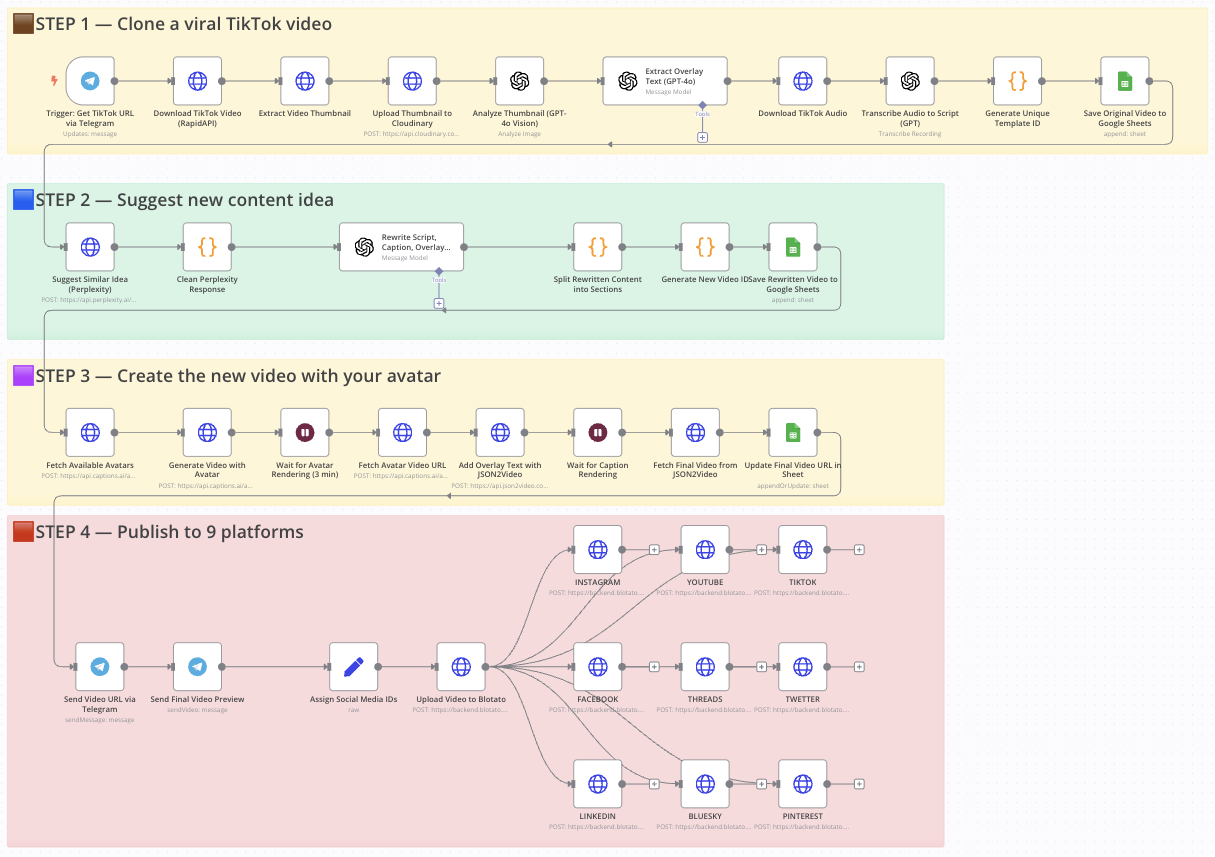
Clone a viral TikTok with AI and auto-post it to 9 platforms using Perplexity & Blotato
Who is this for?
This workflow is perfect for:
- Content creators looking to repurpose viral content
- Social media managers who want to scale short-form content across multiple platforms
- Entrepreneurs and marketers aiming to save time and boost visibility with AI-powered automation
What problem is this workflow solving?
Reproducing viral video formats with your own branding and pushing them to multiple platforms is time-consuming and hard to scale. This workflow solves that by:
- Cloning a viral TikTok video’s structure
- Generating a new version with your avatar
- Rewriting the script, caption, and overlay text
- Auto-posting it to 9 social media platforms — without manual uploads
What this workflow does
From a simple Telegram message with a TikTok link, the workflow:
- Downloads a TikTok video and extracts its thumbnail, audio, and caption
- Transcribes the audio and saves original text into Google Sheets
- Uses Perplexity AI to suggest a new content idea in the same niche
- Rewrites the script, caption, and overlay using GPT-4o
- Generates a new video with your avatar using Captions.ai
- Adds subtitles and overlay text with JSON2Video
- Saves metadata to Google Sheets for tracking
- Sends the final video to Telegram for preview
- Auto-publishes the video to Instagram, YouTube, TikTok, Facebook, LinkedIn, Threads, X (Twitter), Pinterest, and Bluesky via Blotato
Setup
- Connect your Telegram bot to the trigger node.
- Add your OpenAI, Perplexity, Cloudinary, Captions.ai, and Blotato API keys.
- Make sure your Google Sheet is ready with the appropriate columns.
- Replace the default avatar name in the Captions.ai node with yours.
- Fill in your social media account IDs in the “Assign Platform IDs” node.
- Test by sending a TikTok URL to your Telegram bot.
How to customize this workflow to your needs
- Change avatar output style: adjust resolution, voice, or avatar ID.
- Refine script structure: tweak GPT instructions for different tone/format.
- Swap Perplexity with ChatGPT or Claude if needed.
- Filter by platform: disable any Blotato nodes you don’t need.
- Add approval step: insert a Telegram confirmation node before publishing.
- Adjust subtitle style or overlay text font in JSON2Video.
📄 Documentation: Notion Guide
Need help customizing?
Contact me for consulting and support : Linkedin / Youtube
🔗 Nodes Used
Google Sheets, HTTP Request, Telegram, Telegram Trigger, OpenAI
📥 Import
Download workflow.json and import into n8n:
Workflow menu → Import from File