🎬 Generate Youtube video metadata (timestamps, tags, description, …)
⚡ 34,105 views · 🎬 Content Creation & Video
💡 Pro Tip — YouTube’s API quotas can be a bottleneck when you’re pulling data at scale. ScraperNode is a community node with dedicated scrapers for channels, videos, and comments — no quota limits, just structured data.

Description
For Who?
- Content Creators
- Youtube Automation
- Marketing Team
How it works?
1 - Enter the ID of the YTB channel to trigger the workflow when a new video is posted 2 - Apify scrape the last YTB video of the channel 3 - Wait until the dataset is completed in Apify and get it 4 - Verify if Metadata are not already generated and generate them with LLM 5 - Format all the data created and update YTB Video
📺 YouTube Video Tutorial: 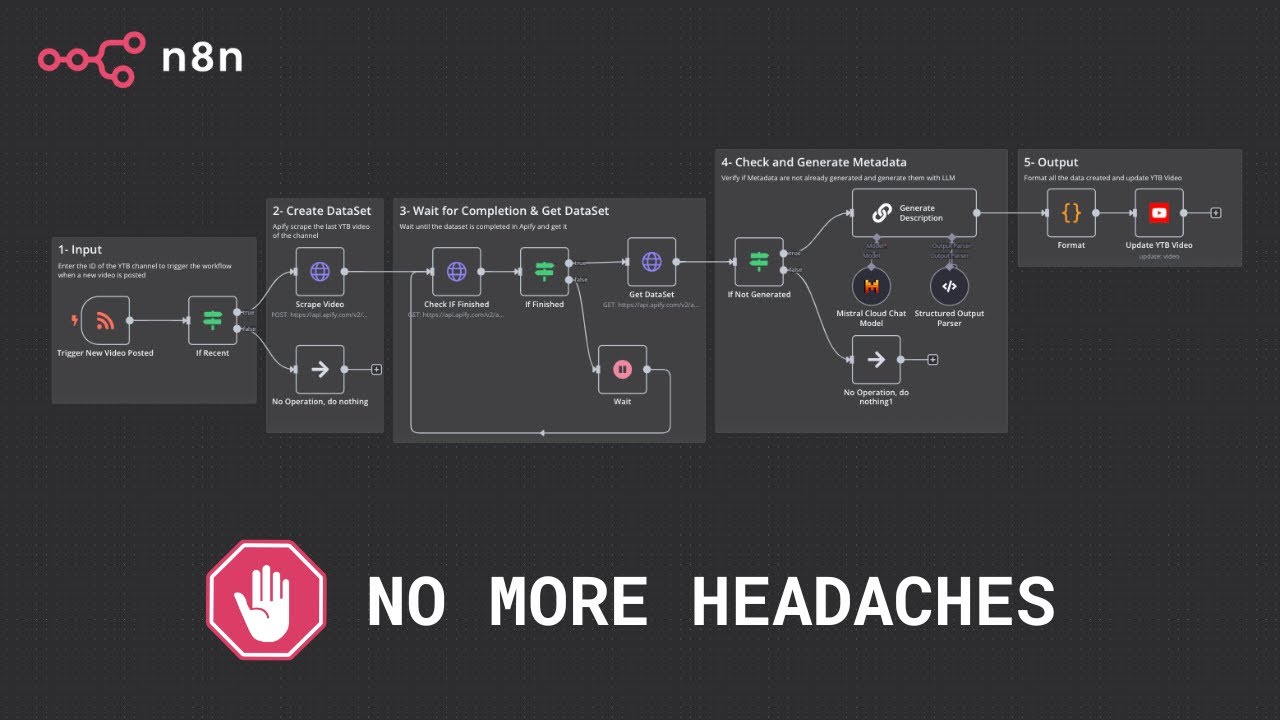
SETUP
Setup Input YTB Chanel : Go to the channel’s page on YouTube, and look at the URL of the page. The channel ID is the value that comes after channel/ in the URL. Add it after “?channel_id=” You can also use free tools available to retrieve channel ID.
Setup Output YTB Video Update : Connect your YTB account to your n8n instance thanks to the Google Cloud Console. You can find tutorials by typing “youtube api Oauth” on Google.
APIs : For the following third-party integrations, replace ==[YOUR_API_TOKEN]== with your API Token or connect your account via Client ID / Secret to your n8n instance :
- Apify : https://docs.apify.com/api/v2/getting-started
- Youtube : https://docs.n8n.io/integrations/builtin/app-nodes/n8n-nodes-base.youtube/?utm_source=n8n_app&utm_medium=node_settings_modal-credential_link&utm_campaign=n8n-nodes-base.youTube#templates-and-examples
👨💻 More Workflows : https://n8n.io/creators/nasser/
🔗 Nodes Used
HTTP Request, YouTube, Basic LLM Chain, Structured Output Parser, RSS Feed Trigger, Mistral Cloud Chat Model
📥 Import
Download workflow.json and import into n8n:
Workflow menu → Import from File