🎬 AI-powered Meta ads analysis & creation with Gemini, GPT-4.1 Mini & Ads Manager
⚡ 2,106 views · 🎬 Content Creation & Video
💡 Pro Tip — If you’ve run into Facebook’s Graph API permission restrictions, ScraperNode is a community node that scrapes pages, groups, posts, and comments directly — no app review needed.

Description
AI-Powered Meta Ads Creation & Analysis Workflow
Overview
This comprehensive n8n workflow automates the entire Meta (Facebook/Instagram) advertising process, from asset analysis to ad creation. It combines AI-powered content analysis with automated ad deployment, streamlining the creation of high-converting social media advertisements.
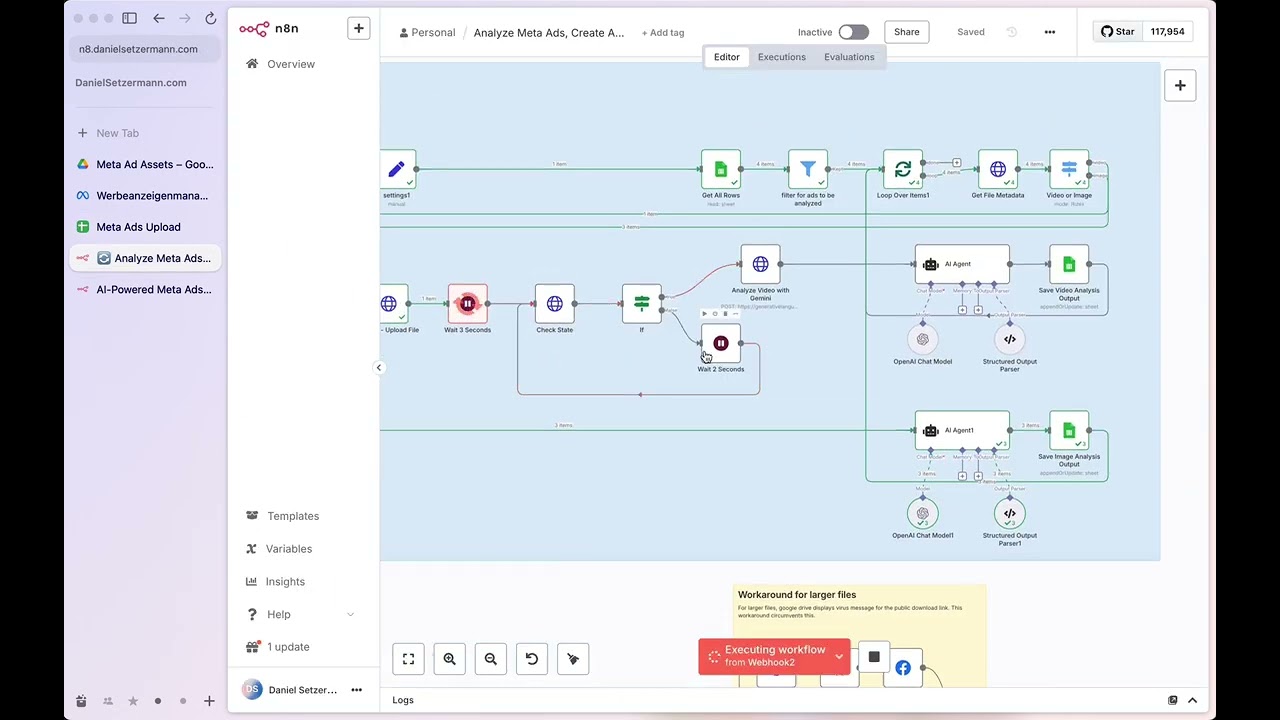
Watch a quick video walkthrough of the workflow
Key Features
🤖 AI-Powered Asset Analysis
- Video Analysis: Uses Google Gemini to analyze video content, extracting transcripts, scene descriptions, hooks, offers, and branding elements
- Image Analysis: Employs GPT-4.1 Mini to analyze static images, identifying visual elements, USPs, and marketing potential
- Structured Output: Generates detailed descriptions and creative insights for informed ad creation
✍️ Automated Ad Copy Generation
- Creates 3 variations each of primary text, headlines, and link descriptions
- Optimized for Meta’s character limits and best practices
- Maintains brand voice and messaging consistency
- Leverages AI analysis to create compelling, conversion-focused copy
🎯 Meta Ads Manager Integration
- Video Ads: Uploads videos, creates ad creatives with multiple text variations
- Image Ads: Supports both single and multi-image campaigns (1:1 and 9:16 formats)
- Asset Feed Optimization: Implements placement-specific customization rules
- Automated Preview Generation: Creates ad previews for different placements
📊 Smart Workflow Management
- Google Drive Integration: Monitors designated folders for new creative assets
- Google Sheets Tracking: Maintains comprehensive records of all assets and campaigns
- Status Management: Tracks processing stages and prevents duplicate work
- Error Handling: Includes retry logic and status checking for reliable operation
Workflow Components
Asset Discovery & Processing
- Google Drive Trigger: Monitors specified folder for new image/video files
- File Analysis: Extracts metadata, dimensions, and file specifications
- Asset Registration: Logs all assets in Google Sheets for tracking
AI Analysis Pipeline
- Content Type Detection: Automatically identifies videos vs. images
- Video Processing:
- Uploads to Google Gemini for analysis
- Generates comprehensive content breakdown
- Extracts all marketing-relevant elements
- Image Processing:
- Analyzes visual content with GPT-4.1 Mini
- Identifies key messaging and visual elements
- Creates detailed creative descriptions
Ad Copy Creation
- AI Agent Processing: Transforms analysis into marketing copy
- Multi-Variant Generation: Creates 3 versions of each text element
- Platform Optimization: Ensures compliance with Meta’s requirements
- Quality Assurance: Structured output validation
Meta Ads Deployment
- Asset Upload: Pushes images/videos to Meta Ads Manager
- Creative Assembly: Builds ad creatives with generated copy variations
- Campaign Creation: Sets up ads with proper targeting and placement rules
- Status Tracking: Updates spreadsheet with campaign IDs and status
Setup Requirements
Required Credentials
- Meta Developer Account: App access token for Meta Graph API
- Google Drive OAuth: For file monitoring and asset access
- Google Sheets OAuth: For workflow tracking and management
- Google Gemini API: For video analysis capabilities
- OpenAI API: For image analysis and copy generation
Configuration Steps
- Google Drive Setup:
- Create dedicated folder for creative assets
- Configure folder monitoring in the trigger node
- Google Sheets Template:
- Use provided template for asset and campaign tracking
- Configure account settings and campaign parameters
- Meta Developer Setup:
- Create Meta App and obtain access tokens
- Set up ad account permissions
- API Credentials:
- Configure all required authentication credentials
- Test connections before activation
🔗 Nodes Used
Google Sheets, HTTP Request, Google Drive, Facebook Graph API, Google Drive Trigger, Filter
📥 Import
Download workflow.json and import into n8n:
Workflow menu → Import from File