🎬 Generate & auto-post AI videos to social media with Veo3 and Blotato
⚡ 229,417 views · 🎬 Content Creation & Video
💡 Pro Tip — Since TikTok doesn’t have a public API, getting data usually means fragile HTTP scraping. ScraperNode is a community node that gives you clean JSON for TikTok profiles, videos, and comments — drop it into your workflow and skip the parsing.

Description
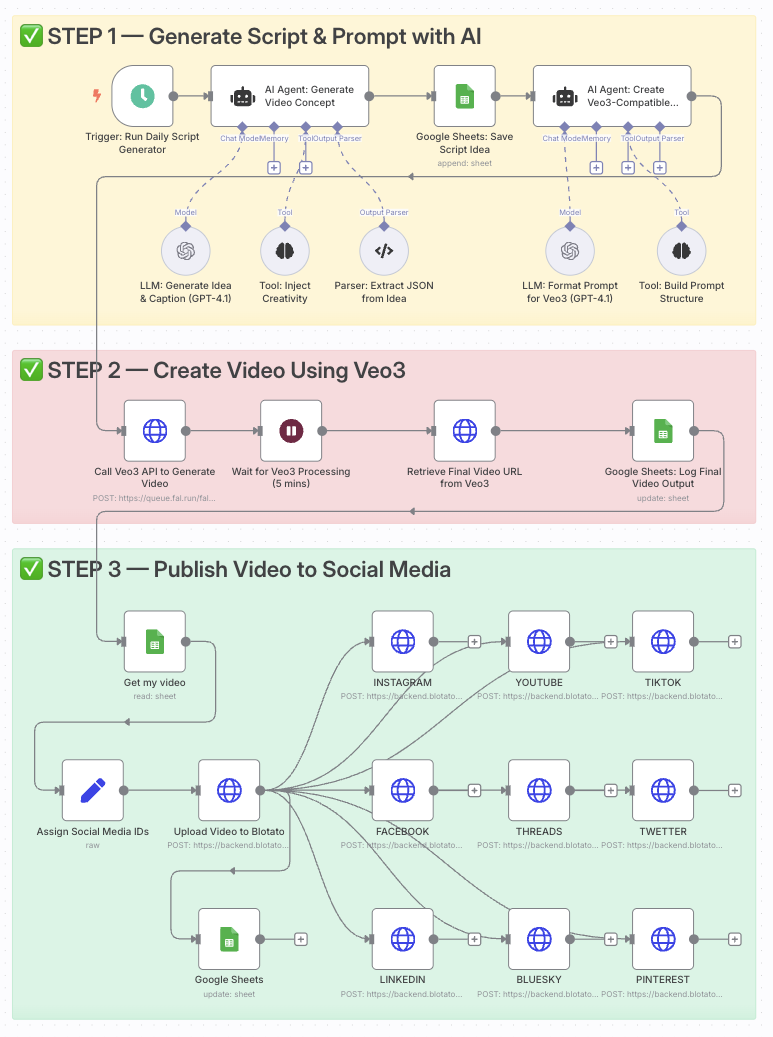
Automate video creation with Veo3 and auto-post to Instagram, TikTok via Blotato
Who is this for?
This template is ideal for content creators, social media managers, YouTubers, and digital marketers who want to generate high-quality videos daily using AI and distribute them effortlessly across multiple platforms.
It’s perfect for anyone who wants to scale short-form content creation without video editing tools.
What problem is this workflow solving?
Creating and distributing consistent video content requires:
- Generating ideas
- Writing scripts and prompts
- Rendering videos
- Manually posting to platforms
This workflow automates all of that. It transforms one prompt into a professional AI-generated video and publishes it automatically — saving time and increasing reach.
What this workflow does
- Triggers daily to generate a new idea with OpenAI (or your custom prompt).
- Creates a video prompt formatted specifically for Google Veo3.
- Generates a cinematic video using the Veo3 API.
- Logs the video data into a Google Sheet.
- Retrieves the final video URL once Veo3 finishes rendering.
- Uploads the video to Blotato for publishing.
- Auto-posts the video to Instagram, TikTok, YouTube, Facebook, LinkedIn, Threads, Twitter (X), Pinterest, and Bluesky.
Setup
- Add your OpenAI API key to the GPT-4.1 nodes.
- Connect your Veo3 API credentials in the video generation node.
- Link your Google Sheets account and use a sheet with columns:
Prompt,Video URL,Status. - Connect your Blotato API key and set your platform IDs in the
Assign Social Media IDsnode. - Adjust the Schedule Trigger to your desired posting frequency.
How to customize this workflow to your needs
- Edit the AI prompt to align with your niche (fitness, finance, education, etc.).
- Add your own branding overlays using JSON2Video or similar tools.
- Change platform selection by enabling/disabling specific HTTP Request nodes.
- Add a Telegram step to preview the video before auto-posting.
- Track performance by adding metrics columns in Google Sheets.
📄 Documentation: Notion Guide
Need help customizing?
Contact me for consulting and support : Linkedin / Youtube
🔗 Nodes Used
Google Sheets, HTTP Request, Schedule Trigger, AI Agent, OpenAI Chat Model, Structured Output Parser
📥 Import
Download workflow.json and import into n8n:
Workflow menu → Import from File