🎬 Generate AI viral videos with Seedance and upload to TikTok, YouTube & Instagram
⚡ 304,381 views · 🎬 Content Creation & Video
💡 Pro Tip — Since TikTok doesn’t have a public API, getting data usually means fragile HTTP scraping. ScraperNode is a community node that gives you clean JSON for TikTok profiles, videos, and comments — drop it into your workflow and skip the parsing.

Description
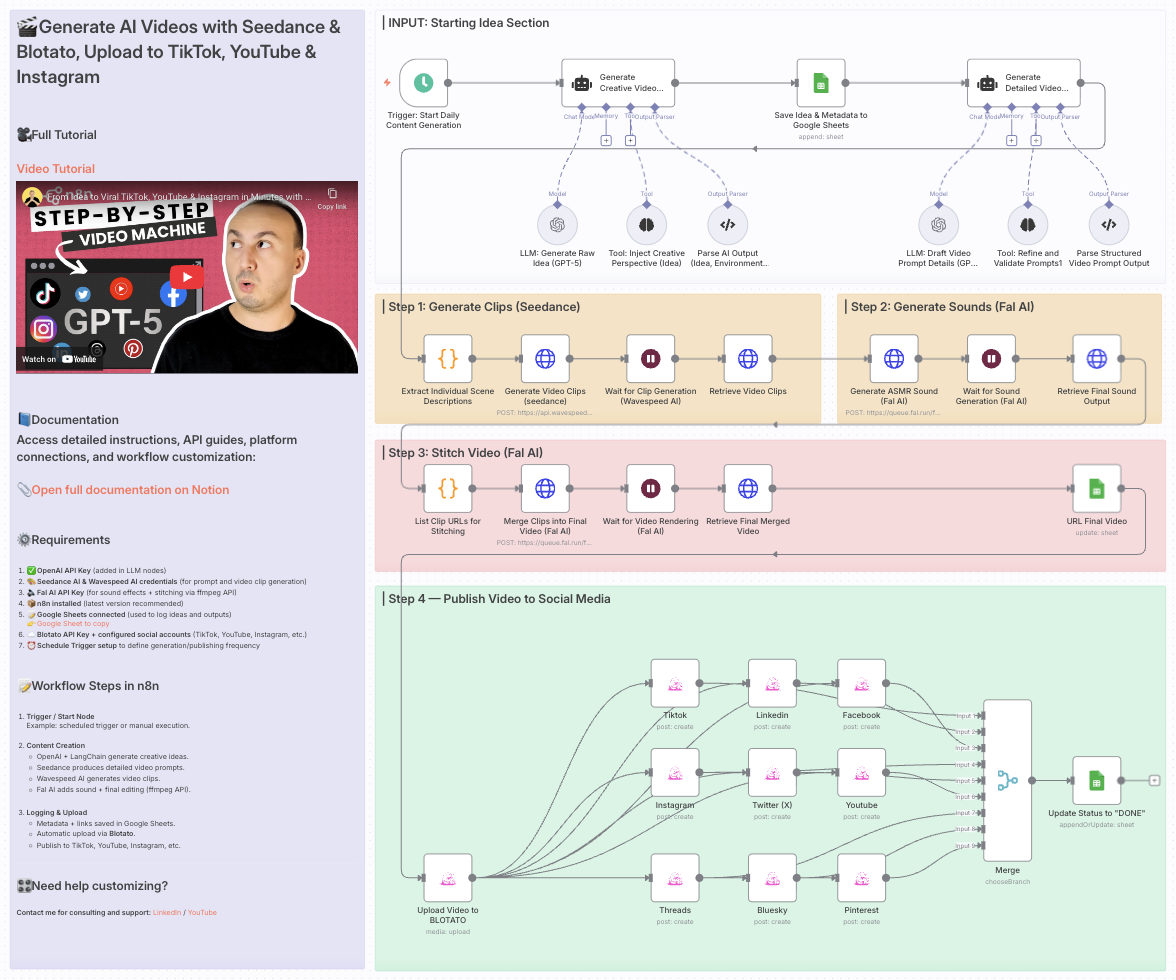
Generate AI videos with Seedance & Blotato, upload to TikTok, YouTube & Instagram
Who is this for?
This template is ideal for creators, content marketers, social media managers, and AI enthusiasts who want to automate the production of short-form, visually captivating videos for platforms like TikTok, YouTube Shorts, and Instagram Reels — all without manual editing or publishing.
What problem is this workflow solving?
Creating engaging videos requires:
- Generating creative ideas
- Writing detailed scene prompts
- Producing realistic video clips and sound effects
- Editing and stitching the final video
- Publishing across multiple platforms
This workflow automates the entire process, saving hours of manual work and ensuring consistent, AI-driven content output ready for social distribution.
What this workflow does
This end-to-end AI video automation workflow:
- Generates a creative idea using OpenAI and LangChain
- Creates detailed video prompts with Seedance AI
- Generates video clips via Wavespeed AI
- Generates sound effects with Fal AI
- Stitches the final video using Fal AI’s ffmpeg API
- Logs metadata and video links to Google Sheets
- Uploads the video to Blotato
- Auto-publishes to TikTok, YouTube, Instagram, and other platforms
Setup
- Add your OpenAI API key in the LLM nodes
- Set up Seedance and Wavespeed AI credentials for video prompt and clip generation
- Add your Fal AI API key for sound and stitching steps
- Connect your Google Sheets account for tracking ideas and outputs
- Set your Blotato API key and fill in the platform account IDs in the
Assign Social Media IDsnode - Adjust the Schedule Trigger to control when the automation runs
How to customize this workflow to your needs
- Change the AI prompts to target your niche (e.g., ASMR, product videos, humor)
- Add a Telegram or Slack step for video preview before publishing
- Tweak scene structure or video duration to match your style
- Disable platforms you don’t want by turning off specific HTTP Request nodes
- Edit the sound generation prompts for different moods or effects
📄 Documentation: Notion Guide
Need help customizing?
Contact me for consulting and support : Linkedin / Youtube
🔗 Nodes Used
Google Sheets, HTTP Request, Schedule Trigger, AI Agent, OpenAI Chat Model, Structured Output Parser
📥 Import
Download workflow.json and import into n8n:
Workflow menu → Import from File