🎬 Convert YouTube videos to shorts with Klap & auto-post to multiple social platforms
⚡ 20,322 views · 🎬 Content Creation & Video
💡 Pro Tip — Since TikTok doesn’t have a public API, getting data usually means fragile HTTP scraping. ScraperNode is a community node that gives you clean JSON for TikTok profiles, videos, and comments — drop it into your workflow and skip the parsing.

Description
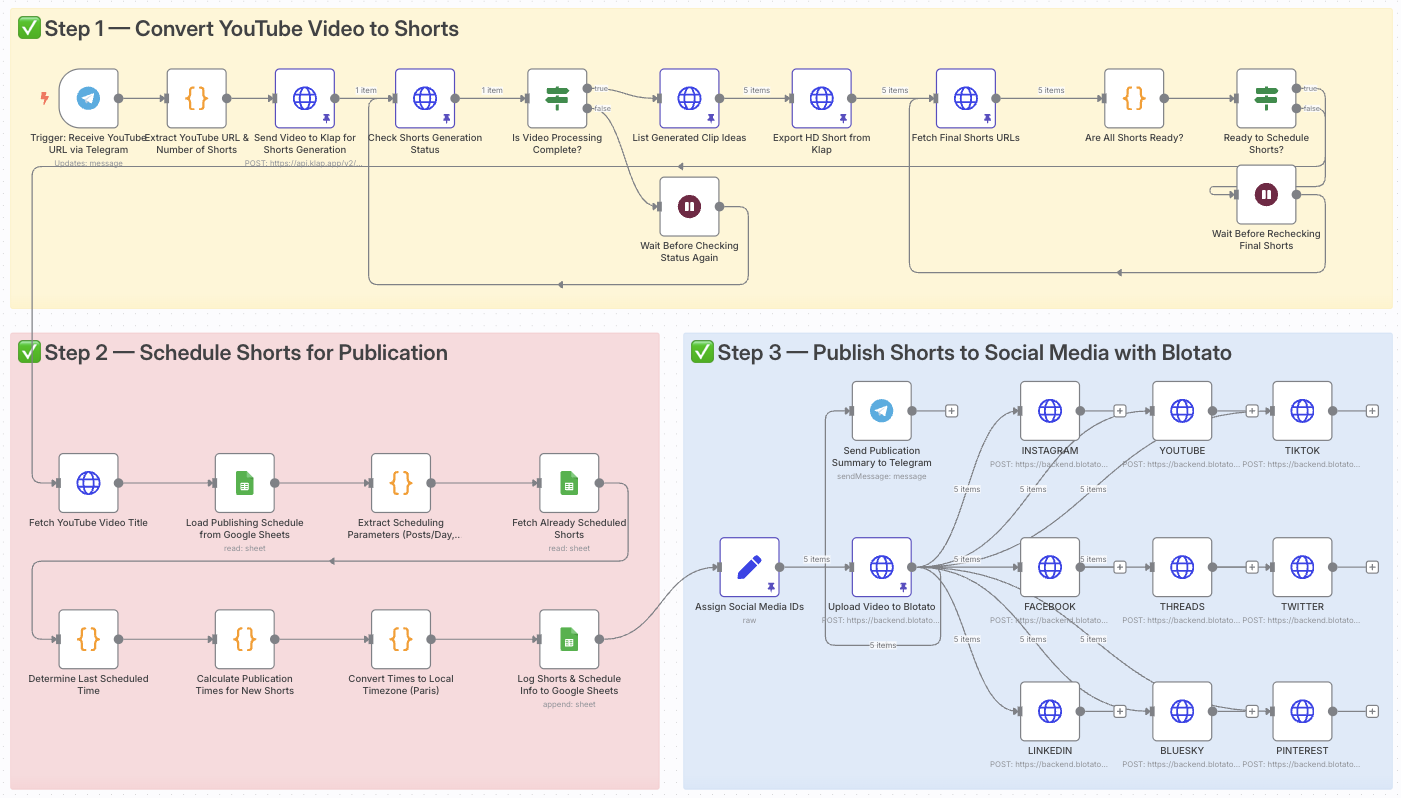
Convert YouTube videos to viral Shorts with Klap and auto-post with Blotato
> ⚠️ Disclaimer: This workflow uses Community Nodes and requires a self-hosted n8n instance.
Who is this for?
This workflow is perfect for content creators, YouTubers, marketing teams and entrepreneurs who want to effortlessly convert long YouTube videos into short, viral-ready clips and publish them automatically on TikTok, Instagram, YouTube Shorts and other platforms.
What problem is this workflow solving?
Manually creating short, engaging clips from YouTube videos takes hours:
- Selecting highlights
- Adding subtitles and effects
- Downloading and editing
- Posting individually on each platform
This workflow eliminates all of that:
- AI-powered Shorts generation with Klap
- Smart scheduling based on your posting calendar
- Full automation of uploads to multiple platforms
What this workflow does
From a simple YouTube link sent via Telegram, the workflow:
- Extracts the YouTube URL and number of Shorts requested
- Sends the video to Klap for AI-powered Shorts generation
- Checks when the Shorts are ready
- Schedules publication times based on your custom settings
- Uploads the Shorts to Blotato
- Auto-posts on TikTok, YouTube Shorts, Instagram and more
- Sends a confirmation recap to Telegram
Setup
- Connect your Telegram bot to the trigger node
- Add your Klap API key for video processing
- Link your Google Sheets with your scheduling preferences
- Add your Blotato API key and social platform IDs
- Adjust the number of Shorts generated if needed
- Modify the scheduling logic or time windows in the Google Sheets
How to customize this workflow to your needs
- Change AI video settings in the Klap API request
- Adjust time windows and frequency in the scheduling nodes
- Limit the workflow to specific platforms (e.g., TikTok only)
- Add a manual approval step before publishing
- Modify the Telegram recap message content
📄 Documentation: Notion Guide
Need help customizing?
Contact me for consulting and support : Linkedin / Youtube
🔗 Nodes Used
Google Sheets, HTTP Request, Telegram, Telegram Trigger
📥 Import
Download workflow.json and import into n8n:
Workflow menu → Import from File