🎬 Multi-source news curator with Mistral AI analysis, summaries & custom channels
⚡ 299 views · 🎬 Content Creation & Video
Description
Flexible News Curator - Multi-Sources, AI Analysis, Summaries, Translation, and Settable Channels
🎬 Overview
The Flexible News Curator workflow can automate the collection, filtering, AI-driven analysis, and summarization of news from diverse sources of your interest. Using customizable search themes, RSS feeds, and (optional) video descriptions, it delivers concise, quality news summaries via configurable channels. This workflow is designed to help reduce information overload and keep you updated effortlessly.
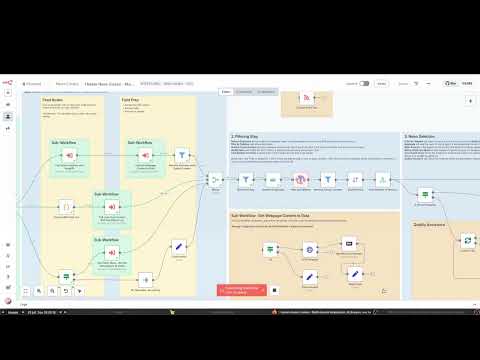
Click the image below to watch the video guide:
✨ Features
- Multi-Source News Aggregation: Collect news from customizable RSS feeds, SerpAPI, and Video Channel Feeds (if enabled).
- AI-Powered News Selection & Summarization: Uses advanced AI agents (Mistral Cloud Chat Model by default) to select, analyze, and summarize top news.
- Quality Assurance Step: Optional AI-powered filtering to improve news selection quality before analysis.
- Multi-Language Translation & Tone Customization: Translate summaries and customize tone for localized or tailored consumption.
- Multi-Channel Delivery: Send outputs via Email, Telegram, WhatsApp, Webhook, or save to disk.
- Advanced Filtering: Regex-based filtering on URLs, titles, and content to exclude unwanted articles.
- Sub-Workflow Architecture: Modular handling of video transcripts, content retrieval, multi-theme searching, and more.
- Flexible Scheduling & Trigger Options: Supports schedule-based triggering, email (IMAP) triggers, and webhook-based activation.
- (Optional) Video Search: Video content descriptions via Video Channel Feeds.
👤 Who is this for?
This workflow benefits professionals, researchers, marketers, and anyone who needs to stay informed about specific news themes without wasting time on irrelevant information or reading too many news to select the most interesting ones.
💡 What problem does this solve?
The workflow tackles the challenge of information overload by automatically filtering, summarizing, and delivering the essential news tailored to your interests and preferences. It integrates various data sources and channels for comprehensive yet efficient news consumption. Ideal use-cases include:
- Monitoring breakthroughs in research fields
- Receiving daily business opportunity updates (e.g., real estate)
- Lower the cognitive load required to follow your favorite news
- Translating news summaries to your chosen language
🔍 What this workflow does
The workflow gathers news from RSS feeds, search engines, and social media, then:
- Filters duplicates and irrelevant content via custom regex filters and date ranges.
- Applies optional AI-powered Quality Assurance for headline evaluation.
- Selects top news articles with AI analysis focused on user-defined criteria and audience.
- Summarizes individual articles using AI summarization agents, ensuring structured, consistent outputs.
- Optionally translates and adjusts the tone of summaries.
- Distributes summaries through configured channels such as email, social media, messaging apps, or webhook calls.
🔄 Workflow Steps
1. News Gathering
- Fetch news using RSS feeds, SerpAPI search, and optionally video channel feeds.
- Standardize output structures for seamless merging.
- Employ sub-workflows for video transcript retrieval and looping over custom RSS feed lists.
2. Filtering
- Remove duplicates and news outside the specified date range.
- Exclude articles matching user-defined keywords via regex filters in URLs, titles, and content.
- Limit the number of news articles for AI analysis.
3. News Selection
- Optionally invoke an AI Quality Assurance agent to pre-filter headlines.
- Aggregate news for AI analysis.
- Select and summarize top news articles with AI agents using customizable criteria.
- Parse AI responses into defined JSON structures to ensure consistent data.
4. News Summarization
- Prepare individual article content.
- Summarize content with AI agents and validate structured output.
5. Sender Preparation
- Combine general summaries with selected top news summaries.
- Format final summaries as text and HTML suitable for delivery.
- Optionally apply translation and tone adjustment.
6. Sending
- Deliver summaries through selected channels (Email, Telegram, WhatsApp, Webhook).
- Optionally save the output to disk as JSON.
📌 Expected Input / Configuration
The workflow is primarily configured via the Configure Workflow Args node or the Global Variables custom node, with these key parameters:
| Parameter | Description | Type |
|---|---|---|
search_themes | List of keywords/themes to search in SerpAPI | List of strings |
datetime_delta | Number of days back to include news from; e.g., 0 = today | Integer |
link_censor | Regex to exclude unwanted URLs | Regex string |
title_censor | Regex to exclude unwanted titles | Regex string |
content_censor | Regex to exclude unwanted content | Regex string |
use_qa | Flag to enable AI Quality Assurance for headline filtering | Boolean |
max_news_analysis | Max number of articles sent to News Analyzer | Integer |
qa_max_news | Number of headlines the QA Agent analyzes | Integer |
qa_max_top_news | Number of headlines selected by QA Agent | Integer |
qa_check_criteria | Criteria used by QA Agent to discard low-quality headlines | List of strings |
qa_select_criteria | Criteria used by QA Agent to rank/select the best headlines | List of strings |
news_focus | What the News Analyzer should focus on while selecting news | String |
news_target_audience | Target audience description for the News Analyzer | String |
news_criteria | Instructions for the News Analyzer to identify relevant news | List of strings |
language | Language for news summaries; triggers translation if not English | String |
translator_tone | Tone for translation (e.g., casual, professional) | String |
translator_notes | Additional instructions for the translator | String |
email_sender | Email address used for sending (via SMTP) | String |
email_recipients | Recipient email addresses (comma-separated) | String |
email_subject | Email subject line | String |
telegram_chat_id | Telegram chat ID for sending notifications | String |
phone_number | Phone number for WhatsApp messages | String |
rss_feeds | Custom list of RSS feeds (objects with link and needs_content_search properties) | JSON array of objects |
video_rss_feeds | Custom list of video RSS feeds | JSON array of objects |
enable_video_search | Enable/disable video search functionality | Boolean |
enabled_senders | List of enabled delivery channels (email, telegram, whatsapp, webhook, save-to-disk) | List of strings |
Hint: To add or combine keywords in censors, use the pattern "keyword1|keyword2|keyword3".
📦 Expected Output
Structured JSON containing a general news summary, top news with summaries, and metadata, suitable for your preferred channel delivery.
📌 Example
example.png
An example that includes workflow parameters is provided in a note within the workflow.
⚙️ n8n Setup Used
- n8n version: 1.100.1
- n8n-nodes-serpapi: 0.1.6
- n8n-nodes-globals: 1.1.0
- LLM Model: mistral-small-latest (API)
- IMAP: imap.gmail.com (Port 993)
- Platform: Podman 4.3.1 on Linux
- Date: 2025-07-15
⚡ Requirements to Use / Setup
- Self-hosted n8n instance. (This workflow contains community nodes that are only compatible with the self-hosted version of n8n.)
- Install necessary custom nodes:
- n8n-nodes-serpapi
- n8n-nodes-globals (or use Edit Field (Set) node instead)
- Configure all sub-workflows bundled within this template (see Sub-Workflows Guide).
- Provide valid credentials to nodes for SerpAPI, Telegram, WhatsApp, Mistral Cloud Chat API, and SMTP (for email).
- Custom RSS feed list must be set by you in the workflow args.
- You must either install the SerpAPI custom node or deactivate it.
⚠️ Notes, Assumptions & Warnings
- The workflow timeout is set to 30 minutes by default; adjust depending on your setup and workload.
- Duplicate removal is applied, but occasional overlaps might still appear depending on feed sources.
- This workflow assumes familiarity with n8n, RSS feeds, API key management and regex expressions.
- Video search only works for configured video channels; remember to respect the rights of these channels.
- Using AI agents (Mistral or substitute LLMs) requires access to their API services and keys.
- Out-of-the-box customization is done via the Global Variables node or direct workflow argument edits.
ℹ️ About Us
This workflow was developed by the Hybroht team of AI enthusiasts and developers dedicated to enhancing the capabilities of AI through collaborative processes. Our goal is to create tools that harness the possibilities of AI technology and more. For questions, support, or feature requests, reach out via contact@hybroht.com.
❓ Questions & Issues
We will answer any questions, provided they are related to this workflow.
Please contact us if there is any bug/issue with this workflow. We will assist you.
⚖️ Warranty & Legal Notice
You can view the full license terms here. Please review them before making your purchase.
By purchasing this product, you agree to these terms.
🔗 Nodes Used
Email Trigger (IMAP), Send Email, Function, HTTP Request, RSS Read, Webhook
📥 Import
Download workflow.json and import into n8n:
Workflow menu → Import from File