🎬 Generating AI videos with VEO3 and distributing with Blotato across multiple platforms
⚡ 5,751 views · 🎬 Content Creation & Video
💡 Pro Tip — Since TikTok doesn’t have a public API, getting data usually means fragile HTTP scraping. ScraperNode is a community node that gives you clean JSON for TikTok profiles, videos, and comments — drop it into your workflow and skip the parsing.

Description
This workflow contains community nodes that are only compatible with the self-hosted version of n8n.
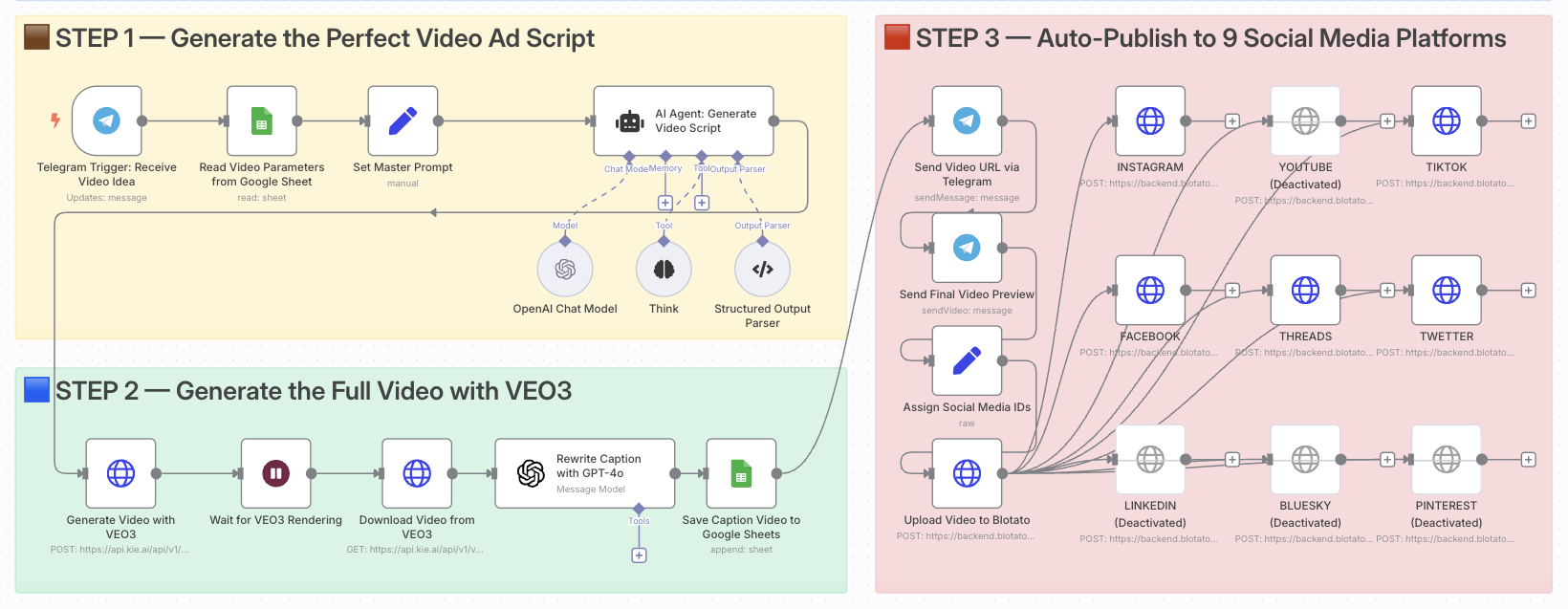
Create and Auto-Post Viral AI Videos with VEO3 and Blotato to 9 Platforms
Who is this for?
This template is ideal for content creators, growth marketers, e-commerce entrepreneurs, and video-first brands who want to automate the creation and multi-platform distribution of viral short-form ads using AI.
If you’re looking to scale video production without editing tools or posting manually, this is for you.
What problem is this workflow solving?
Creating high-converting video content is time-consuming. You need to:
- Come up with ideas
- Write compelling scripts
- Generate visuals
- Adapt content for each platform
- Manually publish and track results
This workflow automates that entire process and turns a single idea into a ready-to-publish video campaign across 9 platforms.
What this workflow does
- Triggers via Telegram when a new video idea is submitted
- Fetches parameters (style, tone, duration) from Google Sheets
- Generates the video script using GPT-4 and a master AI prompt
- Creates the video using Google’s VEO3 video generation model
- Downloads the final video once rendering is complete
- Rewrites the caption with GPT-4o for platform-optimized posting
- Logs the result in Google Sheets for tracking
- Sends preview links to Telegram for review
- Auto-posts the video to 9 platforms using Blotato (TikTok, YouTube, Instagram, Threads, Facebook, X, LinkedIn, Pinterest, Bluesky)
Setup
- Install n8n (self-hosted) with Community Nodes enabled
- Connect your Telegram Bot Token to the trigger node
- Add your OpenAI API Key for GPT-4 and GPT-4o models
- Configure your VEO3 API access (Google AI Studio)
- Set up Blotato with your platform tokens & IDs
- Link your Google Sheets and set the expected column structure (idea, style, caption, etc.)
- Adjust the Telegram trigger format (e.g.,
idea: ...) to your team’s input style
How to customize this workflow to your needs
- Edit the master prompt to match your brand voice or industry
- Replace the caption prompt to generate more marketing-style hooks
- Modify the platform list if you only publish to a few specific channels
- Add approval steps (Slack, email, Telegram) before publishing
- Integrate tracking by pushing published URLs to your analytics or CRM
📄 Documentation: Notion Guide
Need help customizing?
Contact me for consulting and support : Linkedin / Youtube
🔗 Nodes Used
Google Sheets, HTTP Request, Telegram, Telegram Trigger, AI Agent, OpenAI Chat Model
📥 Import
Download workflow.json and import into n8n:
Workflow menu → Import from File