🎬 Generate AI avatar videos with GPT-5 & publish to social media platforms
⚡ 3,571 views · 🎬 Content Creation & Video
💡 Pro Tip — Since TikTok doesn’t have a public API, getting data usually means fragile HTTP scraping. ScraperNode is a community node that gives you clean JSON for TikTok profiles, videos, and comments — drop it into your workflow and skip the parsing.

Description
This workflow contains community nodes that are only compatible with the self-hosted version of n8n.
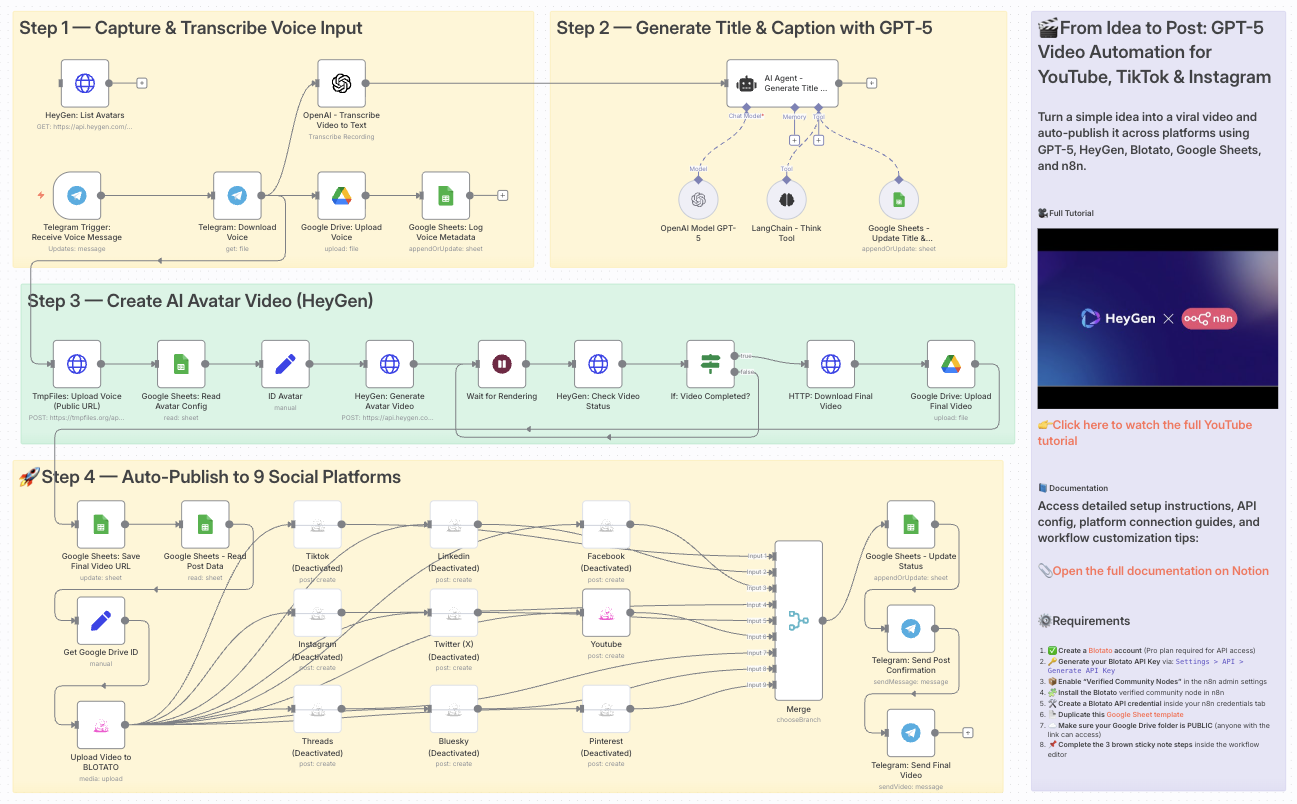
Automate Social Media with HeyGen and GPT-5: Publish Videos to TikTok, YouTube & Instagram
👥 Who is this for?
This workflow is designed for:
- Content creators who want to scale their short-form video production
- Marketing teams seeking consistent and automated publishing pipelines
- Agencies managing multiple social accounts for clients
- Entrepreneurs looking to save time by automating repetitive content tasks
💡 What problem is this workflow solving?
Publishing on multiple platforms like YouTube Shorts, TikTok, and Instagram is often:
- Time-consuming (manual editing, caption writing, uploads)
- Inconsistent (different requirements for each platform)
- Prone to delays (switching between tools)
This workflow solves these issues by creating a fully automated video pipeline powered by GPT-5, HeyGen, and Blotato.
⚙️ What this workflow does
- Capture voice idea via Telegram
- Transcribe voice to text using OpenAI Whisper
- Generate a catchy title and caption with GPT-5
- Create an AI avatar video with HeyGen
- Save and organize assets in Google Drive and Google Sheets
- Upload final video to Blotato
- Auto-publish to:
- YouTube Shorts
- TikTok
- (Optional: Facebook, X/Twitter, LinkedIn, Pinterest, Threads, Bluesky)
- Update logs in Google Sheets
- Send a Telegram confirmation once published
🧰 Setup
Before using this workflow, ensure you have:
- A Telegram Bot connected to n8n for voice input
- An OpenAI API key for transcription (Whisper) and GPT-5 processing
- A HeyGen account & API key for avatar video generation
- A Google Drive & Google Sheets integration for storing assets and logs
- A Blotato account (Pro plan) with API access enabled
- Verified Community Nodes enabled in n8n Admin Panel
- Blotato node installed and credentials configured
🛠️ How to customize this workflow
- Prompts → Adjust GPT-5 prompts to match your brand voice and niche
- Avatars → Use custom avatars or voices via HeyGen configuration
- Platforms → Activate only the social nodes you need (e.g., focus on TikTok & YouTube Shorts)
- Approval steps → Add Telegram or Slack confirmation before publishing
- Analytics → Extend the workflow to track engagement data in Google Sheets, Airtable, or Notion
This workflow turns a simple spoken idea into a viral-ready video — automatically generated, styled, and posted across your most important platforms.
📄 Documentation: Notion Guide
Need help customizing?
Contact me for consulting and support : Linkedin / Youtube
🔗 Nodes Used
Google Sheets, HTTP Request, Telegram, Telegram Trigger, Google Drive, AI Agent
📥 Import
Download workflow.json and import into n8n:
Workflow menu → Import from File