🎬 Automate video creation from voice input with HeyGen, GPT-5 & social publishing
⚡ 2,751 views · 🎬 Content Creation & Video
💡 Pro Tip — Since TikTok doesn’t have a public API, getting data usually means fragile HTTP scraping. ScraperNode is a community node that gives you clean JSON for TikTok profiles, videos, and comments — drop it into your workflow and skip the parsing.

Description
This workflow contains community nodes that are only compatible with the self-hosted version of n8n.
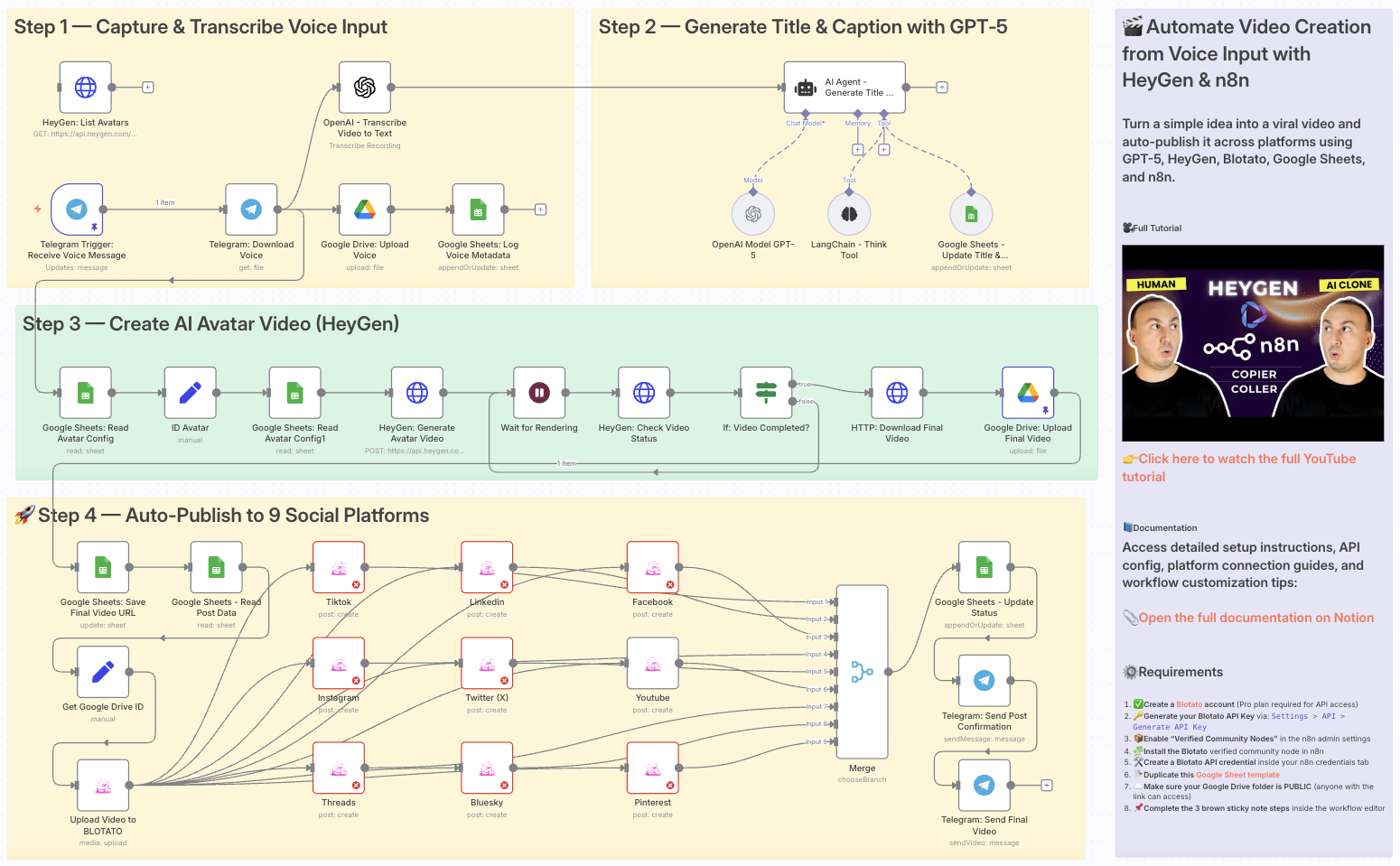
Automate Video Creation from Voice Input with HeyGen & n8n
👥 Who is this for?
This workflow is ideal for:
- Content creators who want to turn ideas into videos in minutes
- Marketers managing multi-platform video campaigns
- Agencies needing scalable video workflows for multiple clients
- Entrepreneurs looking to automate social media presence
💡 What problem is this workflow solving?
Creating and publishing videos across TikTok, YouTube, Instagram and more is:
- Time-consuming (writing scripts, creating videos, uploading manually)
- Inconsistent (different platforms, formats, captions)
- Hard to scale without automation
This workflow solves it by turning a voice note into a complete AI video — scripted, generated, and published automatically.
⚙️ What this workflow does
- Capture idea via Telegram voice note
- Transcribe audio to text using OpenAI Whisper
- Generate script, title, and caption with GPT-5
- Create avatar video with HeyGen based on your script
- Save final video to Google Drive and log metadata in Google Sheets
- Upload video to Blotato
- Auto-publish to 9 platforms (TikTok, YouTube Shorts, Instagram, LinkedIn, Facebook, Twitter (X), Threads, Bluesky, Pinterest)
- Send Telegram notification once published
🧰 Setup
Before you start, you’ll need:
- ✅ A Telegram Bot connected to n8n
- 🔑 An OpenAI API key (Whisper + GPT-5)
- 🎭 A HeyGen API key for avatar video generation
- 📂 Google Drive + Sheets integrations for storage & logs
- 🧩 A Blotato Pro account with API access enabled
- 📦 Verified Community Nodes enabled in n8n Admin Panel
- ⚙️ Blotato node installed + credentials configured
- 📄 A Google Sheet template to log titles, captions, and video links
🛠️ How to customize this workflow
- Change prompts → Adjust GPT-5 prompts to fit your tone or brand
- Select avatars → Configure HeyGen avatar and voice to match your style
- Choose platforms → Activate only TikTok, YouTube, Instagram, etc.
- Add approvals → Insert a Telegram or Slack approval step before publishing
- Extend reporting → Push analytics or engagement data into Sheets or Notion
This workflow transforms a simple voice message into a ready-to-publish viral video — fully automated, consistent, and scalable.
📄 Documentation: Notion Guide
Need help customizing?
Contact me for consulting and support : Linkedin / Youtube
🔗 Nodes Used
Google Sheets, HTTP Request, Telegram, Telegram Trigger, Google Drive, AI Agent
📥 Import
Download workflow.json and import into n8n:
Workflow menu → Import from File