🎬 Generate AI viral videos with NanoBanana & VEO3, shared on socials via Blotato
⚡ 151,811 views · 🎬 Content Creation & Video
💡 Pro Tip — Since TikTok doesn’t have a public API, getting data usually means fragile HTTP scraping. ScraperNode is a community node that gives you clean JSON for TikTok profiles, videos, and comments — drop it into your workflow and skip the parsing.

Description
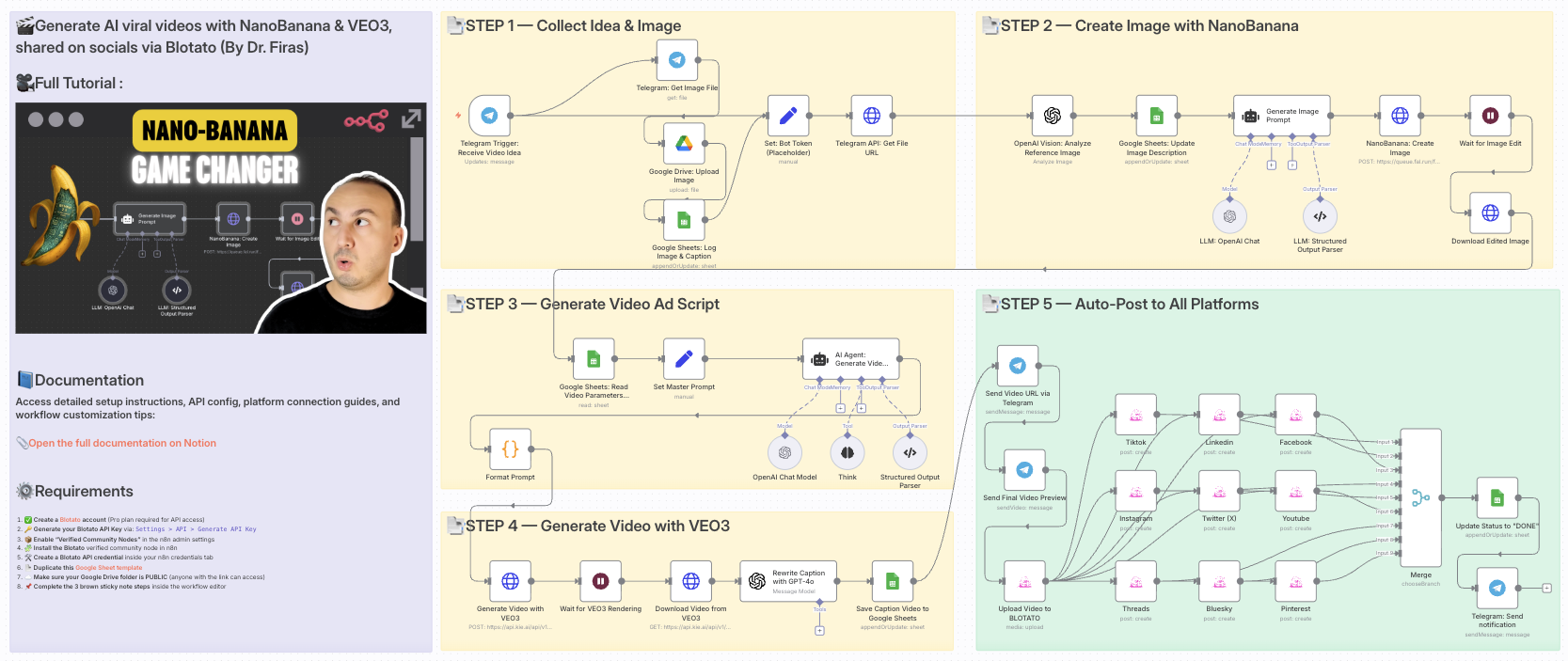
Generate AI viral videos with NanoBanana & VEO3, shared on socials via Blotato
Who is this for?
This workflow is designed for content creators, marketers, and entrepreneurs who want to automate their video production and social media publishing process. If you regularly post promotional or viral-style content on platforms like TikTok, YouTube Shorts, Instagram Reels, LinkedIn, and more, this template will save you hours of manual work.
What problem is this workflow solving? / Use case
Creating viral short-form videos is often time-consuming:
- You need to generate visuals, write scripts, edit videos, and then manually upload them to multiple platforms.
- Staying consistent across TikTok, YouTube Shorts, Instagram Reels, LinkedIn, Twitter/X, and others requires constant effort.
This workflow solves the problem by automating the entire pipeline from idea → video creation → multi-platform publishing.
What this workflow does
- Collects an idea and image from Telegram.
- Enhances visuals with NanoBanana for user-generated content style.
- Generates a complete video script with AI (OpenAI + structured prompts).
- Creates the final video with VEO3 using your custom prompt and visuals.
- Rewrites captions with GPT to be short, catchy, and optimized for social platforms.
- Saves metadata in Google Sheets for tracking and management.
- Auto-uploads the video to all major platforms via Blotato (TikTok, YouTube, Instagram, LinkedIn, Threads, Pinterest, X/Twitter, Bluesky, Facebook).
- Notifies you on Telegram with a preview link once publishing is complete.
Setup
-
Connect your accounts:
- Google Sheets (for video tracking)
- Telegram (to receive and send media)
- Blotato (for multi-platform publishing)
- OpenAI API (for captions, prompts, and image analysis)
- VEO3 API (for video rendering)
- Fal.ai (for NanoBanana image editing)
- Google Drive (to store processed images)
-
Set your credentials in the respective nodes.
-
Adjust the Google Sheet IDs to match your own sheet structure.
-
Insert your Telegram bot token in the
Set: Bot Token (Placeholder)node.
How to customize this workflow to your needs
- Platforms: Disable or enable only the Blotato social accounts you want to post to.
- Video style: Adjust the master prompt schema in the
Set Master Promptnode to fine-tune tone, camera style, or video format. - Captions: Modify the GPT prompt in the
Rewrite Caption with GPT-4onode to control length and tone. - Notifications: Customize the Telegram nodes to notify team members, not just yourself.
- Scheduling: Add a Cron trigger if you want automatic posting at specific times.
✨ With this workflow, you go from idea → AI-enhanced video → instant multi-platform publishing in just minutes, with almost no manual work.
📄 Documentation: Notion Guide
Need help customizing?
Contact me for consulting and support : Linkedin / Youtube
🔗 Nodes Used
Google Sheets, HTTP Request, Telegram, Telegram Trigger, Google Drive, AI Agent
📥 Import
Download workflow.json and import into n8n:
Workflow menu → Import from File