🎬 Create viral ads with AI: NanoBanana & publish on socials via upload-post
⚡ 11,991 views · 🎬 Content Creation & Video
💡 Pro Tip — Since TikTok doesn’t have a public API, getting data usually means fragile HTTP scraping. ScraperNode is a community node that gives you clean JSON for TikTok profiles, videos, and comments — drop it into your workflow and skip the parsing.

Description
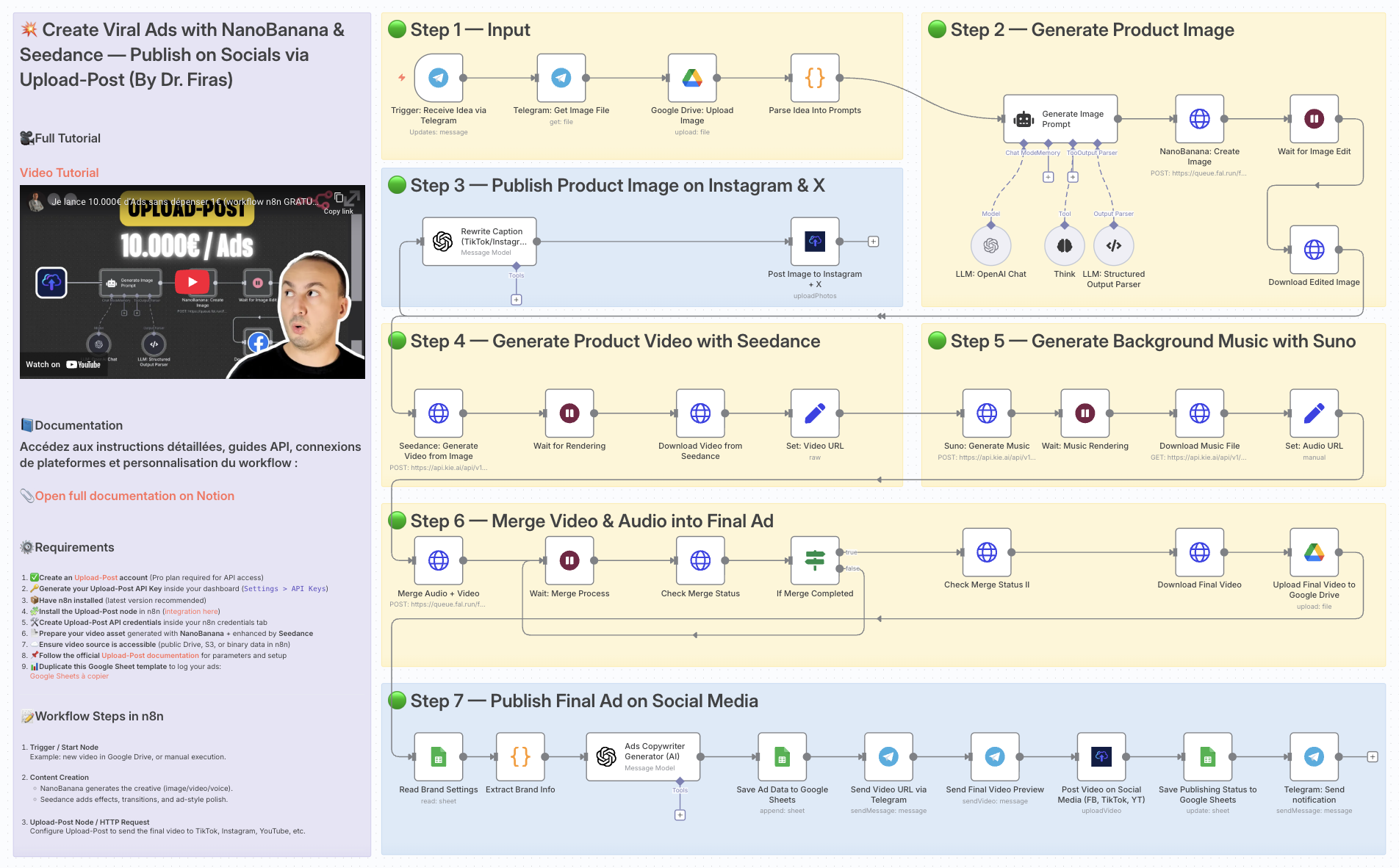
💥 Create viral Ads with NanoBanana & Seedance, publish on socials via upload-post
Who is this for?
This workflow is designed for marketers, content creators, and small businesses who want to automate the creation of engaging social media ads without spending hours on manual design, video editing, or publishing.
What problem is this workflow solving? / Use case
Manually creating ads for multiple platforms is time-consuming and repetitive. You need to generate visuals, edit videos, add music, and then publish them across social channels.
This workflow automates the end-to-end ad production pipeline, saving time while ensuring consistent, professional-quality output.
What this workflow does
- Receives ad ideas via Telegram.
- Uses NanoBanana to generate and edit realistic product images.
- Transforms images into engaging short videos with Seedance.
- Generates background music with Suno.
- Merges video and audio into a polished final ad.
- Reads brand info and generates ad copy with AI (OpenAI).
- Publishes ads to Instagram, TikTok, YouTube, Facebook, and X via upload-post.
- Stores media and campaign data in Google Drive and Google Sheets for tracking.
- Sends back notifications and previews via Telegram.
Setup
-
Connect your accounts:
- Telegram
- Google Drive
- Google Sheets
- OpenAI API
- NanoBanana API
- Seedance API
- Suno API
- Upload-post
-
Prepare Google Sheets:
- Add a sheet for brand details (name, category, features, website).
- Add another sheet for video logs (status, links, captions).
-
Configure upload-post:
- Ensure your social accounts (TikTok, Instagram, YouTube, Facebook, X) are linked to upload-post.
How to customize this workflow to your needs
- Prompts → Adjust the image/video/music prompts to better reflect your brand’s tone and products.
- Ad copy → Modify the AI prompt inside the Ads Copywriter Generator to control wording, style, and structure.
- Publishing scope → Choose only the platforms you want (TikTok, Instagram, etc.) inside the upload-post node.
- Storage → Update Google Drive folder IDs and Google Sheets document IDs to match your own workspace.
👉 With this template, you get a fully automated viral ad production system powered by AI visuals, video rendering, and auto-publishing across social platforms. Perfect for scaling your content strategy while saving time.
📄 Documentation: Notion Guide
Demo Video
🎥 Watch the full tutorial here: YouTube Demo
Need help customizing?
Contact me for consulting and support : Linkedin / Youtube
🔗 Nodes Used
Google Sheets, HTTP Request, Telegram, Telegram Trigger, Google Drive, AI Agent
📥 Import
Download workflow.json and import into n8n:
Workflow menu → Import from File