🎬 Generate AI viral videos with VEO 3 and upload to TikTok
⚡ 196,616 views · 🎬 Content Creation & Video
💡 Pro Tip — Since TikTok doesn’t have a public API, getting data usually means fragile HTTP scraping. ScraperNode is a community node that gives you clean JSON for TikTok profiles, videos, and comments — drop it into your workflow and skip the parsing.

Description
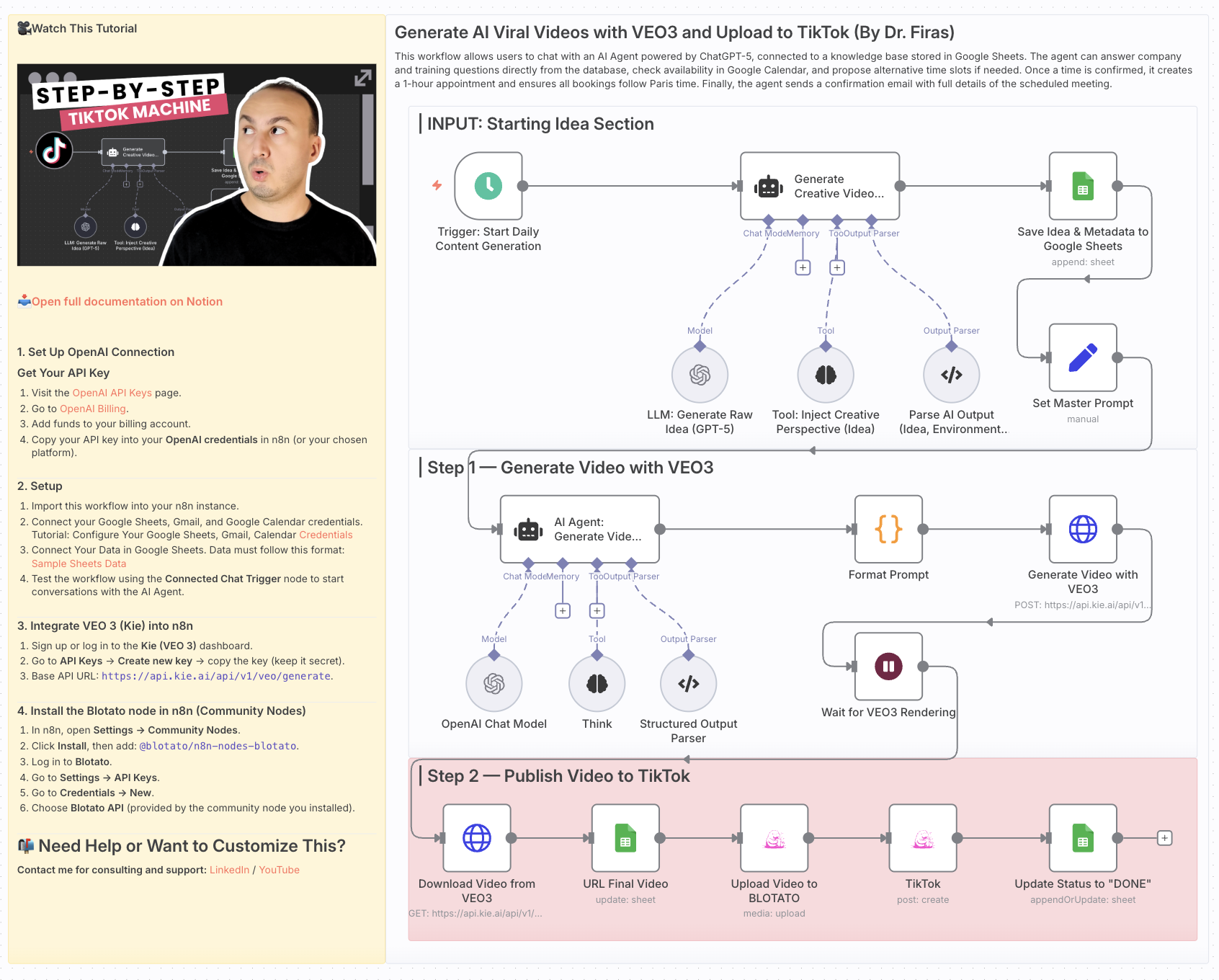
Generate AI Viral Videos with VEO3 and Auto-Publish to TikTok
Who is this for?
This workflow is for content creators, marketers, and social media managers who want to consistently produce viral-style short videos and publish them automatically to TikTok — without manual editing or uploading.
What problem is this workflow solving? / Use case
Creating short-form video content that stands out takes time: ideation, scriptwriting, video generation, and publishing. This workflow automates the entire pipeline — from idea generation to TikTok upload — enabling you to scale your content strategy and focus on creativity rather than repetitive tasks.
What this workflow does
- Generates viral video ideas daily using GPT-5
- Creates structured prompts for before/after transformation videos
- Renders cinematic vertical videos with VEO3 (9:16 format)
- Saves ideas and metadata into Google Sheets for tracking
- Uploads videos automatically to TikTok via Blotato integration
- Updates status in Google Sheets once the video is live
The result: a fully automated daily viral video publishing system.
Setup
- Google Sheets
- Connect your Google Sheets account.
- Create a sheet with columns for idea, caption, environment, sound, production, and final_output.
- OpenAI
- Add your OpenAI API credentials (for GPT-5 mini / GPT-4.1 mini).
- VEO3 (Kie API)
- Set up your API key in the HTTP Request node (
Generate Video with VEO3).
- Set up your API key in the HTTP Request node (
- Blotato
- Connect your Blotato account for TikTok publishing.
- Schedule Trigger
- Adjust the
Start Daily Content Generationnode to fit your preferred posting frequency.
- Adjust the
How to customize this workflow to your needs
- Platforms: Extend publishing to YouTube Shorts or Instagram Reels by duplicating the TikTok step.
- Frequency: Change the Schedule Trigger to post multiple times per day or only a few times per week.
- Creative Style: Modify the system prompts to align with your brand’s style (cinematic, minimalist, neon, etc.).
- Tracking: Enhance the Google Sheets logging with engagement metrics by pulling TikTok analytics via Blotato.
This workflow helps you build a hands-free AI-powered content engine, turning raw ideas into published viral videos every day.
📄 🎥 Watch This Tutorial: Step by Step
📄 Documentation: Notion Guide
Need help customizing?
Contact me for consulting and support : Linkedin / Youtube
🔗 Nodes Used
Google Sheets, HTTP Request, Schedule Trigger, AI Agent, OpenAI Chat Model, Structured Output Parser
📥 Import
Download workflow.json and import into n8n:
Workflow menu → Import from File