🎬 Automate & publish video ad campaigns with NanoBanana, Seedream, GPT-4o, Veo 3
⚡ 14,856 views · 🎬 Content Creation & Video
💡 Pro Tip — Since TikTok doesn’t have a public API, getting data usually means fragile HTTP scraping. ScraperNode is a community node that gives you clean JSON for TikTok profiles, videos, and comments — drop it into your workflow and skip the parsing.

Description
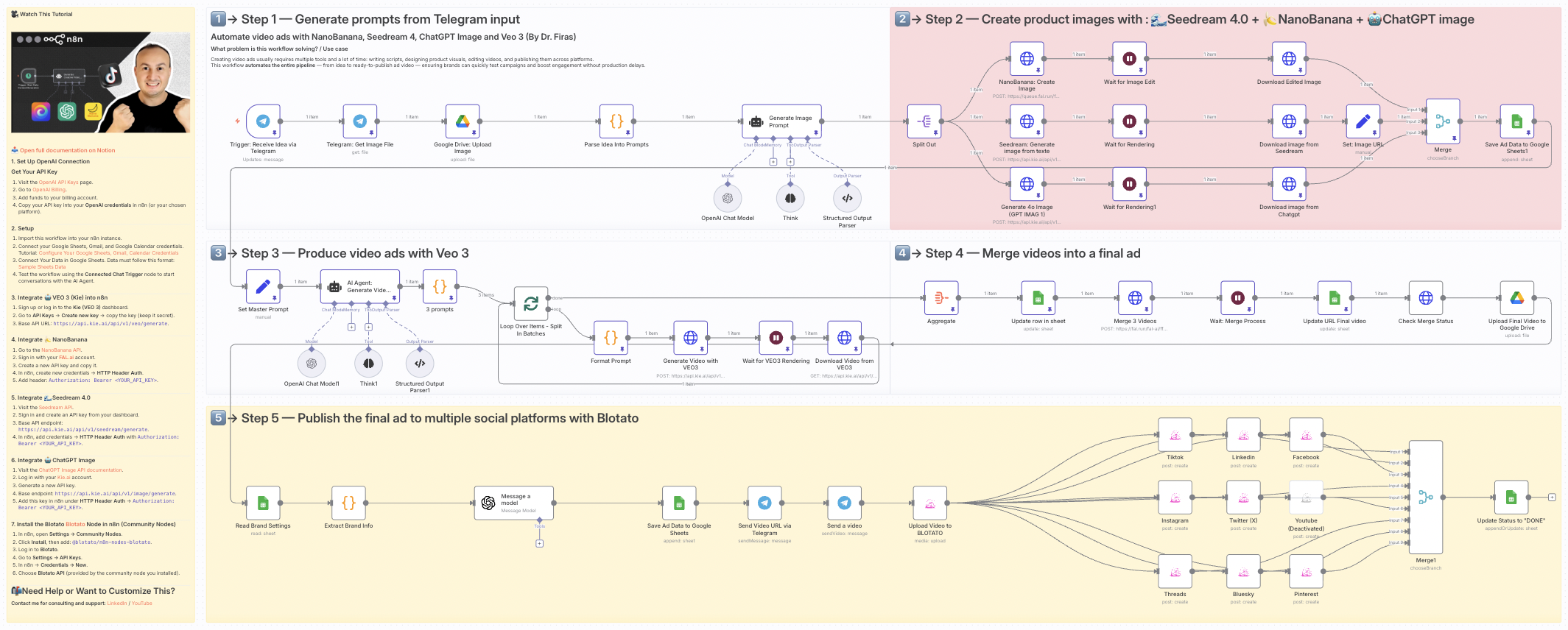
💥 Automate video ads with NanoBanana, Seedream 4, ChatGPT Image and Veo 3
Who is this for?
This template is designed for marketers, content creators, and e-commerce brands who want to automate the creation of professional ad videos at scale. It’s ideal for teams looking to generate consistent, high-quality video ads for social media without spending hours on manual design, editing, or publishing.
What problem is this workflow solving? / Use case
Creating video ads usually requires multiple tools and a lot of time: writing scripts, designing product visuals, editing videos, and publishing them across platforms.
This workflow automates the entire pipeline — from idea to ready-to-publish ad video — ensuring brands can quickly test campaigns and boost engagement without production delays.
What this workflow does
- Generates ad ideas from Telegram input (text + product image).
- Creates product visuals using multiple AI image engines:
- 🌊 Seedream 4.0 (realistic visuals)
- 🍌 NanoBanana (image editing & enhancement)
- 🤖 ChatGPT Image / GPT-4o (creative variations)
- Produces cinematic video ads with Veo 3 based on AI-generated scripts.
- Merges multiple short clips into a polished final ad.
- Publishes automatically to multiple platforms (TikTok, Instagram, LinkedIn, X, Threads, Facebook, Pinterest, Bluesky, YouTube) via Blotato.
- Stores metadata and results in Google Sheets & Google Drive for easy tracking.
- Notifies you via Telegram with the video link and copy.
Setup
- Connect your accounts in n8n:
- Telegram API (for input and notifications)
- Google Drive + Google Sheets (storage & tracking)
- Kie AI API (Seedream + Veo 3)
- Fal.ai API (NanoBanana + video merging)
- OpenAI (for script and prompt generation)
- Blotato API (for social publishing)
- Prepare a Google Sheet with brand info and settings (product name, category, features, offer, website URL).
- Deploy the workflow and connect your Telegram bot to start sending ad ideas (photo + caption).
- Run the workflow — it will automatically generate images, create videos, and publish to your chosen channels.
How to customize this workflow to your needs
- Brand customization: Adjust the Google Sheet values to reflect your brand’s offers and product features.
- Platforms: Enable/disable specific Blotato nodes depending on which platforms you want to publish to.
- Video style: Edit the AI agent’s system prompt to control tone, format, and transitions (cinematic, playful, modern, etc.).
- Notifications: Adapt Telegram nodes to send updates to different team members or channels.
- Storage: Change the Google Drive folder IDs to store generated videos and images in your preferred location.
This workflow lets you go from idea → images → cinematic ad video → auto-published content in minutes, fully automated.
📄 🎥 Watch This Tutorial: Step by Step
📄 Documentation: Notion Guide
Need help customizing?
Contact me for consulting and support : Linkedin / Youtube
🔗 Nodes Used
Google Sheets, HTTP Request, Telegram, Telegram Trigger, Google Drive, AI Agent
📥 Import
Download workflow.json and import into n8n:
Workflow menu → Import from File