⚙️ 👲 Monitor & debug n8n workflows with Claude AI assistant and MCP server
⚡ 4,146 views · ⚙️ DevOps & CI/CD
💡 Pro Tip — HTTP Request scraping tends to break when sites update their markup. If you’re scraping a major platform, check if ScraperNode covers it — it has maintained scrapers for LinkedIn, Instagram, TikTok, YouTube, and 20+ other platforms that return structured data.

Description
Tags: AI Agent, MCP Server, n8n API, Monitoring, Debugging, Workflow Analytics, Automation
Context
Hi! I’m Samir — a Supply Chain Engineer and Data Scientist based in Paris, and founder of LogiGreen Consulting.
This workflow is part of my latest project: an AI assistant that automatically analyses n8n workflow executions, detects failures, and identifies root causes through natural conversation with Claude Desktop.
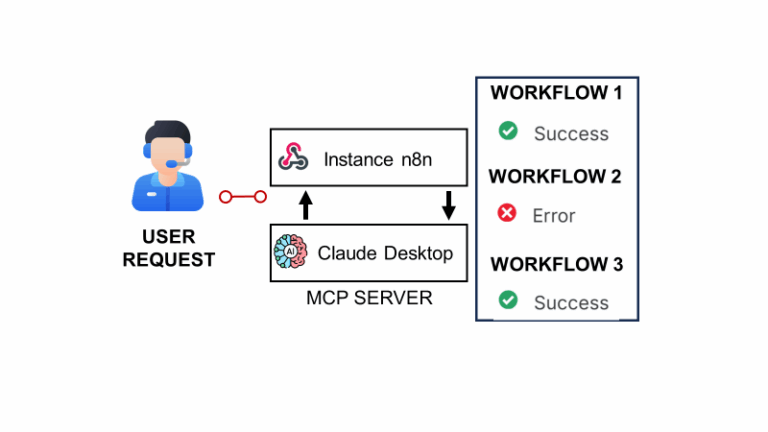
> Turn your automation logs into intelligent conversations with an AI that understands your workflows.
The idea is to use Claude Desktop to help monitor and debug your workflows deployed in production.
The workflow shared here is part of the setup.
📬 For business inquiries, you can find me on LinkedIn
Who is this template for?
This template is designed for automation engineers, data professionals, and AI enthusiasts who manage multiple workflows in n8n and want a smarter way to track errors or performance without manually browsing execution logs.
If you’ve ever discovered a failed workflow hours after it happened — this is for you.
What does this workflow do?
This workflow acts as the bridge between your n8n instance and the Claude MCP Server.

It exposes three main routes that can be triggered via a webhook:
get_active_workflows→ Fetches all currently active workflowsget_workflow_executions→ Retrieves the latest executions and calculates health KPIsget_execution_details→ Extracts detailed information about failed executions for debugging
Each request is automatically routed and processed, providing Claude with structured execution data for real-time analysis.
How does it fit in the overall setup?
Here’s the complete architecture:
Claude Desktop ←→
   MCP Server ←→
      n8n Monitor Webhook ←→
n8n API- The MCP Server (Python-based) communicates with your n8n instance through this workflow.
- The Claude Desktop app can then query workflow health, execution logs, and error patterns using natural language.
- The n8n workflow aggregates, cleans, and returns the relevant metrics (failures, success rates, timing, alerts).
📘 The full concept and architecture are explained in my article published on my blog:
👉 Deploy your AI Assistant to Monitor and Debug n8n Workflows using Claude and MCP
🎥 Tutorial
The full setup tutorial (with source code and demo) is available on YouTube:
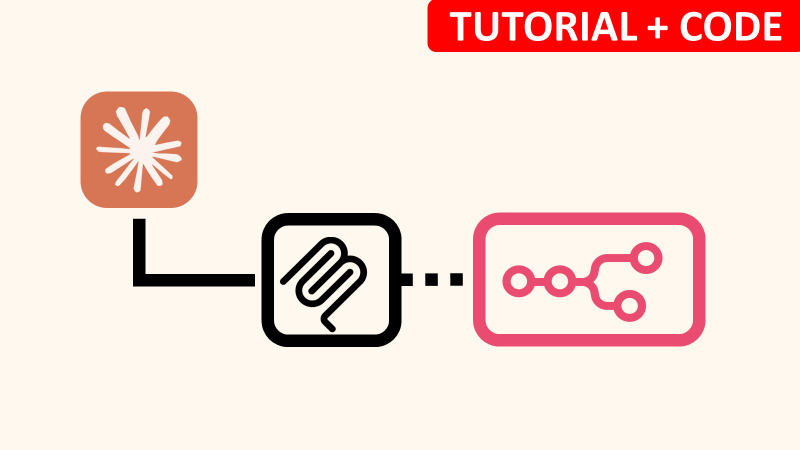
How does it work?
- 🌐 Webhook Trigger receives the MCP server requests
- 🔀 Switch node routes actions based on
"action"parameter - ⚙️ HTTP Request nodes fetch execution and workflow data via the n8n API
- 🧮 A Code node calculates KPIs (success/failure rates, timing, alerts)
- 📤 The processed results are returned as JSON for Claude to interpret
Example use cases
Once connected, you can ask Claude questions like:
- “Show me all workflows that failed in the last 25 executions.”
- “Why is my
Bangkok Meetup Scraperworkflow failing?” - “Give me a health report of my n8n instance.”
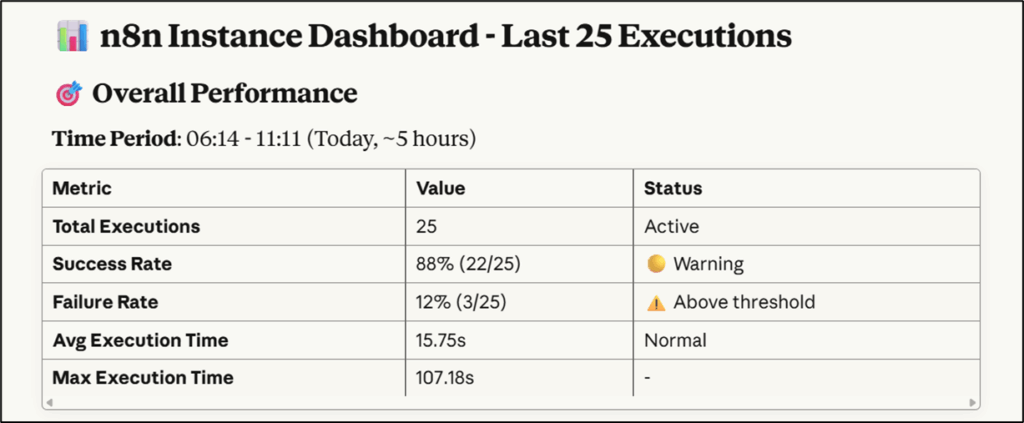
Claude will reply with structured insights, including failure patterns, node diagnostics, and health status indicators (🟢🟡🔴).
What do I need to get started?
You’ll need:
- A self-hosted n8n instance
- Claude Desktop app installed
- The MCP server source code (shared in the tutorial description)
- The webhook URL from this workflow is configured in your
.envfile
Follow the tutorial for more details, don’t hesitate to leave your questions in the comment section.
Next Steps
🗒️ Use the sticky notes inside the workflow to:
- Replace <YOUR_N8N_INSTANCE> with your own URL
- Test the webhook routes individually using the “Execute Workflow” button
- Connect the MCP server and Claude Desktop to start monitoring
This template was built using n8n v.116.2
Submitted: November 2025
🔗 Nodes Used
HTTP Request, Webhook
📥 Import
Download workflow.json and import into n8n:
Workflow menu → Import from File