⚙️ Activate and deactivate workflows on schedule using native n8n API
⚡ 1,661 views · ⚙️ DevOps & CI/CD
Description
How it works
This workflow will activate and deactivate a selected other workflow on schedule.
> ⚠️ Warning! > This approach won’t work for trial users as it requires n8n API that is not available to trial users. > See https://docs.n8n.io/api/ for details.
Set up steps
- Adjust activation/deactivation schedule per your needs. Custom (cron) interval is a recommended approach.
- Set targeted Workflow ID. You will find it in the URL of the workflow you want to manage.
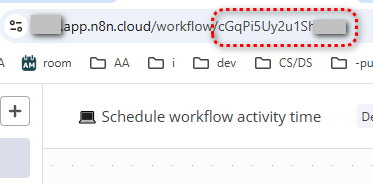
- Set n8n API credentials:
This workflow uses n8n node.
#DevOps #workflow-management
Other useful stuff
Need a universal Error workflow to catch both execution and trigger errors? Here you go: Error handling: Send email via Gmail on execution or trigger-level errors
More stuff by Olek and do not forget to backup your workflows often by automating.
🔗 Nodes Used
n8n, Schedule Trigger
📥 Import
Download workflow.json and import into n8n:
Workflow menu → Import from File