⚙️ Unlimited website down checker - Uptime Robot alternative
⚡ 2,438 views · ⚙️ DevOps & CI/CD
Description
Video Introduction

Want to automate your inbox or need a custom workflow? 📞 Book a Call | 💬 DM me on Linkedin
Get Alerted When Your Website Is Down – n8n as an Uptime Robot Alternative
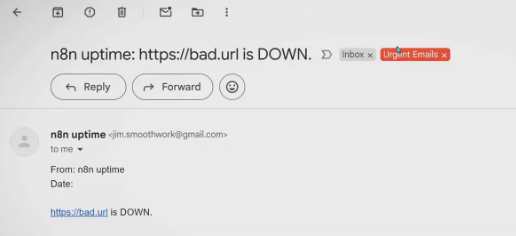
If you manage a website (or client sites), getting notified when your site goes down is critical. But you’ve probably experienced alert fatigue if you’ve ever received a flood of downtime emails for every tiny outage. These short hiccups are common, and most monitoring tools don’t let you filter them out.
Here’s how you can set up website downtime notifications with n8n - no extra subscriptions, and no more false positives spamming your inbox. For your most important sites, you can even get direct text alerts to your phone.
We’ll use n8n, a powerful automation tool with thousands of templates and integrations. You can run it in the cloud or even self-host it for free.
Why Use n8n for Website Monitoring?
Uptime Robot and similar services have limitations or get expensive fast if you monitor several sites. n8n gives you full control - you choose when and how you get notified, set your own timing and thresholds, and you aren’t stuck with default alert logic.
Plus, n8n can automate much more than just uptime monitoring: use it to handle other business workflows too.
Quick Start: Free n8n Website Monitoring Template
- Use the template to get started fast.
- Log in or sign up for n8n Cloud, or self-host for free if you prefer.
- Configure your schedule (default: hourly) and list the sites you want to monitor.
- Key setting: wait seconds. Recommended: 300 seconds (5 minutes). If your site goes down, the workflow waits before sending an alert—no notification for a 1-2 minute outage, only real, persistent problems.
How to Test & Use
- Activate the workflow.
Toggle it on in n8n and it’ll check your sites automatically. - Test instantly:
Add a non-existent URL and run the workflow. After the wait time, you’ll get an email alert for that URL. - Notifications stay organized:
Alerts go straight to your inbox (see my AI email labelling template if you want color-coded organization).
Get Critical Alerts on Your Phone (Telegram)
Email is great, but for your most important sites you want instant notifications on your phone.
Best option: Use Telegram. n8n can send you messages via a Telegram bot—easy to set up, free, and works in seconds.
How:
- Create a Telegram bot via BotFather (instructions in the template).
- Add your bot token and chat ID to n8n.
- Now, you’ll get downtime alerts right on Telegram—no missed notifications, no extra costs.
FAQ
- Can I monitor unlimited sites?
Yes, just list them all in the config. - What if downtime is just a few seconds?
The default 5-minute wait filters these out. - Do I need a paid n8n plan?
No - self-hosting is free, and the workflow works on free plans. - Why not SMS or WhatsApp?
Telegram bots are fastest, easiest, and don’t require extra API setup or subscriptions.
🔗 Nodes Used
HTTP Request, Telegram, Gmail, Schedule Trigger
📥 Import
Download workflow.json and import into n8n:
Workflow menu → Import from File