⚒️ Create a self-contained CRUD app with Redis storage and HTML frontend
⚡ 564 views · ⚒️ Engineering
Description
Build a Redis-Powered CRUD App with HTML Frontend

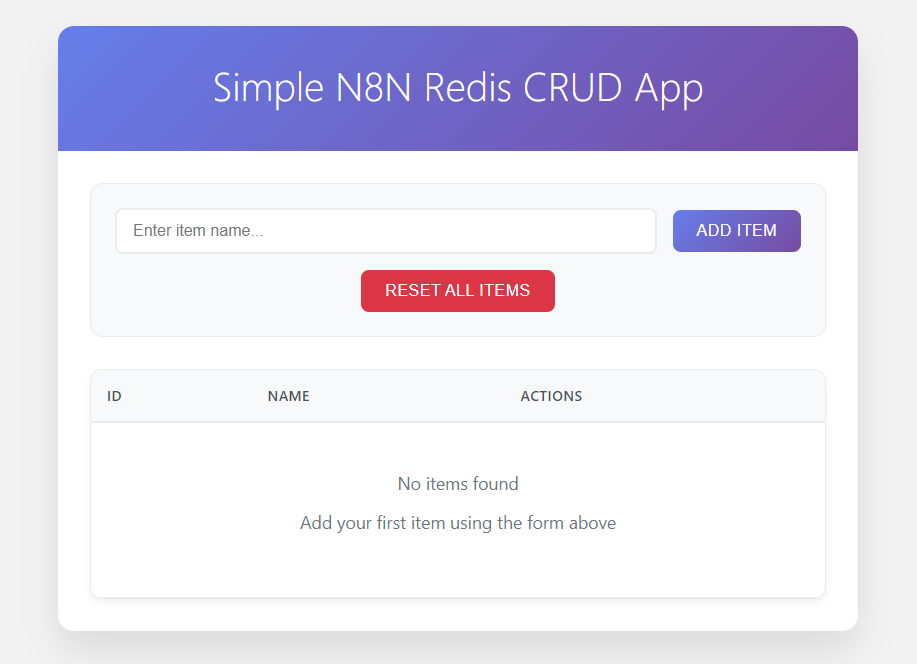
This workflow demonstrates how to use n8n to build a complete, self-contained CRUD (Create, Read, Update, Delete) application without relying on any external server or hosting. It not only acts as the backend, handling all CRUD operations through Webhook endpoints, but also serves a fully functional HTML Single Page Application (SPA) directly via a webhook response.
Redis is used as a lightweight data store, providing fast and simple key-value storage with auto-incremented IDs. Because both the frontend (HTML app) and backend (API endpoints) are managed entirely within a single n8n workflow, you can quickly prototype or deploy small tools without additional infrastructure.
This approach is ideal for:
- Rapidly creating no-code or low-code applications
- Running fully browser-based tools served directly from n8n
- Teaching or demonstrating n8n + Redis integration in a single workflow
Features
- Add new item with auto-incremented ID
- Edit existing item
- Delete specific item
- Reset all data (clear storage and reset autoincrement id)
- Single HTML frontend for demonstration (no framework required)
Setup Instructions
1. Prerequisites
Before importing and running the workflow, make sure you have:
- A running n8n instance (self-hosted or cloud)
- A running Redis server (local or remote)
2. API Path Setup
For the REST API, use a consistent path. For example, if you choose items as the path:
-
2a. Get All Items
- Method:
GET - Endpoint:
items
- Method:
-
2b. Add Item
- Method:
POST - Endpoint:
items
- Method:
-
2c. Edit Item
- Method:
PUT - Endpoint:
items
- Method:
-
2d. Delete Item
- Method:
DELETE - Endpoint:
items
- Method:
-
2e. Reset Items
- Method:
POST - Endpoint:
items-reset
- Method:
3. Configure the API URL
Set the API URL in the SET API URL node. Use your n8n webhook URL, for example:
https://yourn8n.com/webhook/items
4. Run the HTML App
Once everything is set:
- Open the webhook URL for the HTML app in a browser.
- The CRUD interface will load and connect to the API endpoints automatically.
- You can now add, edit, delete, or reset items directly from the web interface.
Workflows
1. Render the HTML CRUD App
This webhook serves a self-contained HTML Single Page Application (SPA) for basic CRUD operations. The HTML content is returned directly in the webhook response.
This setup is ideal for lightweight, browser-based tools without external hosting.
How to Use
- Open the webhook URL in a browser
- The CRUD interface will load and connect to the data source via API calls
- Before using, make sure to edit the
api_urlin theSET API URLnode to match your webhook endpoint
2a. REST API: Get All Items
This webhook handles retrieving all saved items from Redis. Each item is returned with its corresponding ID and associated data (e.g., name). This endpoint is used by the HTML CRUD App to display the full list of items.
- Method:
GET - Function: Fetches all items stored in Redis and returns them as a JSON array
2b. REST API: Add Item
This webhook handles the Add Item functionality. This endpoint is typically called by the HTML CRUD App when adding a new item.
- Method:
POST - Request Body:
{ "name": "item name" } - Function: Generates an auto-incremented ID using Redis and saves the data under that ID
2c. REST API: Edit Item
This webhook handles updating an existing item in Redis.
- Method:
PUT - Request Body:
{ "id": 1, "name": "Updated Item Name" } - Function: Finds the item by the given
idand updates its data in Redis
2d. REST API: Delete Item
This webhook handles deleting a specific item from Redis.
- Method:
DELETE - Request Body:
{ "id": 1 } - Function: Removes the item with the given
idfrom Redis
2e. REST API: Reset Items
This webhook handles resetting all data in the application.
- Method:
POST - Function:
- Deletes all stored items from Redis
- Resets the auto-increment ID by deleting the data in Redis
🔗 Nodes Used
Redis, Webhook
📥 Import
Download workflow.json and import into n8n:
Workflow menu → Import from File