📖 AI agent to chat with Snowflake database
⚡ 3,173 views · 📖 Internal Wiki & Knowledge Base
Description
Video Guide
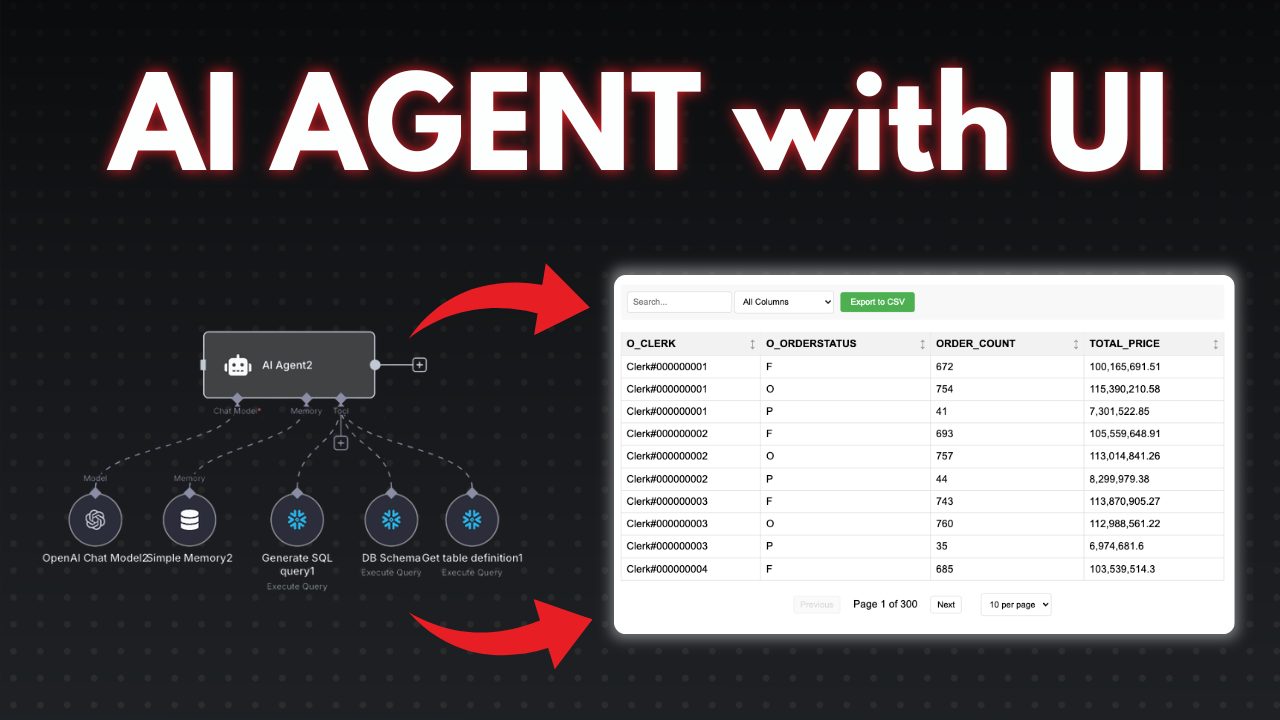
I prepared a detailed guide showcasing the process of building an AI agent that interacts with a Snowflake database using n8n. This setup enables conversational querying, secure execution of SQL queries, and dynamic report generation with rich visualization capabilities.
Who is this for?
This workflow is designed for developers, data analysts, and business professionals who want to interact with their Snowflake data conversationally. It suits users looking to automate SQL query generation with AI, manage large datasets efficiently, and produce interactive reports without deep technical knowledge.
What problem does this workflow solve?
Querying Snowflake databases typically requires SQL proficiency and can lead to heavy token usage if large datasets are sent to AI models directly. This workflow addresses these challenges by:
- Guiding AI to generate accurate SQL queries based on user chat input while referencing live database schema to avoid errors.
- Executing queries safely on Snowflake with proper credential management.
- Aggregating large result sets to reduce token consumption.
- Offering a user-friendly report link with pagination, filtering, charts, and CSV export instead of returning overwhelming raw data.
- Providing an error-resilient environment that prompts regenerations for SQL errors or connectivity issues.
What this workflow does
The scenario consists of multiple focused n8n workflows orchestrated for smooth, secure, and scalable interactions:
-
Agent Workflow
- Starts with a chat node and sets the system role as “Snowflake SQL assistant.”
- AI generates SQL after verifying database schema and table definitions to avoid hallucinations.
- Reinforcement rules ensure schema validation before query creation.
-
Data Retrieval Workflow
- Receives SQL queries from the agent workflow.
- Executes them against the Snowflake database using user-provided credentials (hostname, account, warehouse, database, schema, username, password).
- Optionally applies safety checks on SQL to prevent injection attacks.
-
Aggregation and Reporting Decision
- Aggregates returned data into arrays for efficient processing.
- Applies a threshold (default 100 records) to decide whether to return raw data or generate a dynamic report link.
- Prepares report links embedding URL-encoded SQL queries to securely invoke a separate report workflow.
-
Report Viewing Workflow
- Triggered via webhook from the report link.
- Re-executes SQL queries to fetch fresh data.
- Displays data with pagination, column filtering, and selectable chart visualizations.
- Supports CSV export and custom HTML layouts for tailored user experience.
- Provides proper error pages in case of SQL or data issues.
-
Schema and Table Definition Retrieval Tools
- Two helper workflows that fetch the list of tables and column metadata from Snowflake.
- Require the user to replace placeholders with actual database and data source names.
- Crucial for AI to maintain accurate understanding of the database structure.
N8N Workflow
Preparation
- Create your Snowflake credentials in n8n with required host and account details, warehouse (e.g., “computer_warehouse”), database, schema, username, and password.
- Replace placeholder variables in schema retrieval workflows with your actual database and data source names.
- Verify the credentials by testing the connection; reset passwords if needed.
Workflow Logic
- The Agent Workflow listens to user chats, employs system role “Snowflake SQL assistant,” and ensures schema validation before generating SQL queries.
- Generated SQL queries pass to the Data Retrieval Workflow, which executes them against Snowflake securely.
- Retrieved data is aggregated and evaluated against a configurable threshold to decide between returning raw data or creating a report link.
- When a report link is generated, the Report Viewing Workflow renders a dynamic interactive HTML-based report webpage, including pagination, filters, charts, and CSV export options.
- Helper workflows periodically fetch or update the current database schema and table definitions to maintain AI accuracy and prevent hallucinations in SQL generation.
- Error handling mechanisms provide user-friendly messages both in the agent chat and report pages when issues arise with SQL or connectivity.
This modular, secure, and extensible setup empowers you to build intelligent AI-driven data interactions with Snowflake through n8n automations and custom reporting.
🔗 Nodes Used
Webhook, Snowflake, Execute Workflow Trigger, AI Agent, OpenAI Chat Model, Simple Memory
📥 Import
Download workflow.json and import into n8n:
Workflow menu → Import from File