📖 Two-stage document retrieval chatbot with OpenAI and Supabase vector search
⚡ 1,318 views · 📖 Internal Wiki & Knowledge Base
Description
Video Guide
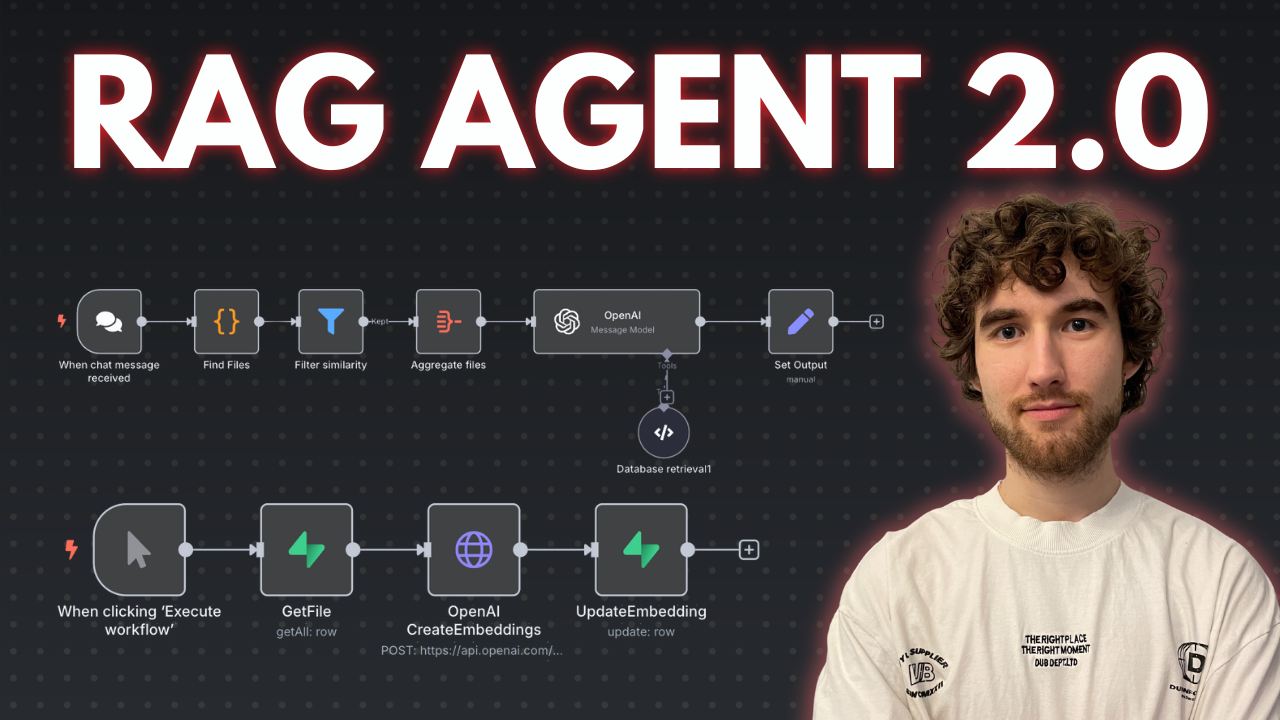
I prepared a comprehensive guide demonstrating how to build a multi-level retrieval AI agent in n8n that smartly narrows down search results first by file descriptions, then retrieves detailed vector data for improved relevance and answer quality.
Who is this for?
This workflow suits developers, AI enthusiasts, and data engineers working with vector stores and large document collections who want to enhance the precision of AI retrieval by leveraging metadata-based filtering before deep content search. It helps users managing many files or documents and aiming to reduce noise and input size limits in AI queries.
What problem does this workflow solve?
Performing vector searches directly on large numbers of document chunks can degrade AI input quality and introduce noise. This workflow implements a two-stage retrieval process that first searches file descriptions to filter relevant files, then runs vector searches only within those files to fetch precise results. This reduces irrelevant data, improves answer accuracy, and optimizes performance when dealing with dozens or hundreds of files split into multiple pieces.
What this workflow does
This n8n workflow connects to a Supabase vector store to perform:
-
Multi-level Retrieval:
- File Description Search: Calls a Supabase RPC function to find files whose descriptions (metadata) best match the user query. It filters and limits the number of relevant files based on similarity scores.
- Document Chunk Retrieval: Uses retrieved file IDs to perform a second RPC call fetching detailed vector pieces only within those files, again filtered by similarity thresholds.
-
OpenAI Integration:
The filtered document chunks and associated metadata (like file names and URLs) are passed to an OpenAI message node that includes system instructions to guide the AI in leveraging the knowledge base and linked resources for comprehensive responses. -
Custom Code Functions:
Two code nodes interact with Supabase stored proceduresmatch_filesandmatch_documentsto perform the semantic searches with multiline metadata filtering unavailable in default vector filters. -
Helper Flows and SQL Setup:
Templates and SQL scripts prepare database tables and functions, with additional flows to generate embeddings from file description summaries using OpenAI.
N8N Workflow
-
Preparation:
- Create or verify Supabase account with vector store capability.
- Set up necessary database tables and RPC functions (
match_filesandmatch_documents) using provided SQL scripts. - Replace all credentials in n8n nodes to connect to your Supabase and OpenAI accounts.
- Optionally upload document files and generate their vector embeddings and description summaries in a separate helper workflow.
-
Main Workflow Logic:
- Code Function Node #1: Receives user query and calls the
match_filesRPC to retrieve file IDs by searching file descriptions with vector similarity thresholds and file limits. - Code Function Node #2: Takes filtered file IDs, invokes
match_documentsRPC to fetch vector document chunks only from those files with additional similarity filtering and count limits. - OpenAI Message Node: Combines fetched document pieces, their metadata (file URLs, similarity scores), and system prompts to generate precise AI-powered answers referencing the documents.
- Code Function Node #1: Receives user query and calls the
This multi-tiered retrieval process improves search relevance and AI contextual understanding by smartly limiting vector search scope first to relevant files, then to specific document chunks, refining user query results.
🔗 Nodes Used
HTTP Request, Supabase, Filter, Code Tool, Chat Trigger, OpenAI
📥 Import
Download workflow.json and import into n8n:
Workflow menu → Import from File