🎣 Extract emails, phones & social links from websites with Apify and Google Sheets
⚡ 326 views · 🎣 Lead Generation & Enrichment
💡 Pro Tip — HTTP Request scraping tends to break when sites update their markup. If you’re scraping a major platform, check if ScraperNode covers it — it has maintained scrapers for LinkedIn, Instagram, TikTok, YouTube, and 20+ other platforms that return structured data.

Description
Try It Out!
This n8n template shows how to, based on a list of website, enrich a Google Spreadsheet with emails and phone numbers automatically using the Apify Email & Phone Extractor actor from Anchor. It will create a new sheet with the extracted contact details.
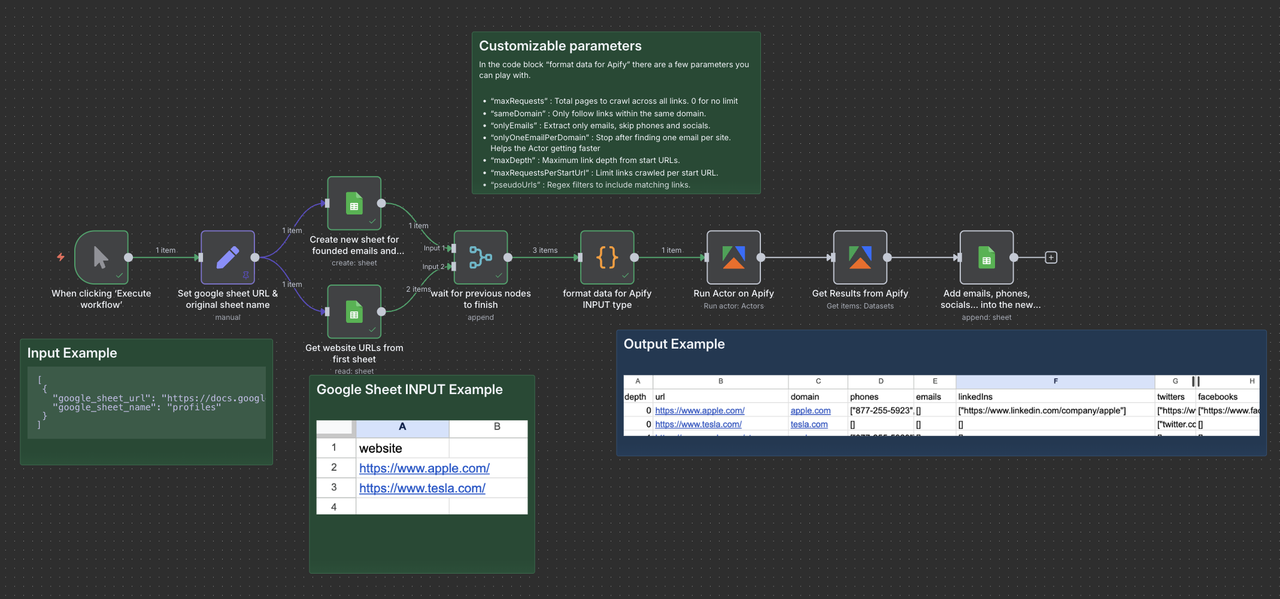
You can use it to build lead enrichment workflows, keep CRM records current, or prep outreach lists, all directly inside n8n.
Who is this for
- Sales Teams: Surface contacts for target accounts fast.
- Recruiters: Find contact details on company sites.
- Growth Marketers: Clean and enrich prospect lists at scale.
- Researchers: Map industries and orgs with real contacts.
- CRM Builders: Auto-populate contact fields from the web.
- Lead-Gen Agencies: Deliver verified contact data at volume.
How it works
- The workflow starts with a list of website URLs or domains in Google Sheets (one per row).
- The Apify node runs the Email & Phone Extractor to collect emails, phone numbers, and social links (e.g., Twitter, LinkedIn, Instagram) from those sites.
- The results are written to a new Google Sheet with the found contacts and their source pages.
How to use
In Google Sheets:
- Create a Google Sheet, rename the sheet websites, and add all the domains or URLs you want to scan (one per row).
In this Workflow:
- Open “Set google sheet URL & original sheet name” and replace the example Google Sheet URL and the name of the source sheet (e.g., websites).
In the n8n credentials:
- Connect your Google Sheets account with read and write privileges.
- Connect your Apify account.
In Apify:
- Sign up for this Apify Actor
Speed
The step “Run actor on Apify” can take a long time. It needs to scrape many pages on each website you provide. That’s why. If you want to keep track of its progress, you can check the logs on Apify Run direclty !
Requirements
- Apify account with access to Email & Phone Extractor.
- A list of domains or URLs to process.
Need Help?
Open an issue directly on Apify! Avg answer in less than 24h
Happy Contact Discovery
🔗 Nodes Used
Google Sheets
📥 Import
Download workflow.json and import into n8n:
Workflow menu → Import from File