🎣 Scrape business leads from Google Maps using OpenAI and Google Sheets
⚡ 66,966 views · 🎣 Lead Generation & Enrichment
💡 Pro Tip — HTTP Request scraping tends to break when sites update their markup. If you’re scraping a major platform, check if ScraperNode covers it — it has maintained scrapers for LinkedIn, Instagram, TikTok, YouTube, and 20+ other platforms that return structured data.

Description
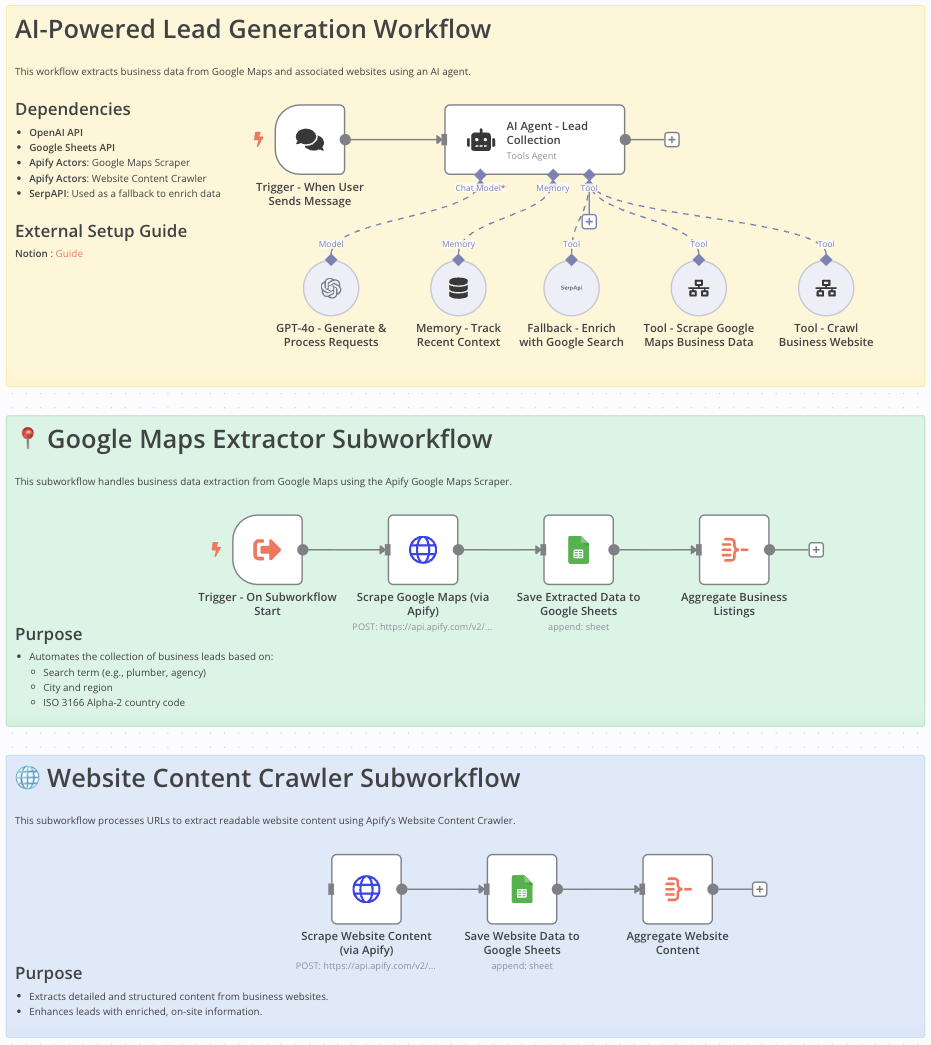
Google Maps Data Extraction Workflow for Lead Generation
This workflow is ideal for sales teams, marketers, entrepreneurs, and researchers looking to efficiently gather detailed business information from Google Maps for:
- Lead generation
- Market analysis
- Competitive research
Who Is This Workflow For?
- Sales professionals aiming to build targeted contact lists
- Marketers looking for localized business data
- Researchers needing organized, comprehensive business information
Problem This Workflow Solves
Manually gathering business contact details from Google Maps is:
- Tedious
- Error-prone
- Time-consuming
This workflow automates data extraction to increase efficiency, accuracy, and productivity.
What This Workflow Does
- Automates extraction of business data (name, address, phone, email, website) from Google Maps
- Crawls and extracts additional website content
- Integrates OpenAI to enhance data processing
- Stores structured results in Google Sheets for easy access and analysis
- Uses Google Search API to fill in missing information
Setup
- Import the provided n8n workflow JSON into your n8n instance.
- Set your OpenAI and Google Sheets API credentials.
- Provide your Google Maps Scraper and Website Content Crawler API keys.
- Ensure SerpAPI is configured to enhance data completeness.
Customizing This Workflow to Your Needs
- Adjust scraping parameters:
- Location
- Business category
- Country code
- Customize Google Sheets output format to fit your current data structure
- Integrate additional AI processing steps or APIs for richer data enrichment
Final Notes
This structured approach ensures:
- Accurate and compliant data extraction from Google Maps
- Streamlined lead generation
- Actionable and well-organized data ready for business use
📄 Documentation: Notion Guide
Demo Video
🎥 Watch the full tutorial here: YouTube Demo
🔗 Nodes Used
Google Sheets, HTTP Request, Execute Workflow Trigger, AI Agent, OpenAI Chat Model, Simple Memory
📥 Import
Download workflow.json and import into n8n:
Workflow menu → Import from File