🎣 Find & qualify funded leads with BrowserAct & Gemini
⚡ 182 views · 🎣 Lead Generation & Enrichment
💡 Pro Tip — HTTP Request scraping tends to break when sites update their markup. If you’re scraping a major platform, check if ScraperNode covers it — it has maintained scrapers for LinkedIn, Instagram, TikTok, YouTube, and 20+ other platforms that return structured data.

Description
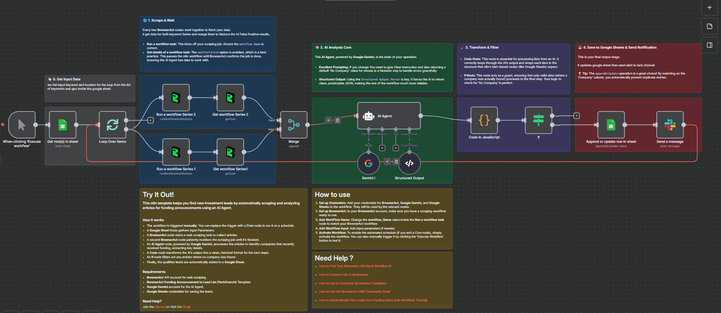
Find & Qualify Funded Leads with BrowserAct & Gemini
This n8n template helps you find new investment leads by automatically scraping articles for funding announcements and analyzing them with an AI Agent.
This workflow is ideal for venture capitalists, sales teams, or market researchers who need to automatically track and compile lists of recently funded companies.
Self-Hosted Only
This Workflow uses a community contribution and is designed and tested for self-hosted n8n instances only.
How it works
- The workflow is triggered manually but can be set to a Cron node to run on a schedule.
- A Google Sheet node loads a list of keywords (e.g., “Series A,” “Series B”) and geographic locations to search for.
- The workflow loops through each keyword, initiating BrowserAct web scraping tasks to collect relevant articles.
- A second set of BrowserAct nodes patiently monitors the scraping jobs, waiting for them to complete before proceeding.
- Once all articles are collected, they are merged and fed into an AI Agent node, powered by Google Gemini.
- The AI Agent processes the articles to identify companies that recently received funding, extracting the Company Name, the Field of Investment, and the source URL.
- A Code node transforms the AI’s JSON output into a clean, itemized format.
- An If node filters out any entries where no company was found, ensuring data quality.
- The qualified leads are automatically added or updated in a Google Sheet, matching by “Company” to prevent duplicates.
- Finally, a Slack message is sent to a channel to notify your team that the lead list has been updated.
Requirements
- BrowserAct API account for web scraping
- BrowserAct n8n Community Node -> (n8n Nodes BrowserAct)
- BrowserAct “Funding Announcement to Lead List (TechCrunch)” Template (or a similar scraping workflow)
- Gemini account for the AI Agent
- Google Sheets credentials for input and output
- Slack credentials for sending notifications
Need Help?
-
How to Find Your BrowseAct API Key & Workflow ID
-
How to Connect n8n to Browseract
-
How to Use & Customize BrowserAct Templates
-
How to Use the BrowserAct n8n Community Node
Workflow Guidance and Showcase
🔗 Nodes Used
Google Sheets, Slack, AI Agent, Structured Output Parser, Google Gemini Chat Model
📥 Import
Download workflow.json and import into n8n:
Workflow menu → Import from File