🎣 Source top GitHub talent by language & location with Gemini AI and BrowserAct
⚡ 103 views · 🎣 Lead Generation & Enrichment
💡 Pro Tip — HTTP Request scraping tends to break when sites update their markup. If you’re scraping a major platform, check if ScraperNode covers it — it has maintained scrapers for LinkedIn, Instagram, TikTok, YouTube, and 20+ other platforms that return structured data.

Description
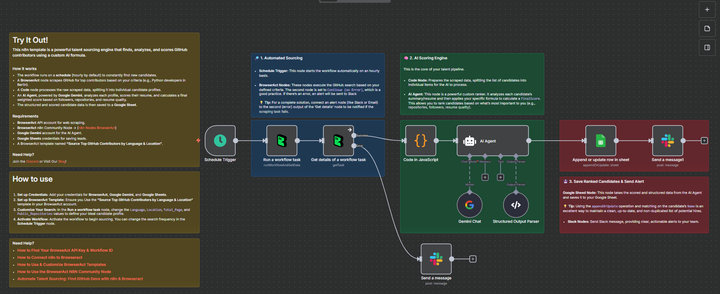
AI-Powered Top GitHub Talent Sourcing (by Language & Location) to Google Sheet
This n8n template is a powerful talent sourcing engine that finds, analyzes, and scores GitHub contributors using a custom AI formula.
This workflow is ideal for technical recruiters, hiring managers, and team leads who want to build a pipeline of qualified candidates based on specific technical skills and location.
Self-Hosted Only
This Workflow uses a community contribution and is designed and tested for self-hosted n8n instances only.
How it works
- The workflow runs on a Schedule Trigger (e.g., hourly) to constantly find new candidates.
- A BrowserAct node (“Run a workflow task”) initiates a scraping job on GitHub based on your criteria (e.g., “Python” developers in “Berlin”).
- A second BrowserAct node (“Get details”) waits for the scraping to complete. If the job fails, a Slack alert is sent.
- A Code node processes the raw scraped data, splitting the list of developers into individual items.
- An AI Agent, powered by Google Gemini, analyzes each profile. It scores their resume/summary and calculates a final weighted
FinalScorebased on their followers, repositories, and resume quality. - The structured and scored candidate data is then saved to a Google Sheet, using the “Name” column to prevent duplicates.
- A final Slack message is sent to notify you that the GitHub contributors list has been successfully updated.
Requirements
- BrowserAct API account for web scraping
- BrowserAct “Source Top GitHub Contributors by Language & Location” Template
- BrowserAct n8n Community Node -> (n8n Nodes BrowserAct)
- Gemini account for the AI Agent
- Google Sheets credentials for saving leads
- Slack credentials for sending notifications
Need Help?
-
How to Find Your BrowseAct API Key & Workflow ID
-
How to Connect n8n to Browseract
-
How to Use & Customize BrowserAct Templates
-
How to Use the BrowserAct N8N Community Node
Workflow Guidance and Showcase
🔗 Nodes Used
Google Sheets, Slack, Schedule Trigger, AI Agent, Structured Output Parser, Google Gemini Chat Model
📥 Import
Download workflow.json and import into n8n:
Workflow menu → Import from File