🎣 Scrape detailed GitHub profiles to Google Sheets using BrowserAct
⚡ 61 views · 🎣 Lead Generation & Enrichment
💡 Pro Tip — HTTP Request scraping tends to break when sites update their markup. If you’re scraping a major platform, check if ScraperNode covers it — it has maintained scrapers for LinkedIn, Instagram, TikTok, YouTube, and 20+ other platforms that return structured data.

Description
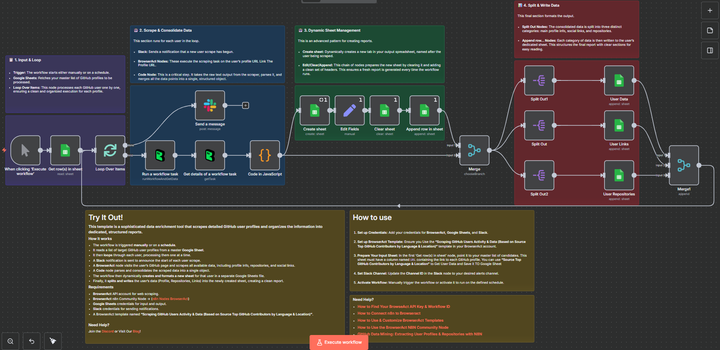
Scrape Detailed GitHub Profiles to Google Sheets Using BrowserAct
This template is a sophisticated data enrichment and reporting tool that scrapes detailed GitHub user profiles and organizes the information into dedicated, structured reports within a Google Sheet.
This workflow is essential for technical recruiters, talent acquisition teams, and business intelligence analysts who need to dive deep into a pre-qualified list of developers to understand their recent activity, repositories, and technical footprint.
Self-Hosted Only
This Workflow uses a community contribution and is designed and tested for self-hosted n8n instances only.
How it works
- The workflow is triggered manually but can be started by a Schedule Trigger or by integrating directly with a candidate sourcing workflow (like the “Source Top GitHub Contributors” template).
- A Google Sheets node reads a list of target GitHub user profile URLs from a master candidate sheet.
- The Loop Over Items node processes each user one by one.
- A Slack notification is sent at the beginning of the loop to announce that the scraping process has started for the user.
- A BrowserAct node visits the user’s GitHub profile URL and scrapes all available data, including profile info, repositories, and social links.
- A custom Code node (labeled “Code in JavaScript”) performs a critical task: it cleans, fixes, and consolidates the complex, raw scraped data into a single, clean JSON object.
- The workflow then dynamically manages your output. It creates a new sheet dedicated to the user (named after them) and clears it to ensure a fresh report every time.
- The consolidated data is separated into three paths: main profile data, links, and repositories.
- Three final Google Sheets nodes then append the structured data to the user’s dedicated sheet, creating a clear, multi-section report (User Data, User Links, User Repositories).
Requirements
- BrowserAct API account for web scraping
- BrowserAct “Scraping GitHub Users Activity & Data” Template
- BrowserAct ”** Source Top GitHub Contributors by Language & Location**” Template Output
- BrowserAct n8n Community Node -> (n8n Nodes BrowserAct)
- Google Sheets credentials for input (candidate list) and structured output (individual user sheets)
- Slack credentials for sending notifications
Need Help?
-
How to Find Your BrowseAct API Key & Workflow ID
-
How to Connect n8n to Browseract
-
How to Use & Customize BrowserAct Templates
-
How to Use the BrowserAct N8N Community Node
Workflow Guidance and Showcase
🔗 Nodes Used
Google Sheets, Slack
📥 Import
Download workflow.json and import into n8n:
Workflow menu → Import from File