📊 Detect team burnout with Groq AI analysis of GitHub activity for wellness reports
⚡ 98 views · 📊 Market Research & Insights
💡 Pro Tip — If you need GitHub data beyond what the REST API gives you, ScraperNode has a repository scraper that extracts metadata at scale without token rate limits.

Description
Team Wellness - AI Burnout Detector Agent devex github
🎯 Demo
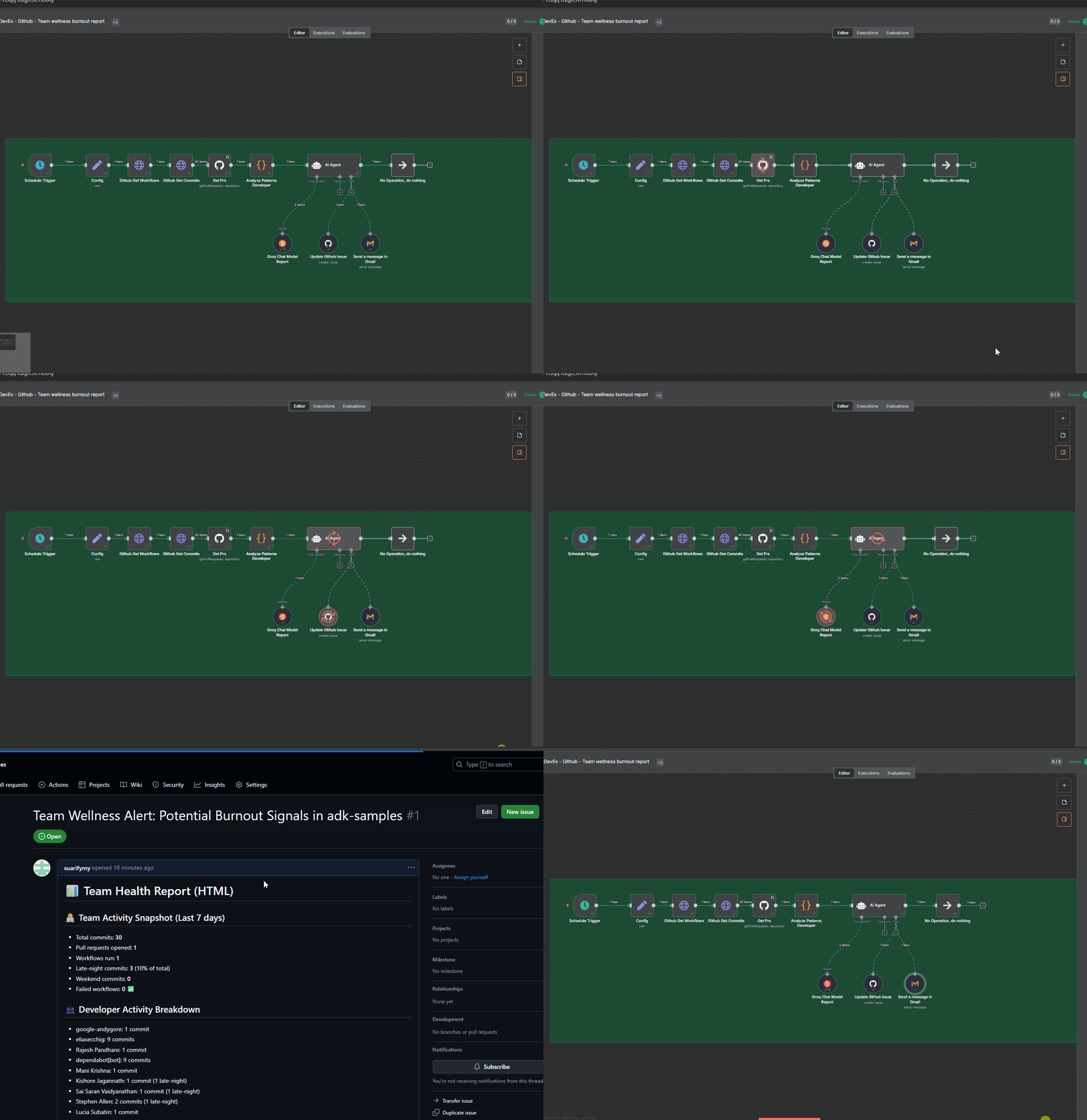
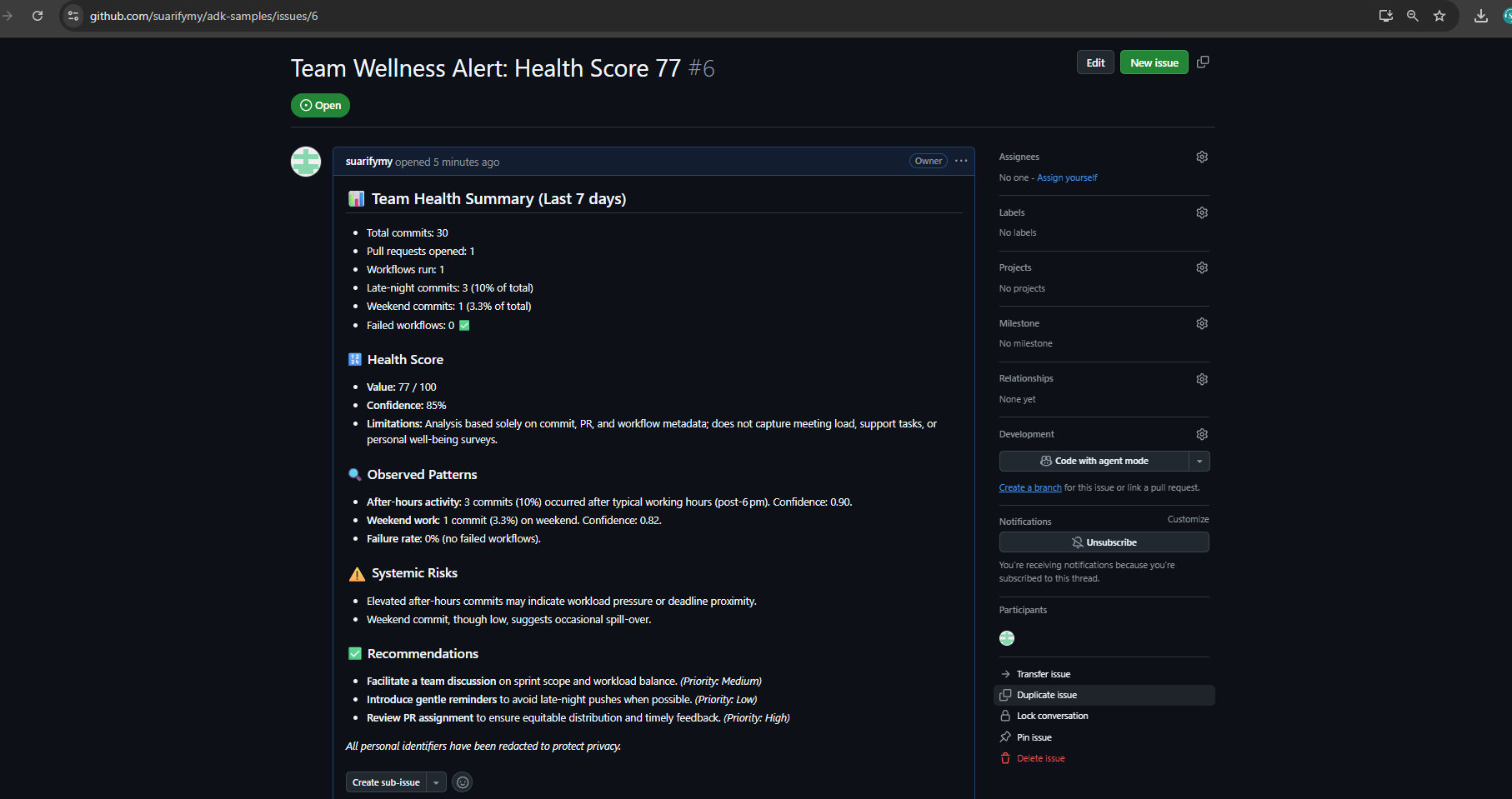
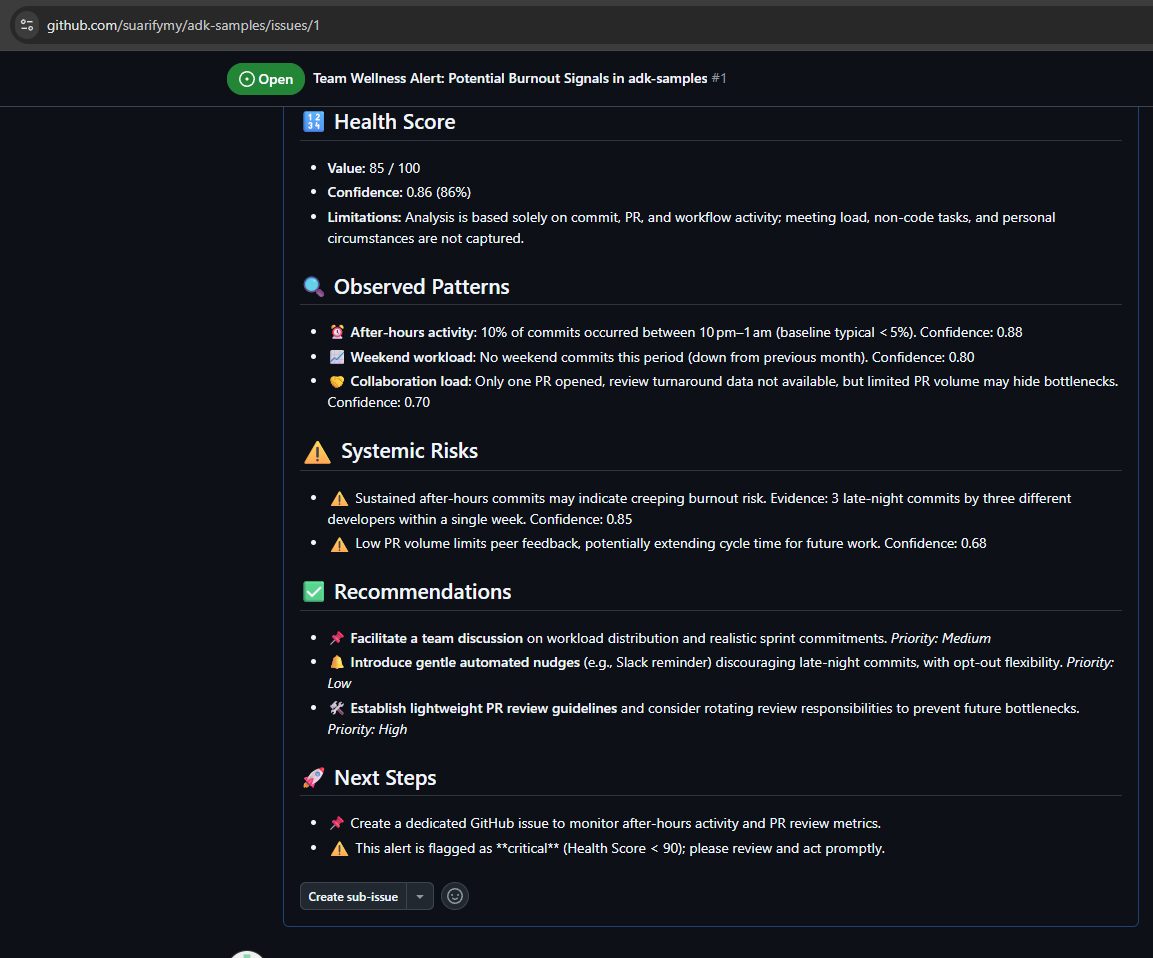
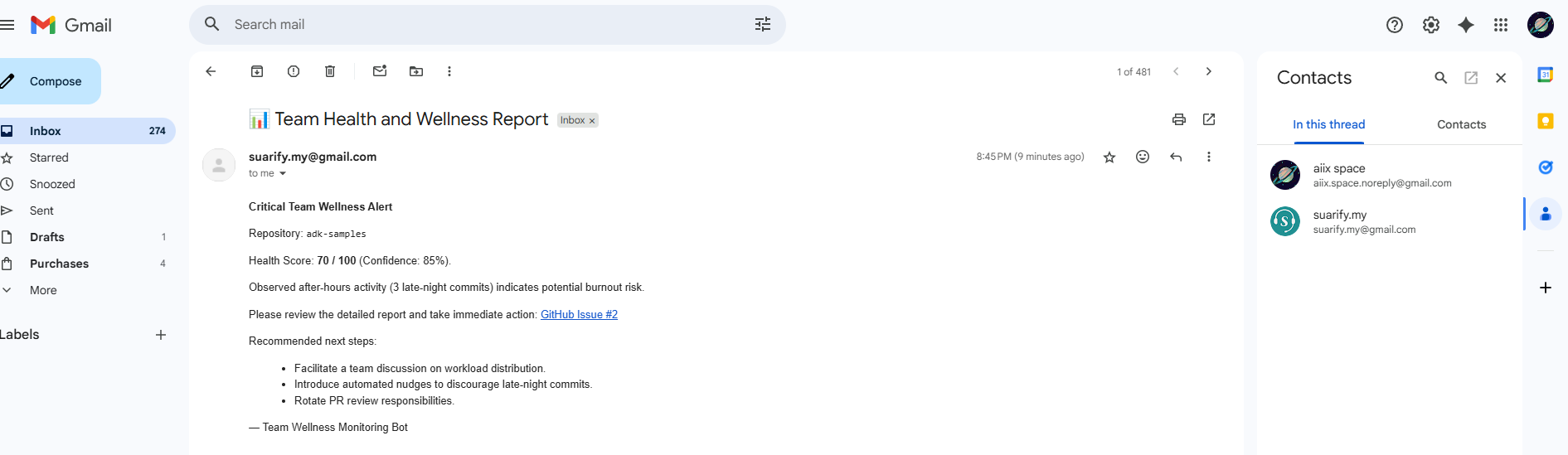
How it works
🎯 Overview
A comprehensive n8n workflow that analyzes developer workload patterns from GitHub repositories to detect potential software engineering team burnout risks and provide actionable team wellness recommendations. This workflow automatically monitors team activity patterns, analyzes them using AI, and provides professional wellness reports with actionable recommendations which will automate GitHub issue creation and do email notifications for critical alerts.
✨ Features
- Automated Data Collection: Fetches commits, pull requests, and workflow data from GitHub
- Pattern Analysis: Identifies late-night work, weekend activity, and workload distribution
- AI-Powered Analysis: Uses Groq’s LLM for professional burnout risk assessment
- Automated Actions: Creates GitHub issues and sends email alerts based on criticality
- Professional Guardrails: Ensures objective, evidence-based analysis with privacy protection
- Scheduled Monitoring: Weekly automated wellness checks
🏗️ Architecture
1. Data Collection Layer
- GitHub Commits API: Fetches commit history and timing data
- GitHub Pull Requests API: Analyzes collaboration patterns
- GitHub Workflows API: Monitors CI/CD pipeline health
2. Pattern Analysis Engine
- Work Pattern Signals: Late-night commits, weekend activity
- Developer Activity: Individual contribution analysis
- Workflow Health: Pipeline success/failure rates
- Collaboration Metrics: PR review patterns and merge frequency
3. AI Analysis Layer
- Professional Guardrails: Objective, evidence-based assessments
- Risk Assessment: Burnout risk classification (Low/Medium/High)
- Health Scoring: Team wellness score (0-100)
- Recommendation Engine: Actionable suggestions for improvement
📊 Sample Output
# 📊 Team Health Report

## 📝 Summary
Overall, the team is maintaining a healthy delivery pace, but there are emerging signs of workload imbalance due to increased after-hours activity.

## 🔢 Health Score
- **Value:** 68 / 100
- **Confidence:** 87%
- **Limitations:** Based solely on commit and PR activity; meeting load and non-code tasks not captured.

## 🔍 Observed Patterns
- ⏰ **After-hours activity**
  - 29% of commits occurred between 10pm–1am (baseline: 12%).
  - Confidence: 0.90

## ⚠️ Systemic Risks
- Sustained after-hours work may indicate creeping burnout risk.
  - Evidence: 3 consecutive weeks of elevated late-night commits.
  - Confidence: 0.85

## ✅ Recommendations
- 📌 Facilitate a team discussion on workload distribution and sprint commitments. *(Priority: Medium)*
- 🔔 Introduce automated nudges discouraging late-night commits. *(Priority: Low)*
- 🛠️ Rotate PR review responsibilities or adopt lightweight review guidelines. *(Priority: High)*
🚀 Quick Start
Prerequisites
- n8n instance (cloud or self-hosted)
- GitHub repository with API access
- Groq API key
- Gmail account (optional, for email notifications)
Setup Instructions
-
Import Workflow
# Import the workflow JSON file into your n8n instance -
Configure Credentials
- GitHub API: Create a personal access token with repo access
- Groq API: Get your API key from Groq Console
- Gmail OAuth2: Set up OAuth2 credentials for email notifications
-
Update Configuration
{ "repoowner": "your-github-username", "reponame": "your-repository-name", "period": 7, "emailreport": "your-email@company.com" } -
Test Workflow
- Run the workflow manually to verify all connections
- Check that data is being fetched correctly
- Verify AI analysis is working
-
Schedule Automation
- Enable the schedule trigger for weekly reports
- Set up monitoring for critical alerts
🔧 Configuration
Configuration Node Settings
repoowner: GitHub username or organizationreponame: Repository nameperiod: Analysis period in days (default: 7)emailreport: Email address for critical alerts
AI Model Settings
- Model:
openai/gpt-oss-120b(Groq) - Temperature: 0.3 (for consistent analysis)
- Max Tokens: 2000
- Safety Settings: Professional content filtering
📈 Metrics Analyzed
Repository-Level Metrics
- Total commits count
- Pull requests opened/closed
- Workflow runs and success rate
- Failed workflow percentage
Work Pattern Signals
- Late-night commits (10PM-6AM)
- Weekend commits (Saturday-Sunday)
- Work intensity patterns
- Collaboration bottlenecks
Developer-Level Activity
- Individual commit counts
- Late-night activity per developer
- Weekend activity per developer
- Workload distribution fairness
🛡️ Privacy & Ethics
Professional Guardrails
- Never makes personal judgments about individual developers
- Only analyzes observable patterns in code activity data
- Always provides evidence-based reasoning for assessments
- Never suggests disciplinary actions or performance reviews
- Focuses on systemic issues and team-level recommendations
- Respects privacy and confidentiality of team members
Data Protection
- No personal information is stored or transmitted
- Analysis is based solely on public repository data and public data
- All recommendations are constructive and team-focused
- Confidence scores indicate analysis reliability
- There is added redaction prompt. Note that LLM is not deterministic and usually, you will need to refine your own prompt to enhance difference level of criticality of privacy you need censored or displayed. In some cases ,you will need the engineer account names to help identify f2f conversation.
🔄 Workflow Nodes
Core Nodes
- Schedule Trigger: Weekly automation (configurable)
- Config: Repository and email configuration
- Github Get Commits: Fetches commit history
- Github Get Workflows: Retrieves workflow runs
- Get Prs: Pulls pull request data
- Analyze Patterns Developer: JavaScript pattern analysis
- AI Agent: Groq-powered analysis with guardrails
- Update Github Issue: Creates wellness tracking issues
- Send a message in Gmail: Email notifications
Data Flow
Schedule Trigger → Config → Github APIs → Pattern Analysis → AI Agent → Actions🚨 Alert Levels (Optional and Prompt configurable)
Critical Alerts (Health Score < 90)
- GitHub Issue: Automatic issue creation with detailed analysis
- Email Notification: Immediate alert to team leads
- Slack Integration: Critical team notifications
Warning Alerts (Health Score 90-95)
- GitHub Issue: Tracking issue for monitoring
- Slack Notification: Team awareness message
Normal Reports (Health Score > 95)
- Weekly Report: Comprehensive team health summary
- Slack Summary: Positive reinforcement message
🔧 Troubleshooting
Common Issues
-
GitHub API Rate Limits
- Solution: Use authenticated requests, implement rate limiting
- Check: API token permissions and repository access
-
AI Analysis Failures
- Solution: Verify Groq API key, check model availability
- Check: Input data format and prompt structure
-
Email Notifications Not Sending
- Solution: Verify Gmail OAuth2 setup, check email permissions
- Check: SMTP settings and authentication
-
Workflow Execution Errors
- Solution: Check node connections, verify data flow
- Check: Error logs and execution history
🤝 Contributing
Development Setup
- Fork the repository link above demo part
- Create a feature branch
- Make your changes
- Test thoroughly
- Submit a pull request
Testing
- Test with different repository types
- Verify AI analysis accuracy
- Check alert threshold sensitivity
- Validate email and GitHub integrations
📄 License
This project is licensed under the MIT License
🙏 Acknowledgments
- Groq: For providing the AI analysis capabilities
- GitHub: For the comprehensive API ecosystem
- n8n: For the powerful workflow automation platform
- Community: For feedback and contributions
📞 Support
Getting Help
- Issues: Create a GitHub issue for bugs or feature requests
- Discussions: Use GitHub Discussions for questions
- Documentation: Check the comprehensive setup guides
Contact
- Email:aiix.space.noreply@gmail.com
- LinkedIn: SeanLon
⚠️ Important: This tool is designed for team wellness monitoring and should be used responsibly. Always respect team privacy and use the insights constructively to improve team health and productivity.
🔗 Nodes Used
GitHub, HTTP Request, Schedule Trigger, AI Agent, Groq Chat Model
📥 Import
Download workflow.json and import into n8n:
Workflow menu → Import from File