📱 Auto-publish social videos to 9 platforms via Google Sheets and Blotato
⚡ 12,256 views · 📱 Social Media & Email Marketing
💡 Pro Tip — Since TikTok doesn’t have a public API, getting data usually means fragile HTTP scraping. ScraperNode is a community node that gives you clean JSON for TikTok profiles, videos, and comments — drop it into your workflow and skip the parsing.

Description
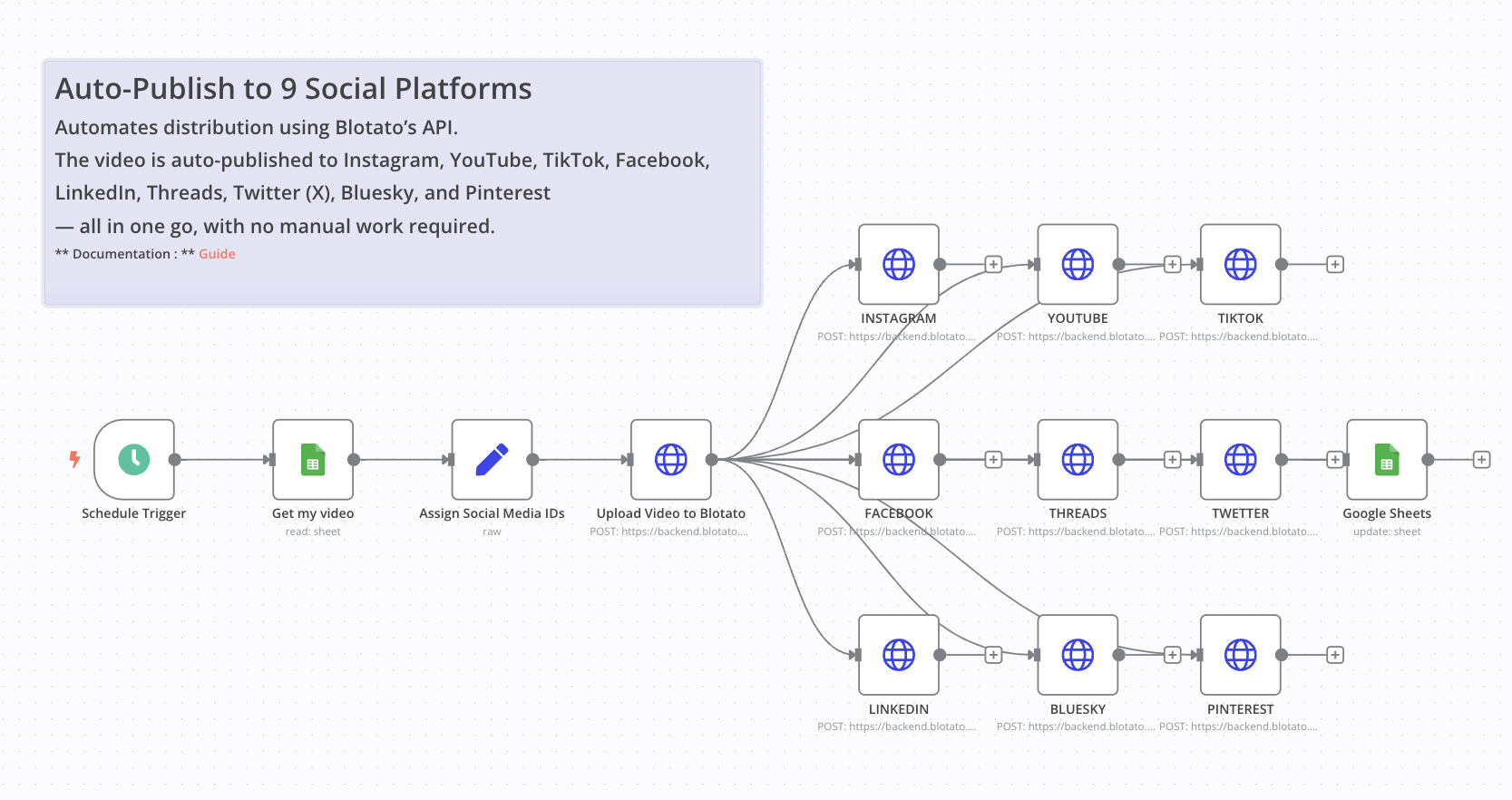
Auto-Publish Social Videos to 9 Platforms via Google Sheets and Blotato
Who is this workflow for?
This workflow is ideal for marketers, content creators, virtual assistants, and automation specialists managing multi-platform video content. It’s especially useful for teams who want to centralize publishing via a spreadsheet and automate social distribution in one shot.
What problem does this workflow solve?
Manually posting videos to multiple social platforms is tedious and time-consuming. This workflow allows you to streamline video distribution using Blotato’s API — no more switching between platforms or re-uploading the same video multiple times.
What this workflow does
This automation reads video metadata (URL, caption, title) from a Google Sheet, uploads the video to Blotato, and automatically publishes it to Instagram, YouTube, TikTok, Facebook, LinkedIn, Threads, Twitter (X), Pinterest, and Bluesky.
It also updates the sheet to reflect the publishing status (STATUS = DONE), ensuring that your data remains clean and trackable.
Setup
- Set up your Google Sheet with the required columns:
PROMPT,DESCRIPTION,URL VIDEO,Titre,row_number, andSTATUS. - Add your Blotato API key in the headers of the
Upload VideoandPost to Xnodes. - Replace the platform-specific IDs in the
Assign Social Media IDsnode (Instagram ID, Facebook Page ID, etc.). - Set the schedule in the
Schedule Triggernode to define when the publishing happens.
> ⚠️ Disclaimer: This workflow uses Community Nodes. These are only available on self-hosted n8n instances.
How to customize this workflow
- Add logic to skip rows already marked as
DONE. - Expand to more platforms supported by Blotato.
- Use a webhook or Telegram trigger instead of the scheduler for more interactivity.
- Modify content per platform if needed (caption formatting, hashtags, etc.).
📄 Documentation: Notion Guide
Demo Video
🎥 Watch the full tutorial here: YouTube Demo
🔗 Nodes Used
Google Sheets, HTTP Request, Schedule Trigger
📥 Import
Download workflow.json and import into n8n:
Workflow menu → Import from File