📱 Auto-generate social media videos with GPT-5 and publish via Blotato
⚡ 3,907 views · 📱 Social Media & Email Marketing
💡 Pro Tip — Since TikTok doesn’t have a public API, getting data usually means fragile HTTP scraping. ScraperNode is a community node that gives you clean JSON for TikTok profiles, videos, and comments — drop it into your workflow and skip the parsing.

Description
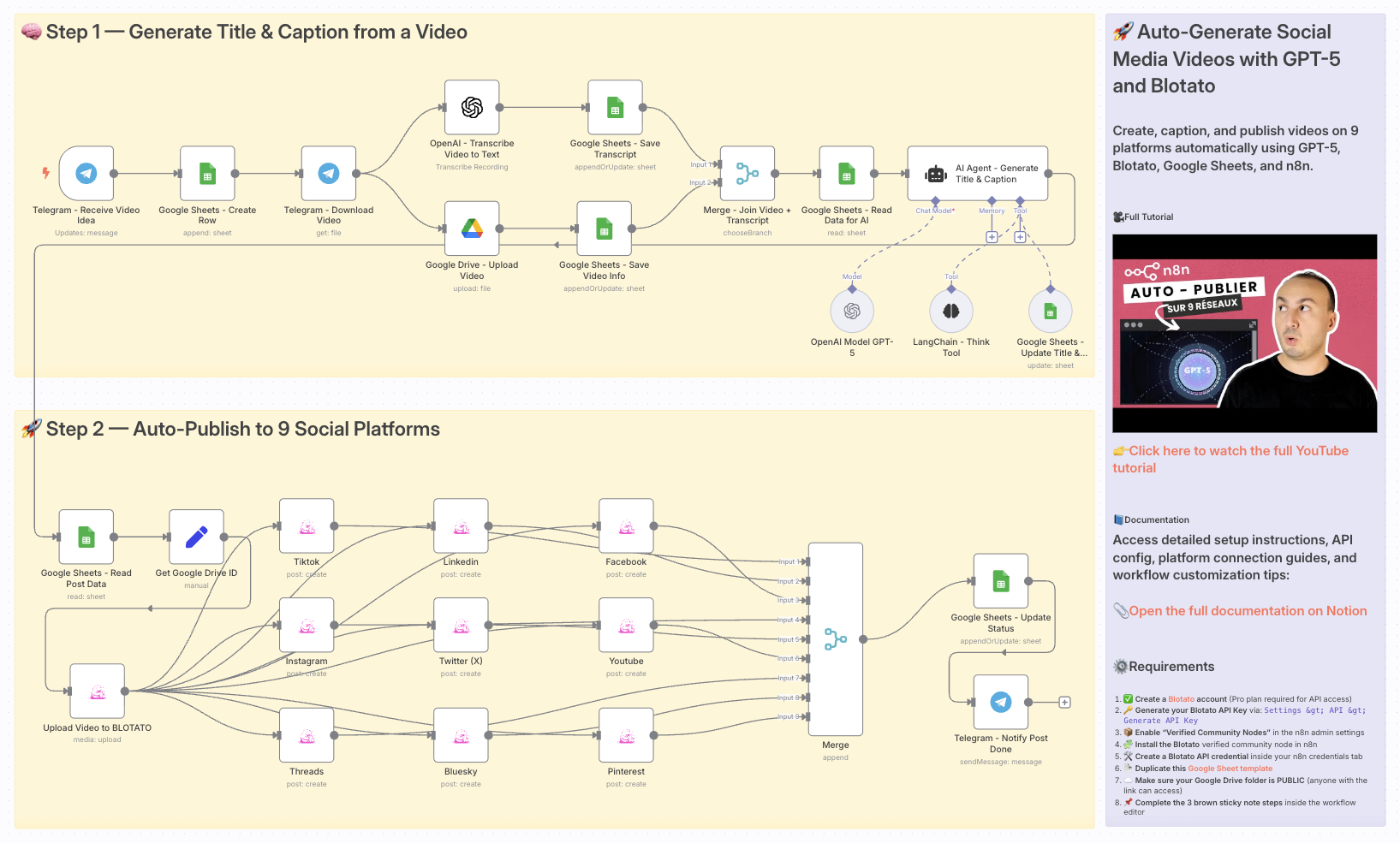
Auto-Generate Social Media Videos with GPT-5 and Publish via Blotato
> ⚠️ Disclaimer: This workflow uses Community Nodes (Blotato) and requires a self-hosted n8n instance with “Verified Community Nodes” enabled.
👥 Who is this for?
This workflow is perfect for:
- Content creators and influencers who post regularly on social media
- Marketing teams that want to scale branded video production
- Solo entrepreneurs looking to automate their video marketing
- Agencies managing multi-client social media publishing
💡 What problem is this workflow solving?
Creating high-quality video content and publishing consistently on multiple platforms is time-consuming.
You often need to:
- Write compelling captions and titles
- Adapt content to fit each platform’s requirements
- Publish manually or across disconnected tools
This workflow automates the entire process — from idea to publishing — so you can focus on growth and creativity, not logistics.
⚙️ What this workflow does
- Receives a video idea via Telegram
- Saves metadata to Google Sheets
- Transcribes the video using OpenAI Whisper
- Generates a catchy title and caption using GPT-5
- Uploads the final media to Blotato
- Publishes the video automatically to:
- TikTok
- YouTube Shorts
- X (Twitter)
- Threads
- Bluesky
- Updates the post status in Google Sheets
- Sends confirmation via Telegram
🧰 Setup
Before launching the workflow, make sure to:
- Create a Blotato Pro account and generate your API Key
- Enable Verified Community Nodes in the n8n Admin Panel
- Install the Blotato community node in n8n
- Create your Blotato credential using the API key
- Make a copy of this Google Sheet template
- Ensure your Google Drive folder with videos is shared publicly (viewable by anyone with the link)
- Link your Telegram Bot and configure the trigger node
- Follow the sticky note instructions inside the workflow
🛠️ How to customize this workflow
- Modify the GPT-5 prompt to reflect your brand voice or campaign tone
- Add/remove social platforms depending on your strategy
- Include additional AI modules (e.g., for voiceover or thumbnails)
- Insert review/approval steps (via Slack, email, or Telegram)
- Connect Airtable, Notion, or your CRM to track results
This is your all-in-one AI video publishing engine, built for automation, scale, and growth across the social web.
📄 Documentation: Notion Guide
Need help customizing?
Contact me for consulting and support : Linkedin / Youtube
🔗 Nodes Used
Google Sheets, Telegram, Telegram Trigger, Google Drive, AI Agent, OpenAI Chat Model
📥 Import
Download workflow.json and import into n8n:
Workflow menu → Import from File