🤝 Synchronizing WooCommerce inventory and creating products with Google Gemini AI and BrowserAct
⚡ 837 views · 🤝 CRM & Sales Operations
💡 Pro Tip — HTTP Request scraping tends to break when sites update their markup. If you’re scraping a major platform, check if ScraperNode covers it — it has maintained scrapers for LinkedIn, Instagram, TikTok, YouTube, and 20+ other platforms that return structured data.

Description
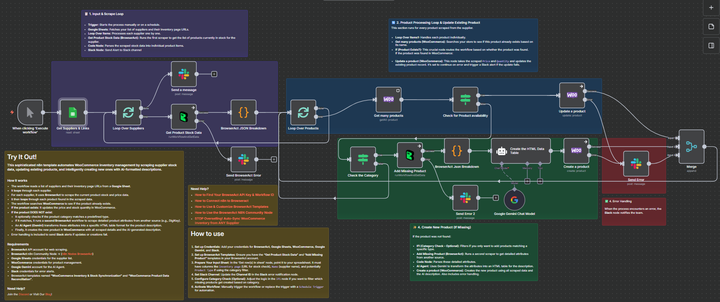
Synchronize WooCommerce Inventory & Create Products with Gemini AI & BrowserAct
This sophisticated n8n template automates WooCommerce inventory management by scraping supplier data, updating existing products, and intelligently creating new ones with AI-formatted descriptions.
This workflow is essential for e-commerce operators, dropshippers, and inventory managers who need to ensure their product pricing and stock levels are synchronized with multiple third-party suppliers, minimizing overselling and maximizing profit.
Self-Hosted Only
This Workflow uses a community contribution and is designed and tested for self-hosted n8n instances only.
How it works
- The workflow is typically run by a Schedule Trigger (though a Manual Trigger is also shown) to check stock automatically.
- It reads a list of suppliers and their inventory page URLs from a central Google Sheet.
- The workflow loops through each supplier:
- A BrowserAct node scrapes the current stock and price data from the supplier’s inventory page.
- A Code node parses this bulk data into individual product items.
- It then loops through each individual product found.
- The workflow checks WooCommerce to see if the product already exists based on its name.
- If the product exists: It proceeds to update the existing product’s price and stock quantity.
- If the product DOES NOT exist:
- An If node checks if the missing product’s category matches a predefined type (optional filtering).
- If it passes the filter, a second BrowserAct workflow scrapes detailed product attributes from a dedicated product page (e.g., DigiKey).
- An AI Agent (Gemini) transforms these attributes into a specific, styled HTML table for the product description.
- Finally, the product is created in WooCommerce with all scraped details and the AI-generated description.
- Error Handling: Multiple Slack nodes are configured to alert your team immediately if any scraping task fails or if the product update/creation process encounters an issue.
Note: This workflow does not support image uploads for new products. To enable this functionality, you must modify both the n8n and BrowserAct workflows.
Requirements
- BrowserAct API account for web scraping
- BrowserAct n8n Community Node -> (n8n Nodes BrowserAct)
- BrowserAct templates named “WooCommerce Inventory & Stock Synchronization” and “WooCommerce Product Data Reconciliation”
- Google Sheets credentials for the supplier list
- WooCommerce credentials for product management
- Google Gemini account for the AI Agent
- Slack credentials for error alerts
Need Help?
-
How to Find Your BrowseAct API Key & Workflow ID
-
How to Connect n8n to Browseract
-
How to Use & Customize BrowserAct Templates
-
How to Use the BrowserAct N8N Community Node
Workflow Guidance and Showcase
🔗 Nodes Used
Google Sheets, Slack, WooCommerce, AI Agent, Google Gemini Chat Model
📥 Import
Download workflow.json and import into n8n:
Workflow menu → Import from File