🔬 Save YouTube transcripts to Google Sheets using Apify
⚡ 0 views · 🔬 Document Extraction & Analysis
💡 Pro Tip — YouTube’s API quotas can be a bottleneck when you’re pulling data at scale. ScraperNode is a community node with dedicated scrapers for channels, videos, and comments — no quota limits, just structured data.

Description
Quick overview
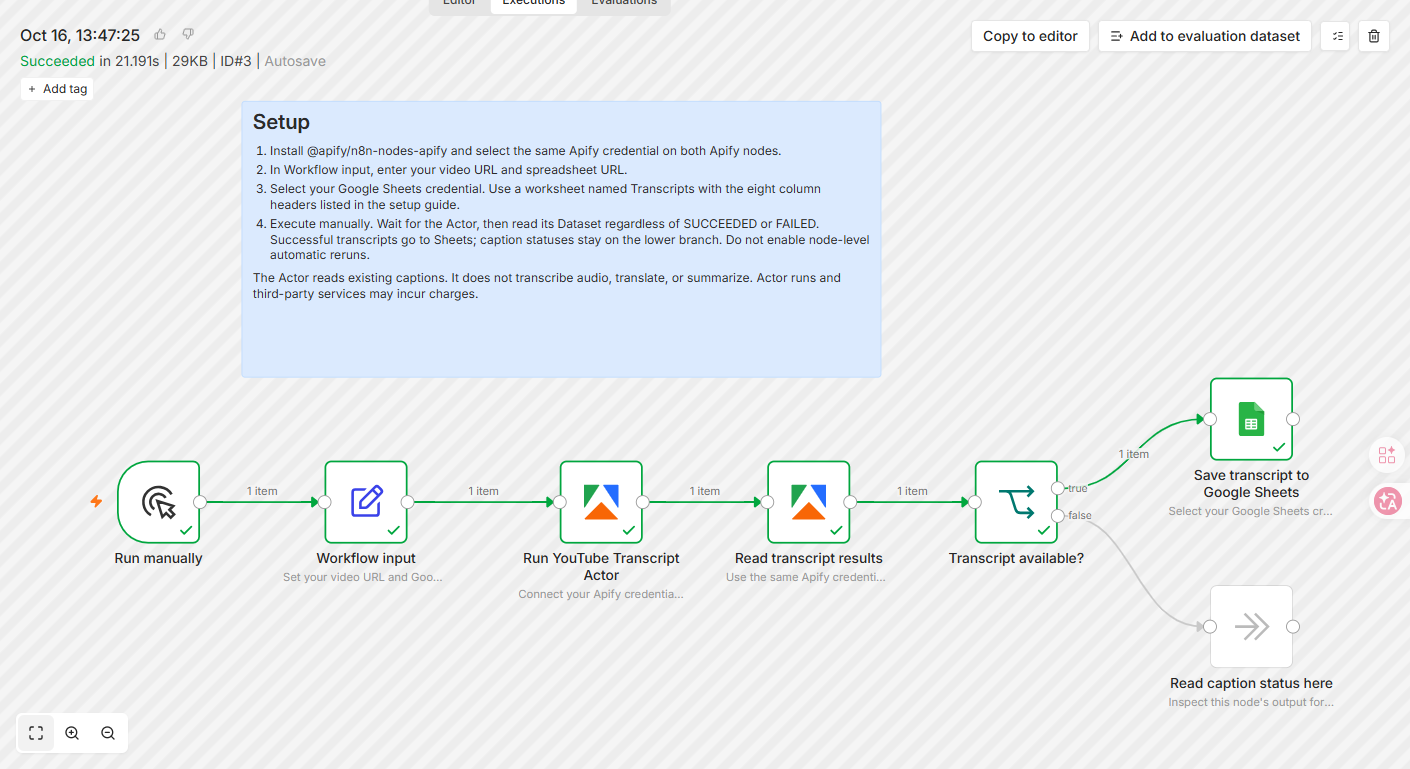
Save an existing YouTube video or Shorts caption track to Google Sheets with Apify. Each successful video becomes one row with full fetched text and metadata; caption failures follow a separate branch.
How it works
- Starts when you manually execute the workflow.
- Reads the target YouTube video URL plus the Google Sheets spreadsheet URL and worksheet name.
- Runs YouTube Transcript Scraper on Apify and waits for the run to finish. The Actor retrieves existing captions rather than transcribing audio.
- Reads the same run’s Dataset, including saved status records from a failed Actor run, and checks whether a transcript was retrieved successfully.
- Appends one row to Google Sheets with the video ID, title, URL, channel, caption language, automatic-caption flag, full fetched text, and extraction time.
- Routes missing captions, unavailable languages, and blocked requests to a separate status node without appending blank transcript rows.
Setup
- Install the verified Apify node (@apify/n8n-nodes-apify) if needed. Select the same Apify API credential on both Apify nodes; do not put API tokens in the shared JSON.
- Connect a Google Sheets credential with permission to edit the destination spreadsheet.
- Create a worksheet named Transcripts with these eight headers: Video ID, Video title, Video URL, Channel, Caption language, Auto-generated, Transcript, Scraped at.
- In Workflow input, set videoUrl, spreadsheetUrl, and sheetName, then execute manually. See the illustrated setup guide: https://github.com/arjun-go-go/apify-workflow-examples/tree/main/youtube-transcripts-to-google-sheets
Requirements
- Requires n8n Cloud or a self-hosted instance with the verified Apify node, an Apify account, Google Sheets access, and a public video with available captions.
Customization
- Change caption-language preferences in the Actor input if needed. Extend the downstream workflow for your own analysis; this template itself does not translate or summarize.
Additional info
The template has no separate fee. Actor runs are paid: check current pricing at https://apify.com/arjun_code/youtube-transcript-scraper. n8n and Google services may have their own charges. This is a manual, single-video, append-only example: rerunning a successful URL adds another row. It requests text only, not SRT/VTT. It does not transcribe audio, and source captions can contain errors or omit speech.
🔗 Nodes Used
Google Sheets
📥 Import
Download workflow.json and import into n8n:
Workflow menu → Import from File