🔬 💰 Automate currency rates update in invoices with Google Sheet, ExchangeRate API
⚡ 1,492 views · 🔬 Document Extraction & Analysis
Description
Tags: Automation, Finance, Google Sheets, API
Note: This workflow uses the Exchange rate API and requires a valid API key.
Context
I’m Samir Saci, a Supply Chain Data Scientist who builds automations to streamline operations, reduce manual tasks, and boost decision-making through real-time data.
In this workflow, I automated the task of fetching live currency exchange rates, updating a Google Sheet with the latest values, and archiving historical records — all without writing any code.
> Improve your productivity by automating admin tasks with n8n!
📬 For business inquiries, you can add me on LinkedIn
Who is this template for?
This template is perfect for:
- Finance teams tracking multi-currency cashflows
- Analysts building dashboards or models requiring updated FX data
- Anyone working with spreadsheets who needs up-to-date exchange rates
It updates:
- A live sheet with the latest USD-based exchange rates
- An archive tab to track historical changes over time
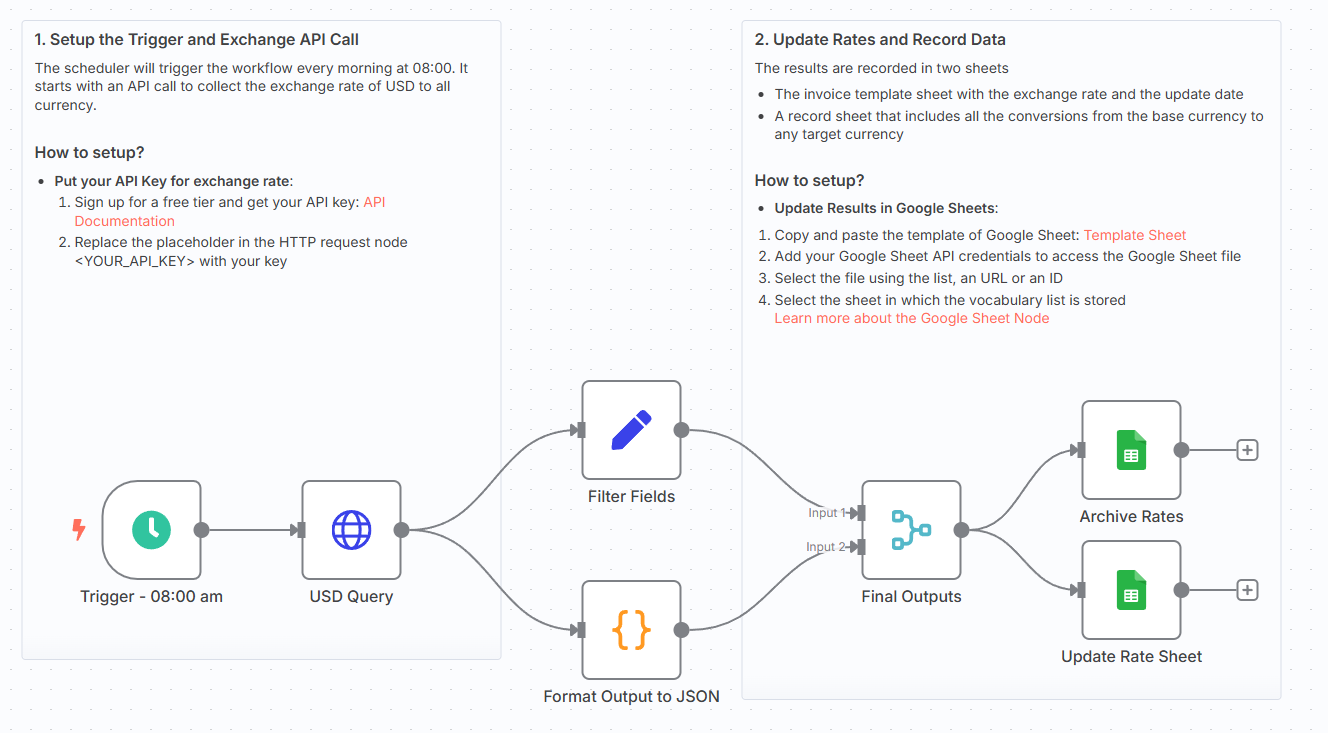
How does it work?
This workflow runs in N8N and performs the following steps:
- 🌐 Calls the ExchangeRate API to get the latest rates based on USD
- 🧠 Extracts and formats key fields: base currency, timestamp, and conversion values
- 📊 Updates a main Google Sheet with the latest data (using upsert logic)
- 🗂️ Appends all rates to a second Google Sheet tab for historical tracking
You can schedule this workflow to run daily, hourly, or on-demand.
What do I need to start?
You don’t need to write a single line of code.
Prerequisites:
- A Google Sheet with two tabs:
Rate SheetandArchives(Link of the publicly available example in the template) - A valid Exchangerate API key
- Google Sheets API connected via OAuth2
Next Steps
Use the sticky notes in the workflow to understand how to:
- Add your Exchangerate API key
- Map the fields to match your Google Sheet layout
- Schedule the run frequency using the Cron node
- Optionally add Slack or email alerts if the base rate changes
For more information, check my tutorial:

🚀 Want to build finance automation workflows like this? 📬 Let’s connect on LinkedIn
Notes
- You can adapt this template for other currencies by changing the API endpoint
This workflow was built using n8n 1.85.4 Submitted: April 15th, 2025
🔗 Nodes Used
Google Sheets, HTTP Request, Schedule Trigger
📥 Import
Download workflow.json and import into n8n:
Workflow menu → Import from File