🔬 Convert Fathom meeting transcripts to formatted Google Docs with AI summaries
⚡ 1,135 views · 🔬 Document Extraction & Analysis
Description
Transcript → AI Analysis → Formatted Doc
This workflow automatically converts Fathom meeting transcripts into beautifully formatted Google Docs with AI-generated summaries, key points, decisions, and action items.
Good to know
- Works fully with Fathom free account
- Webhook responds immediately to prevent Fathom timeout and duplicate triggers
- Validates transcript quality (3+ conversation turns) before AI processing to save costs
- Uses Google Gemini API (generous free tier and rate limits, typically enough to avoid paying for API requests, but check latest pricing at Google AI Pricing)
- Creates temporary HTML file that’s auto-deleted after conversion
Who’s it for
Individuals or teams using Fathom for meetings who want more control and flexibility with their AI meeting analysis and storage independently of Fathom, as well as automatic, formatted documentation without manual note-taking. Perfect for recurring syncs, client meetings, or interview debriefs.
How it works
- Fathom webhook triggers when meeting ends and sends transcript data
- Validates transcript has meaningful conversation (3+ turns)
- Google Gemini AI analyzes transcript and generates structured summary (key points, decisions, actions, next steps)
- Creates formatted HTML with proper styling
- Uploads to Google Drive and converts to native Google Doc
- Reduces page margins for readability and deletes temporary HTML file
Requirements
- Fathom account with API webhook access (available on free tier)
- Google Drive account (OAuth2)
- Google Docs account (OAuth2)
- Google Gemini API key (Get free key here)
How to set up
- Add credentials: Google Drive OAuth2, Google Docs OAuth2, Google Gemini API
- Copy the webhook URL from the Get Fathom Meeting webhook node (Test URL first, change to Production URL when ready)
- In Fathom: Settings → API Access → Add → Add webhook URL and select all events including “Transcript”
- Test with a short meeting, verify Google Doc appears in Drive
- Activate workflow
Customizing this workflow
- Change save location: Edit “Upload File as HTML” node → update “Parent Folder”
- Modify AI output: Edit “AI Meeting Analysis” node → customize the prompt to add/remove sections (e.g., risks, follow-ups, sentiment, etc)
- Adjust document margins: Edit “Reduce Page Margins” node → change margin pixel values
- Add notifications: E.g. add Slack/Email node after “Convert to Google Doc” to notify team when summary is ready
Quick Troubleshooting
- “Transcript Present?” fails: Fathom must send
transcript_mergedwith 3+ conversation turns (i.e. only send to Gemini for analysis if there’s a genuine transcript) - HTML as plain text: Check “Convert to Google Doc” uses POST to
/copyendpoint - 401/403 errors: Re-authorize Google credentials
- Inadequate meeting notes: Edit prompts in “AI Meeting Analysis” node
Sample File and Storage Output
- Google Doc meeting notes - sample
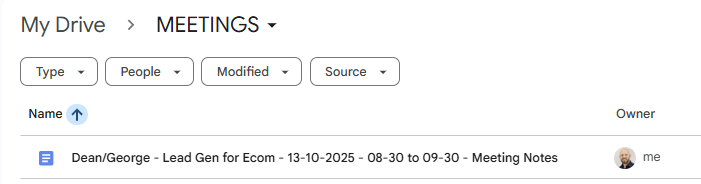
- Google Drive sample folder output:
🔗 Nodes Used
HTTP Request, Webhook, Google Drive, Basic LLM Chain, Structured Output Parser, Google Gemini Chat Model
📥 Import
Download workflow.json and import into n8n:
Workflow menu → Import from File