🔬 Convert DMARC reports to readable tables with Gmail automation
⚡ 164 views · 🔬 Document Extraction & Analysis
Description
DMARC Reporter
Gmail and Yahoo send DMARC reports as .zip or .gz xml attachments that can be hard to read. This workflow unpacks them on a schedule, turns the data into a simple table, and emails you an easy-to-read report.
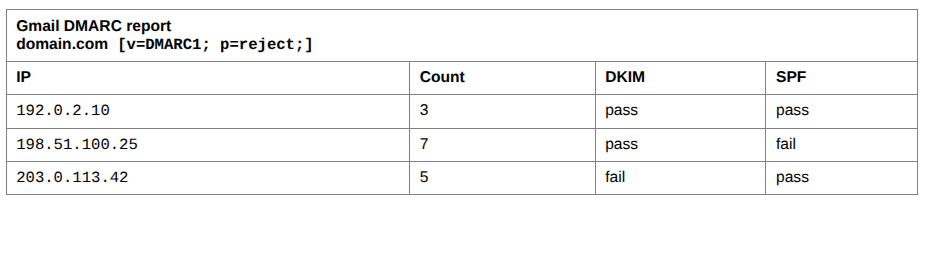
DMARC insights at a glance:
-
Confirm that your published policy is correct and consistent.
-
Quickly spot unknown or suspicious IPs trying to send as you.
-
Distinguish between legitimate high-volume senders (e.g. your ESP) and one-off or small-scale abuse.
-
Makes it easy to confirm your legitimate servers are authenticating correctly, and to detect spoofed mail that fails DKIM/SPF.
Who is this For?
- Email Marketing Team
- Mailchimp, Sensorpro, Omnisend users
- Compliance Team
Customize:
- Adjust the Gmail node to include other DMARC reporters by changing the search parms.
- If not using Gmail you can use any of the n8n email nodes.
- To keep a record, add an Airtable node after the Set node.
🔗 Nodes Used
Gmail, Schedule Trigger, Extract from File
📥 Import
Download workflow.json and import into n8n:
Workflow menu → Import from File