🔬 Automate full agreement lifecycle with JotForm, approvals, Signwell e-signatures & tracking
⚡ 288 views · 🔬 Document Extraction & Analysis
Description
Client Form → Draft → Approve → Sign → Deliver, fully automated
This workflow automates the entire agreement lifecycle from client form submission to signed document delivery. It generates personalized agreements from templates, manages internal approvals, orchestrates e-signatures via Signwell, and delivers fully executed documents with complete audit trails in n8n Data Tables.
Good to know
- Handles client data collection via JotForm with custom field mapping
- Automatically populates Google Doc templates with client-specific details
- Internal approval workflow with email-based confirmation
- Signwell integration for embedded e-signatures - test mode enabled by default - disable for legally binding documents
- Complete lifecycle tracking in n8n Data Tables (draft → approval → sent → signed)
- Auto-cleanup: removes documents from Signwell after completion to save storage
Who’s it for
Service businesses, consultants, agencies, and freelancers who send agreements to clients regularly. Perfect for anyone wanting to avoid other costly e-signature platforms with limited API and automation capabilities. Signwell has an affordable entry level tier with generous API limits. If you’re looking to eliminate manual document preparation, have an approval workflow, and track signatures while maintaining professional client communication, then this solution is a good fit.
How it works
Phase 1: Draft Creation
- JotForm trigger captures client submission (company name, address, contact details, position)
- Standardizes form data and duplicates Google Doc template with custom filename
- Replaces template variables with client information (company name, address, full name, position, dates)
- Creates clean document URL and logs initial record to Data Tables
- Emails internal team with draft review link and client details
Phase 2: Approval & Preparation
- Gmail monitors inbox for “Approved” reply email
- Fetches agreement record from Data Tables and marks as approved
- Downloads Google Doc as PDF and uploads to Drive folder
- Grants temporary public sharing access (required for Signwell file import)
- Creates Signwell document with embedded signature fields and signing URL
- Emails client with personalized signing link
- Revokes public sharing access for security and updates Data Tables with Signwell details
Phase 3: Signature & Delivery
- Gmail monitors for Signwell completion notification
- Extracts signed document download link from notification email
- Downloads fully executed PDF from Signwell
- Uploads to “Final Versions” folder in Google Drive
- Updates Data Tables with completion status and final document URLs
- Sends confirmation email to client with signed PDF attached
- Deletes document from Signwell to free up storage
Requirements
- JotForm account (free tier works)
- Gmail account with OAuth2 access
- Google Drive account (OAuth2)
- Google Docs account (OAuth2) with a draft Agreement template
- Signwell account with API key
- n8n Data Tables (built-in, no external service needed)
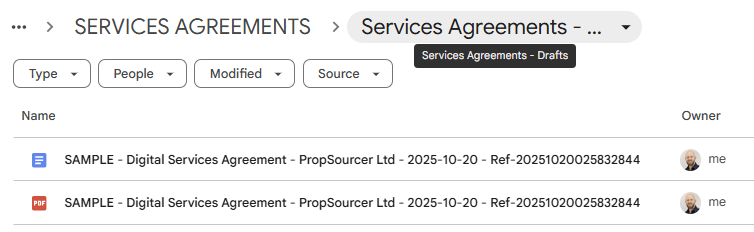
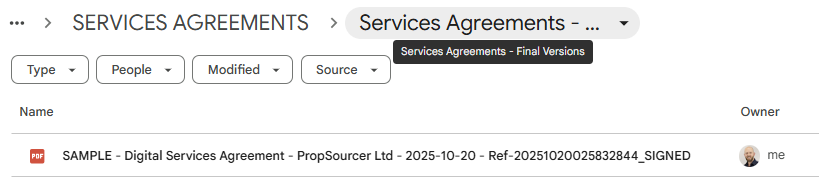
- Google Drive folders: “Services Agreements - Drafts” and “Services Agreements - Final Versions”
How to set up
- Add credentials: JotForm API, Gmail OAuth2, Google Drive OAuth2, Google Docs OAuth2, Signwell API key
- Create JotForm: Build form with fields: Company Name, Company Address (address field), Full Name (name field), Your Position/Job
Title, Email - In “JotForm Trigger” node: select your form
- Create Google Doc template: Add variables
{{clientCompanyName}},{{clientFullName}},{{clientNamePosition}},{{clientCompanyAddress}},{{agreementDate1}},{{agreementDate2}} - In “Copy and Rename File” node: select your template document and update folder ID to your “Drafts” folder
- Create Data Table: Name it “Services Agreements” with columns: documentFileName, clientEmail, clientFullName,
clientNamePosition, clientCompanyName, clientCompanyAddress, documentUrl, approvalStatus, sentDocumentPdfUrl, sentDate, signwellUrl,
signwellDocID, docSigned, finalExecutedDocGDrive, finalExecutedDocSignwellUrl - In “Insert Row” and all “Get/Update Row” nodes: select your Data Table
- Create Gmail labels: “_AGREEMENTS” with 2 nested (sublabels) Agreement-Approvals” and “Agreement-Completed” for filtering
- In “Check for Email Approval” node: select your approval label and update internal email address
- In “Check Email for Completed Notification” node: select your completed label
- In “Create Document in Signwell” node: update API key and adjust signature field coordinates for your document
- Set Signwell to live mode: Change
"test_mode": trueto"test_mode": falsewhen ready for production - Activate workflow
Customizing this workflow
- Change template variables: Edit “Update New File” node to add/remove fields (e.g., pricing, terms, scope of work)
- Modify approval email: Edit “Share Email Draft” node to change recipient, subject line, or message format
- Adjust Signwell fields: Edit “Create Document in Signwell” node to change signature/date field positions (x, y coordinates) to match your agreement template, and add any other fields you’d like
- Add approval deadline: Add Wait node with timeout after “Share Email Draft” to auto-remind for pending approvals
- Multi-signer support: Modify “Create Document in Signwell” recipients array to add multiple signers (e.g., both parties)
- Change storage folders: Update folder IDs in “Upload PDF File” and “Upload Completed Doc” nodes
- Add Slack notifications: Add Slack nodes after key milestones (draft created, approved, signed)
- Custom client messaging: Edit “Send Prepared Agreement to Client” and “Send Client Completed Agreement PDF” nodes for personalized communication
- Add reminder logic: Insert Wait + Send Email nodes between signing and completion to remind client if not signed within X days
Quick Troubleshooting
- JotForm not triggering: Verify webhook is active in JotForm settings and form ID matches “JotForm Trigger” node
- Template variables not replacing: Check variable names in template doc exactly match
{{variableName}}format (case-sensitive) - Wrong internal email for approval: Update email address in “Share Email Draft” node to your own email
- Approval email not detected: Confirm Gmail label “Agreement-Approvals” exists and reply contains exact word “Approved”
- Signwell document creation fails: Verify PDF has public sharing enabled before API call AND Signwell API key is valid in “Create Document in Signwell” node
- Signature fields in wrong position: Adjust x/y coordinates in “Create Document in Signwell” node (test in Signwell UI first to find correct pixel positions)
- Completed document not downloading: Check Signwell completion email format - Code node extracts link via regex pattern
- Data Tables errors: Ensure documentFileName exactly matches between “Insert Row” and “Get/Update Row” operations
- Client emails not sending: Re-authorize Gmail OAuth2 credentials and verify sender name/address in Gmail nodes
- Drive folder not found: Update folder IDs in “Copy and Rename File”, “Upload PDF File”, and “Upload Completed Doc” nodes to your own folder IDs
- Signwell deletion fails: Verify signwellDocID was correctly stored in Data Tables before deletion (check “Update Row - Additional Doc Details” output)
- 401/403 API errors: Re-authorize all OAuth2 credentials (Gmail, Google Drive, Google Docs)
- Test mode documents: Change
"test_mode": trueto"test_mode": falsein “Create Document in Signwell” node for production signatures
Sample Outputs
- Agreement Drafts and Final folders/files in Google Drive
File References
🔗 Nodes Used
HTTP Request, Google Drive, Jotform Trigger, Gmail, Google Docs, Gmail Trigger
📥 Import
Download workflow.json and import into n8n:
Workflow menu → Import from File