👥 AI candidate screening pipeline: LinkedIn to Telegram with Gemini & Apify
⚡ 1,475 views · 👥 HR & Recruitment
💡 Pro Tip — If you’re pulling LinkedIn data through HTTP requests or dealing with API restrictions, there’s a community node called ScraperNode that handles this natively. It has dedicated scrapers for profiles, companies, jobs, and people search — you just pass a URL and get structured data back.

Description
LinkedIn URL → Scrape → Match → Screen → Decide, all automated
This workflow automatically processes candidate LinkedIn profiles shared via Telegram, intelligently matches them to job descriptions, performs AI-powered screening analysis, and sends actionable summaries to your team in Telegram.
Good to know
- Handles LinkedIn profile scraping via Apify API (extracts full profile data including experience, education, skills)
- Built-in spam prevention: limits users to 3 LinkedIn profile submissions
- Two-stage JD matching: prioritizes role mentioned in candidate’s Telegram message, falls back to LinkedIn profile analysis if needed
- Uses Google Gemini API for AI screening (generous free tier and rate limits, typically enough to avoid paying for API requests - check latest pricing at Google AI Pricing and rate limits documentation)
- Automatic polling mechanism checks Apify extraction status up to 10 times (15-second intervals)
- Complete audit trail logged in Google Sheets with unique submission IDs
Who’s it for
Hiring teams and recruiters who want to streamline first-round screening for candidates who share LinkedIn profiles directly. Perfect for companies accepting applications via messaging platforms (Telegram, WhatsApp, etc.), especially useful fortech-savvy audiences and remote/global hiring.
How it works
- Telegram bot receives message containing LinkedIn profile URL from candidate
- Validates URL format and checks spam prevention (max 3 submissions per Telegram username)
- Sends confirmation message to candidate and notifies internal talent team via Telegram group
- Extracts clean LinkedIn URL and initiates Apify scraping job
- Polls Apify API up to 10 times (15-second intervals) until profile extraction completes
- AI agent matches candidate to best-fit job description by analyzing Telegram message context first (if candidate mentioned a role), or LinkedIn profile content as fallback (selects up to 3 potential JD matches)
- If multiple JDs matched, second AI agent selects the single best fit based on detailed profile analysis
- AI recruiter agent analyzes LinkedIn profile against selected JD and generates structured screening report (strengths, weaknesses, risk/reward factors, overall fit score 0-10 with justification)
- Logs complete analysis to Google Sheets tracker with unique submission ID
- Sends formatted summary to Telegram group with candidate details, matched JD, and overall fit score
Requirements
- Telegram Bot Token (Create bot via @BotFather)
- Apify account with API token (Sign up for free tier)
- Google Drive account (OAuth2)
- Google Sheets account (OAuth2)
- Google Gemini API key (Get free key here)
- Google Drive folder for Job Descriptions (as PDFs or Google Docs)
- Telegram group for internal talent team notifications
How to set up
-
Create Telegram bot and internal Telegram chat group with new bot:
- Message @BotFather on Telegram
- Send
/newbotand follow instructions to create your bot - Save the API token provided
- Create Telegram group chat and invite your new bot + invite the @GetIDs bot
- Note down the group chat ID (How to get group chat ID)
-
Setup Apify:
- Sign up at Apify
- Get your API token from Settings
- Note: Free tier includes sufficient scraping credits for testing and production ($0.01 per successful LinkedIn profile enriched, a free monthly limit of $5.00) - LinkedIn profile scraper “actor” details
-
Create Google Sheet:
- Create new sheet named “LinkedIn Profile AI Candidate Screening”
- Add columns: Submission ID, Date, LinkedIn Profile URL, First Name, Last Name, Email (if known), Telegram Username, Strengths, Weaknesses, Risk Factor, Reward Factor, JD Match, Overall Fit, Justification
- Copy the spreadsheet ID from URL
-
Setup Google Drive folder:
- Create folder named “Job Descriptions”
- Upload your JD files (PDFs or Google Docs) with clear, descriptive filenames
- Copy the folder ID from URL
-
Configure workflow nodes:
- In “Receive Telegram Msg to Recruiter Bot” node: Add Telegram API credentials
- In “Extract LinkedIn Profile Information” node: Replace
YOUR_APIFY_API_TOKENwith your Apify token - In “Check LinkedIn Profile Extraction Status” node: Replace
YOUR_APIFY_API_TOKENwith your Apify token - In “Get Fully Extracted LinkedIn Profile Data” node: Replace
YOUR_APIFY_API_TOKENwith your Apify token - In “Access JD Files” node: Update folder ID to your “Job Descriptions” folder
- In “Get All Rows Matching Telegram Username” node: Select your Google Sheet
- In “Add Candidate Analysis in GSheet” node: Select your Google Sheet and verify column mappings
- In “Send Msg to Internal Talent Group” node: Update chat ID to your Telegram group chat ID
- In “Send Review Completed Msg to Talent Group” node: Update chat ID and Google Sheet URL
-
Add your company description:
- In “JD Matching Agent” system message: Replace company description with your details
- In “Detailed JD Matching Agent” system message: Replace company description with your details
- In “Recruiter Scoring Agent” system message: Update company description
-
Test the workflow:
- Send a LinkedIn profile URL to your bot from Telegram
- Monitor execution to ensure all nodes run successfully
- Check Google Sheets for logged results
-
Activate workflow
Customizing this workflow
- Change spam limits: Edit “Spam Check: Sent <4 LinkedIn Profiles?” node to adjust maximum submissions (currently 3)
- Adjust polling attempts: Edit “Checked 10x for LinkedIn Profile Data?” node to change maximum polling attempts (currently 10) or modify wait time in “Wait for LinkedIn Profile” node (currently 15 seconds)
- Change JD matching logic: Edit “JD Matching Agent” node prompt to adjust how LinkedIn profiles are matched to roles (e.g., weight current role vs. overall experience)
- Modify screening criteria: Edit “Recruiter Scoring Agent” node system message to focus on specific qualities (culture fit, leadership potential, technical depth, industry experience, etc.)
- Add more messaging platforms: Add nodes to support WhatsApp, Discord, or other messaging platforms using similar URL-based triggers
- Customize Telegram messages: Edit notification nodes to change formatting, add emojis, or include additional candidate data
- Auto-proceed logic: Add IF node after screening to auto-proceed candidates with fit score above threshold (e.g., 8+/10) and trigger different notification paths
- Add candidate responses: Connect nodes to automatically message candidates back via Telegram (confirmation, rejection, interview invite)
- Add interview scheduling: For approved candidates, send Telegram message with Cal.com or Calendly link so they can book their interview
- Enrich with additional data: Add nodes to cross-reference candidate data with other sources (GitHub, Twitter/X, company websites)
- Multi-language support: Add translation nodes to support candidates submitting profiles in different languages
- Add human approval step: Create buttons in Telegram group messages for instant Approve/Reject decisions that update Google Sheets
Pro tip: Add your Telegram bot to your company’s careers page with instructions like: “Want fast-track screening? Share your LinkedIn profile with our AI recruiter: @YourBotName”
Troubleshooting
- Telegram bot not responding: Ensure bot token is correct in “Receive Telegram Msg to Recruiter Bot” node, and users have sent
/startto your bot at least once - “LinkedIn profile URL invalid” error: Check that candidates are sending full URLs in format
https://www.linkedin.com/in/username(not shortened links or text without URL) - Apify extraction failing: Verify Apify API token is correctly set in all three HTTP Request nodes (“Extract LinkedIn
Profile Information”, “Check LinkedIn Profile Extraction Status”, “Get Fully Extracted LinkedIn Profile Data”) - LinkedIn extraction timeout: Increase polling attempts in “Checked 10x for LinkedIn Profile Data?” node (currently 10) or increase wait time in “Wait for LinkedIn Profile” node (currently 15 seconds)
- Spam check blocking valid users: Check “Get All Rows Matching Telegram Username” node is pointing to correct Google Sheet, and adjust limit in “Spam Check: Sent <4 LinkedIn Profiles?” node if needed
- JD matching returns no results: Check “Access JD Files” node folder ID points to your Job Descriptions folder, and JD files are named clearly (e.g., “Marketing Director JD.pdf”)
- JD matching is not relevant for my company: Update the “Company Description” in the System Messages in all three AI agent nodes (“JD Matching Agent”, “Detailed JD Matching Agent”, “Recruiter Scoring Agent”)
- “Can’t find matching JD”: Ensure candidate’s Telegram message mentions role name OR their LinkedIn profile clearly indicates relevant experience for available JDs
- Google Sheets errors: Verify sheet name is “LinkedIn Profile AI Candidate Screening” and column headers exactly match workflow expectations (Submission ID, Date, LinkedIn Profile URL, First Name, Last Name, etc.)
- Telegram group notifications not appearing: Verify chat ID is correct in “Send Msg to Internal Talent Group” and “Send Review Completed Msg to Talent Group” nodes (use negative number for group chats, e.g.,
-4954246611) - Missing candidate data in Google Sheets: LinkedIn profile may be incomplete - verify Apify successfully extracted data by checking “Get Fully Extracted LinkedIn Profile Data” node output
- Loop counter not working: Check “Restore Loop Counter” code node references correct node names (“Checked 10x for LinkedIn Profile Data?” and “Initialize Loop Counter to Poll for Completion”)
- 401/403 API errors: Re-authorize all OAuth2 credentials (Google Drive, Google Sheets) and verify Apify and Telegram API tokens are valid
- AI analysis quality issues: Edit system prompts in “JD Matching Agent”, “Detailed JD Matching Agent”, and “Recruiter Scoring Agent” nodes to refine screening criteria and provide more context about your hiring needs
- Gemini API rate limit errors: Check your usage at Google AI Studio and consider upgrading to paid tier if exceeding free tier limits (see rate limits documentation)
Sample Outputs
Google Sheets - LinkedIn AI Candidate Screening - sample
Telegram messages between AI recruiter bot and job applicant

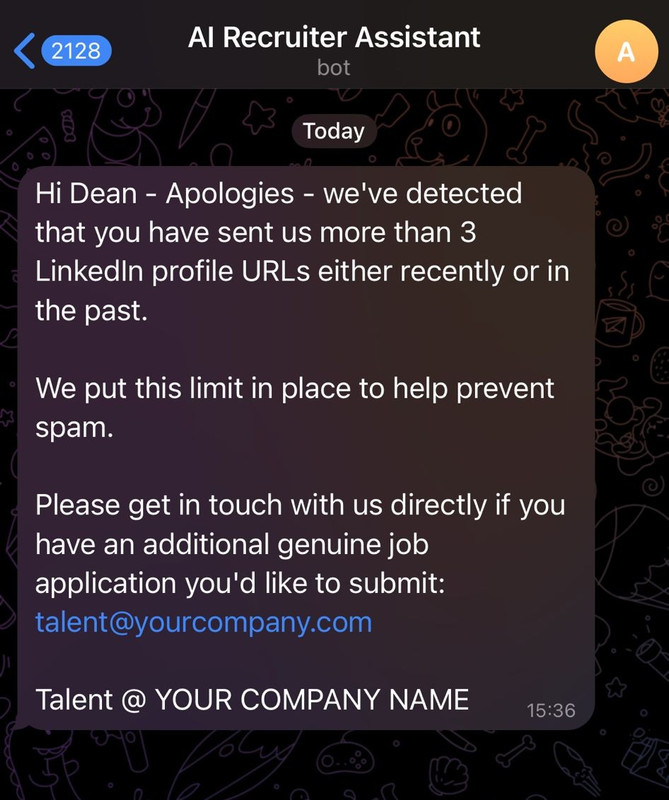
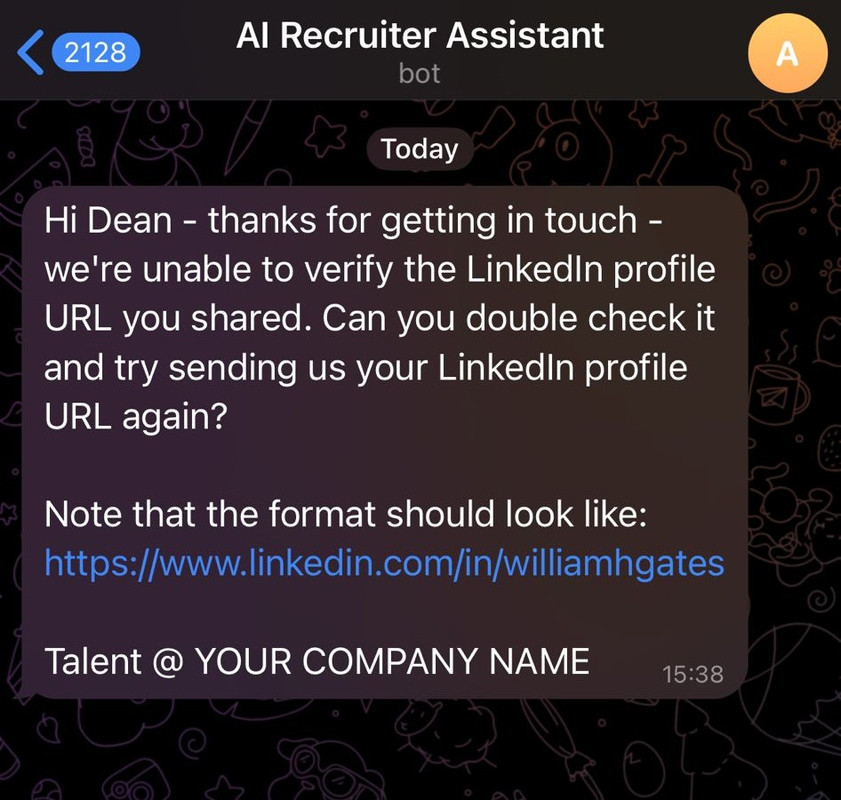
Telegram messages from AI recruiter bot in internal group chat

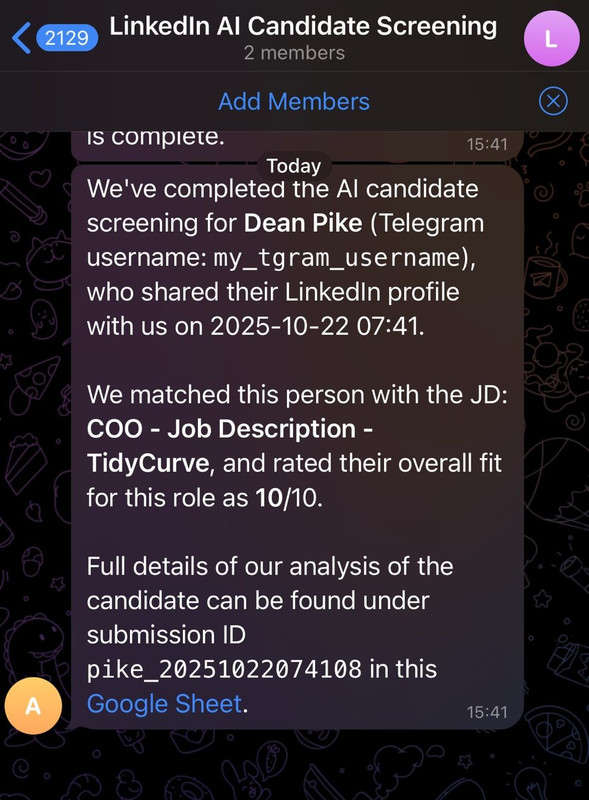
🔗 Nodes Used
Google Sheets, HTTP Request, Telegram, Telegram Trigger, Google Drive, AI Agent
📥 Import
Download workflow.json and import into n8n:
Workflow menu → Import from File