👥 Automate CV screening with GPT-4o-mini: Gmail to Google Sheets HR evaluation system
⚡ 3,289 views · 👥 HR & Recruitment
Description
AI-Powered HR Workflow: CV Analysis and Evaluation from Gmail to Sheets
Who is this for?
This workflow is designed for HR professionals, recruiters, startup founders, and operations teams who receive candidate resumes by email and want to automate the evaluation process using AI.
It’s ideal for teams that receive high volumes of applications and want to streamline screening without sacrificing quality.
What problem is this workflow solving?
Manually reviewing every resume is time-consuming, inconsistent, and often inefficient. This workflow automates the initial screening process by:
- Extracting resume data directly from incoming emails
- Analyzing resumes using GPT-4 to evaluate candidate fit
- Saving scores and notes in Google Sheets for easy filtering
It helps teams qualify candidates faster while staying organized.
What this workflow does
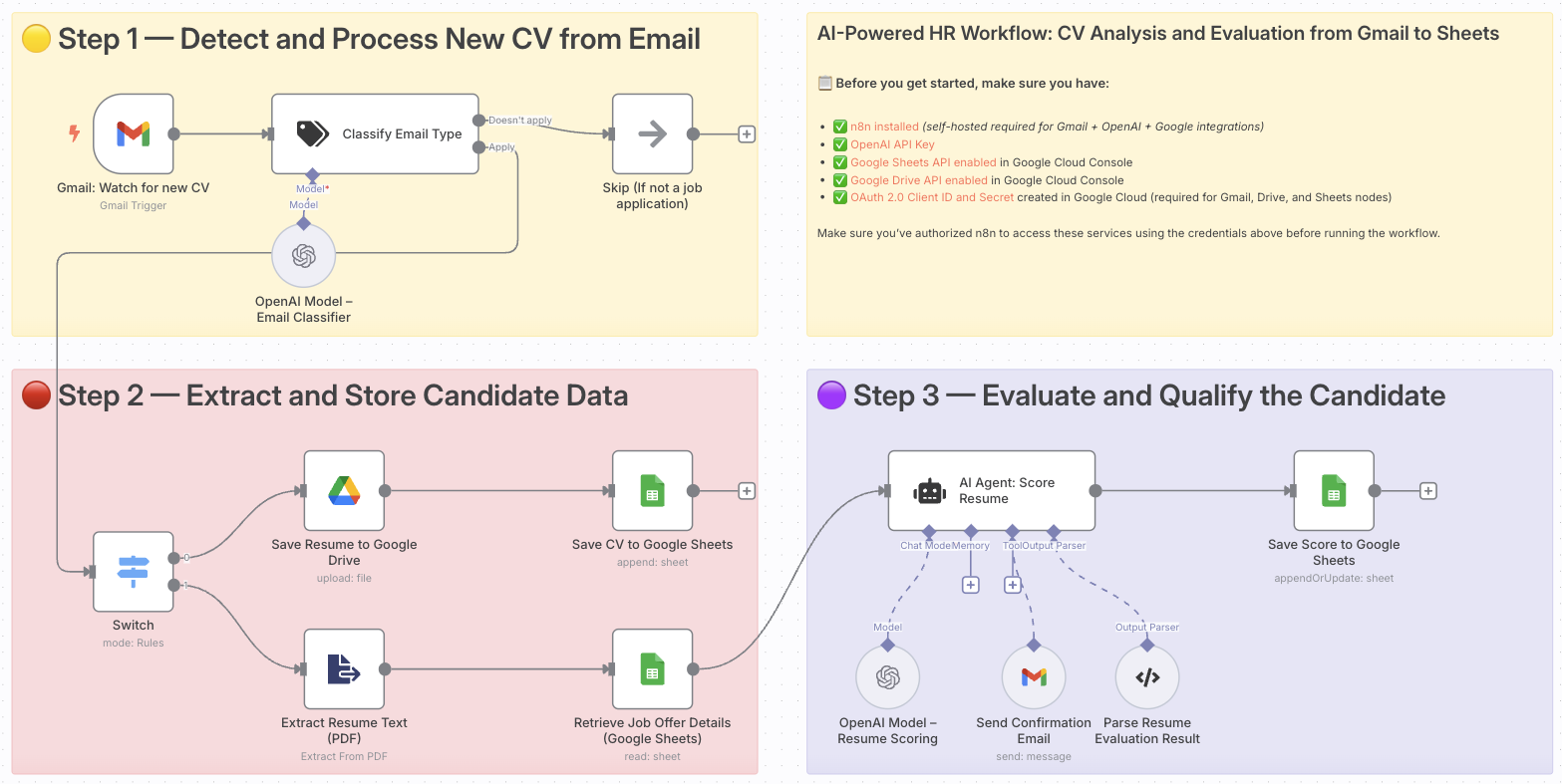
- Detects when a new email with a CV is received (Gmail)
- Filters out non-relevant messages using an AI classifier
- Extracts the resume text (PDF parsing)
- Uploads the original file to Google Drive
- Retrieves job offer details from a connected Google Sheet
- Uses GPT-4 to evaluate the candidate’s fit for the job
- Parses the AI output to extract the candidate’s score
- Logs the results into a central Google Sheet
- Sends a confirmation email to the applicant
Setup
- Install n8n self-hosted
- Add your OpenAI API Key in the AI nodes
- Enable the following APIs in your Google Cloud Console:
- Gmail API
- Google Drive API
- Google Sheets API
- Create OAuth credentials and connect them in n8n
- Configure your Gmail trigger to watch the inbox receiving CVs
- Create a Google Sheet with columns like:
Candidate,Score,Job,Status, etc.
How to customize this workflow to your needs
- Adjust the AI scoring prompt to match your company’s hiring criteria
- Add new columns to the Google Sheet for additional metadata
- Include Slack or email notifications for each qualified candidate
- Add multiple job profiles and route candidates accordingly
- Add a Telegram or WhatsApp step to notify HR in real time
📄 Documentation: Notion Guide
Need help customizing?
Contact me for consulting and support : Linkedin / Youtube
🔗 Nodes Used
Google Sheets, Google Drive, Gmail Trigger, AI Agent, OpenAI Chat Model, Structured Output Parser
📥 Import
Download workflow.json and import into n8n:
Workflow menu → Import from File