👥 Fast-track CV screening with AI analysis from Gmail to Slack and Google Sheets
⚡ 847 views · 👥 HR & Recruitment
Description
CV → Match → Screen → Decide, all automated
This workflow automatically processes candidate CVs from email, intelligently matches them to job descriptions, performs AI-powered screening analysis, and sends actionable summaries to your team in Slack.
Good to know
- Handles both PDF and Word document CVs automatically
- Two-stage JD matching: prioritizes role mentioned in candidate’s email, falls back to CV analysis if needed
- Uses Google Gemini API for AI screening (generous free tier and rate limits, typically enough to avoid paying for API requests, but check latest pricing at Google AI Pricing)
- All CVs stored in Google Drive with standardized naming (candidate name + date/time)
- Complete audit trail logged in Google Sheets
Who’s it for
Hiring teams and recruiters who want to automate first-round CV screening while maintaining quality. Perfect for companies
receiving high volumes of applications across multiple roles, especially in tech, sales, or automation-focused positions.
How it works
- Gmail monitors inbox for CVs with specific label and downloads attachments
- Detects file type (PDF or Word) and converts/standardizes format for text extraction
- AI agent matches candidate to best-fit job description by analyzing email context first (if candidate mentioned a role), or
CV content as fallback (selects up to 3 potential JD matches) - If multiple JDs matched, second AI agent selects the single best fit
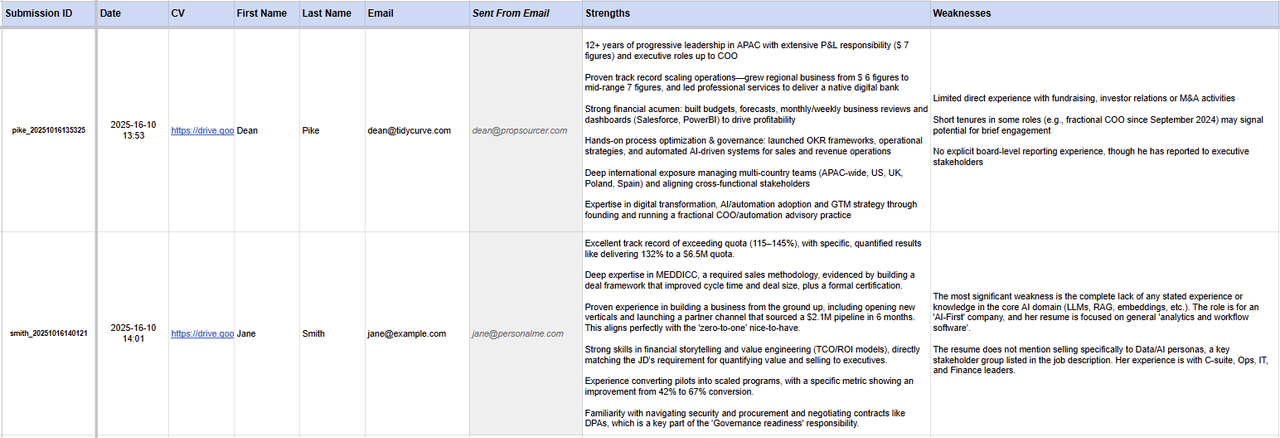
- AI recruiter agent analyzes CV against selected JD and generates structured screening report (strengths, weaknesses, risk/reward factors, overall fit score 0-10 with justification)
- Extracts candidate details (name, email) from CV text
- Logs complete analysis to Google Sheets tracker
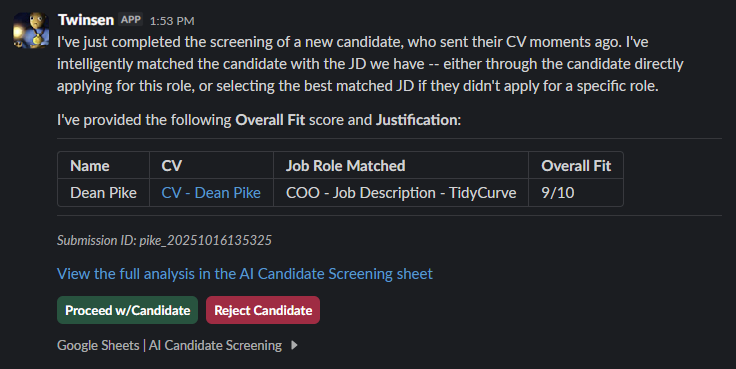
- Sends formatted summary to Slack with Proceed/Reject action buttons for instant team decisions
Requirements
- Gmail account with API access
- Google Drive account (OAuth2)
- Google Sheets account (OAuth2)
- Slack workspace with bot permissions
- Google Gemini API key (Get free key here)
- Google Drive folders: one for CVs, one for Job Descriptions (as PDFs or Google Docs)
How to set up
- Add credentials: Gmail OAuth2, Google Drive OAuth2, Google Sheets OAuth2, Slack OAuth2, Google Gemini API
- Create Gmail label (e.g., “CV-Screening”) for incoming candidate emails
- In “Receive CV via Email” node: select your Gmail label for filtering
- Create two Google Drive folders: “Candidate CVs” and “Job Descriptions”
- In “Upload CV - PDF” and “Stream Doc/Docx File” nodes: update folder ID to your “Candidate CVs” folder
- In “Access JD Files” node: update folder ID to your “Job Descriptions” folder
- Create Google Sheet named “AI Candidate Screening” with columns matching the sample AI Candidate Screening sheet
- In “Append row in sheet” node: select your Google Sheet
- In “Send Candidate Screening Confirmation” node: select your Slack channel
- Activate workflow
Customizing this workflow
- Change JD matching logic: Edit “JD Matching Agent” node prompt to adjust how CVs are matched to roles (e.g., weight technical skills vs. experience).
- Change “Company Description” in AI prompts: Insert your “Company Description” in System Message sections in “JD Matching Agent” and “Detailed JD Matching Agent” nodes
- Modify screening criteria: Edit “Recruiter Scoring Agent” node system message to focus on specific qualities (culture
fit, leadership, technical depth, etc.) - Add more storage locations: Add nodes to save CVs to other systems (Notion, Airtable, ATS platforms)
- Customize Slack message: Edit “Send Candidate Screening Confirmation” node to change formatting, add more context, or
include additional candidate data - Auto-proceed logic: Add IF node after screening to auto-proceed candidates with fit score above threshold (e.g., 8+/10)
- Add email responses: Connect nodes to automatically email candidates (confirmation, rejection, interview invite)
- Add human-in-the-loop: Sub-workflow triggered by Slack response or email response, to update Sheet with approve/reject status
- Add candidate email responses + interview scheduling: For approved candidates, trigger email to candidate with Cal.com or Calendly link so they can book their interview
Quick Troubleshooting
- No CVs being processed: Check Gmail label is correctly set in “Receive CV via Email” node and emails are being labeled
- Word documents failing: Verify “Stream Doc/Docx File” node has correct parent folder ID and Google Drive credentials
authorized - JD matching returns no results: Check “Access JD Files” node folder ID points to your Job Descriptions folder, and JD
files are named clearly (e.g., “Marketing Director JD.pdf”) - JD matching is not relevant for my company: Update the “Company Description” in the System Messages in the “JD Matching Agent” and “Detailed JD Matching Agent” nodes
- “Can’t find matching JD”: Ensure candidate’s email mentions role name OR their CV clearly indicates relevant experience
for available JDs - Google Sheets errors: Verify sheet name is “AI Candidate Screening” and column headers exactly match workflow expectations (Submission ID, Date, CV, First Name, etc.)
- Slack message not appearing: Re-authorize Slack credentials and confirm channel ID in “Send Candidate Screening Confirmation” node
- Missing candidate name/email: CV text must be readable - check PDF extraction quality or try converting complex CVs to
simpler format - 401/403 API errors: Re-authorize all OAuth2 credentials (Gmail, Google Drive, Google Sheets, Slack)
- AI analysis quality issues: Edit system prompts in “JD Matching Agent” and “Recruiter Scoring Agent” nodes to refine
screening criteria
Sample Outputs
- Google Sheets - AI Candidate Screening - sample

- Slack confirmation message
Acknowledgments
This workflow was inspired by Nate Herk’s YouTube demonstration on building a resume analysis system. This implementation builds upon that foundation by adding dynamic job description matching (initial + detailed JD matching agents), Slack Block Kit integration with interactive buttons, updated Google Drive API methods for document handling, and enhanced candidate data capture in Google Sheets.
🔗 Nodes Used
Google Sheets, HTTP Request, Slack, Google Drive, Gmail Trigger, AI Agent
📥 Import
Download workflow.json and import into n8n:
Workflow menu → Import from File