👥 Automate job posting across multiple boards with Google Sheets and BrowserAct
⚡ 148 views · 👥 HR & Recruitment
💡 Pro Tip — Job boards are notoriously hard to scrape — CAPTCHAs, rate limits, constantly changing layouts. ScraperNode has maintained scrapers for Indeed jobs, Glassdoor reviews, and Glassdoor jobs that handle all of that for you.

Description
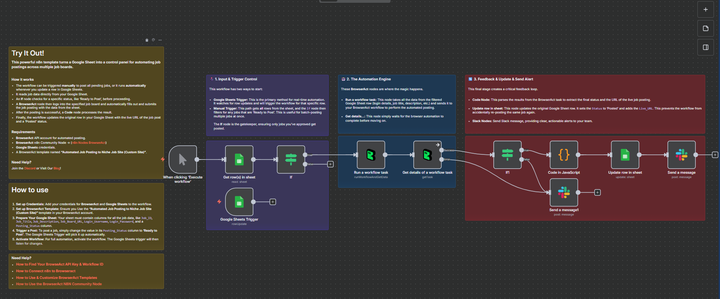
Post Jobs to Multiple Boards from Google Sheets using BrowerAct
This powerful n8n template turns a Google Sheet into a control panel for automating job postings across multiple job boards.
This workflow is perfect for HR teams, recruiters, and hiring managers who want to streamline their hiring process by posting jobs to multiple boards from a single source of truth.
Self-Hosted Only
This Workflow uses a community contribution and is designed and tested for self-hosted n8n instances only.
How it works
- The workflow is triggered in two ways: manually (to batch-post all “Ready to Post” jobs) or automatically via a Google Sheets Trigger when a single row is updated.
- An If node filters for jobs marked with the status ‘Ready to Post’.
- A BrowserAct node takes the job details (title, description, logins, target URL) and runs an automation to post the job on the specified board.
- An If node checks if the posting was successful. If it fails, a Slack alert is sent.
- A Code node parses the successful result from BrowserAct to get the status and live URL.
- The workflow Updates the row in Google Sheets with the
Live_URLand changes theStatusto ‘Posted’. - A final Slack message is sent to a channel to confirm the successful posting.
Requirements
-
BrowserAct API account for automated posting
-
BrowserAct “Automated Job Posting to Niche Job Site (Custom Site)” Template | User needs to customize the workflow based on the target site.
-
BrowserAct n8n Community Node -> (n8n Nodes BrowserAct)
-
Google Sheets credentials
-
Slack credentials for sending notifications
Need Help?
-
How to Find Your BrowseAct API Key & Workflow ID
-
How to Connect n8n to Browseract
-
How to Use & Customize BrowserAct Templates
-
How to Use the BrowserAct N8N Community Node
🔗 Nodes Used
Google Sheets, Slack, Google Sheets Trigger
📥 Import
Download workflow.json and import into n8n:
Workflow menu → Import from File